

27 Jul I Automated My Google Reviews and Got Ranked
I Automated My Google Reviews and Got Ranked
Why Google Review Automation Is the Smartest Move You Can Make for Local SEO
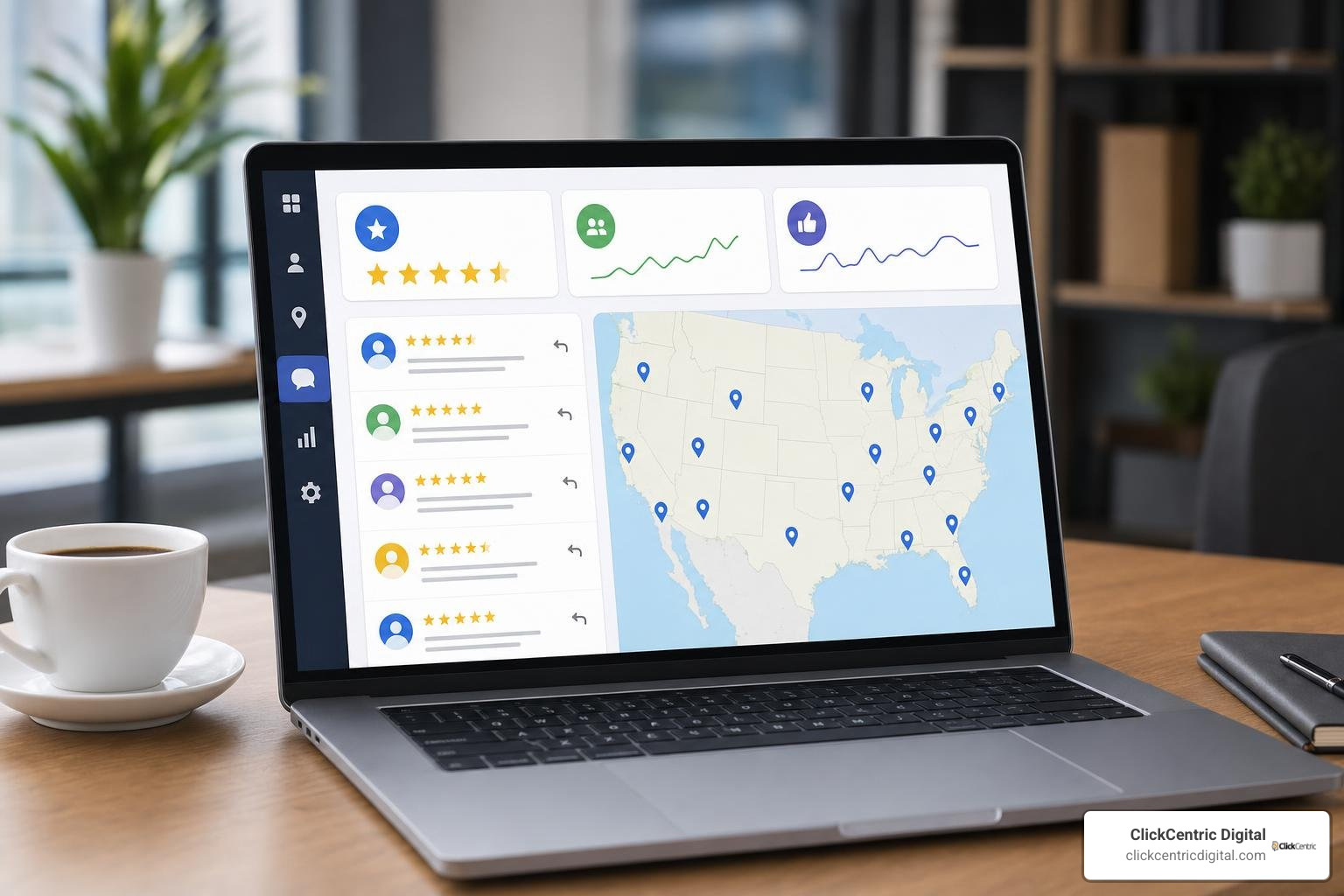
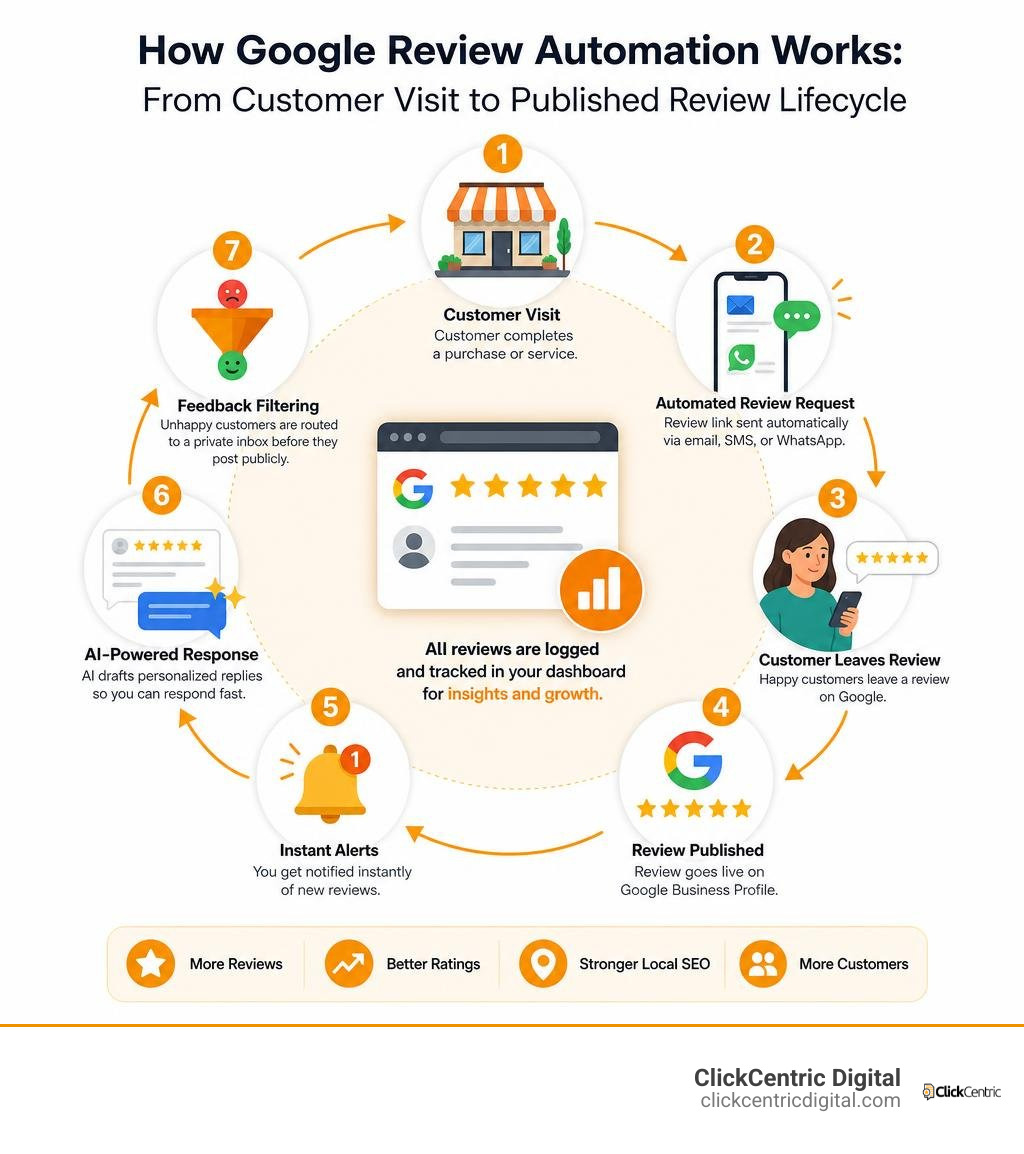
Google review automation is the process of using software to automatically request, monitor, and respond to customer reviews on your Google Business Profile — without doing it all by hand.
Here’s what it covers in practice:
- Requesting reviews — Automatically send review links to customers via email, SMS, or WhatsApp after a transaction or service completion
- Monitoring reviews — Get instant alerts when new reviews appear, so you can act fast
- Responding to reviews — Use AI to draft personalized replies to every review, positive or negative
- Filtering feedback — Route unhappy customers to a private inbox before they post publicly
- Logging and tracking — Record all review data in a spreadsheet or dashboard for reporting
The results can be significant. One cell phone repair shop went from averaging 6 reviews per month to over 30 — just by automating their review requests. And with 81% of US consumers checking Google before visiting a local business, your review count and star rating directly affect how many new customers walk through your door.
The problem? Most business owners are still asking for reviews manually — or worse, not asking at all. It’s easy to forget, it doesn’t scale, and it leaves your reputation to chance.
I’m Fred Dirkse, and in this guide I’ll walk you through exactly how to set up a Google review automation system from scratch — from generating your first review link to using AI to respond at scale.
Terms related to google review automation:
What is Google Review Automation and Why Does It Matter?

For local businesses in West Michigan—whether you are running a boutique shop in Holland, a plumbing service in Grand Rapids, or a cozy restaurant in Grand Haven—reputation is your currency. When local customers search for your services, they do not just look at your website. They look at your star rating.
But manually asking every single customer for a review is exhausting. That is where google review automation comes into play. By setting up systems that handle the heavy lifting, you ensure that every satisfied customer is prompted to share their experience without you or your staff having to lift a finger.
Building a solid online presence requires active reputation management. If you rely entirely on manual effort, you will inevitably face dry spells where no reviews come in, or worse, the only people motivated enough to write reviews are the rare disgruntled customers.
Automating this process levels the playing field. However, before diving headfirst, it is vital to understand the automated review response system pros and cons so you can design a system that maintains a warm, human touch while operating on autopilot.
The Mechanics of Google Review Automation
At its core, an automated review system connects your point-of-sale (POS) system, customer relationship management (CRM) software, or project management tool directly to a communication channel (like email, SMS, or WhatsApp).
The process follows a simple, reliable chain of events:
- The Trigger: A customer completes a transaction, or a job is marked as “Completed” in your CRM.
- The Delay: The system waits for a predetermined, optimal period (usually 2 to 24 hours) to ensure the customer has experienced the service.
- The Request: An automated message is sent containing a direct, frictionless link to your Google Business Profile.
- The Response Logging: The system tracks whether the link was clicked and logs the transaction status.
By syncing this workflow with daily business operations, you turn review collection from an afterthought into a built-in business process.
The Impact of Local Reviews on Search Rankings
Google’s local search algorithm prioritizes three primary factors: relevance, distance, and prominence. Your reviews directly feed into “prominence.” Google wants to recommend businesses that are highly rated, active, and trusted by the local community.
In 2026, the local SEO landscape is more competitive than ever. Frequent, positive reviews signal to Google that your business is open, active, and consistently satisfying customers. Understanding google reviews everything you need to know is step one, but translating that knowledge into action is what gets you ranked.
When you consistently secure new reviews, your business gains visibility in the coveted Google Local 3-Pack. To truly dominate search results in regions like Kalamazoo, South Haven, and Grand Rapids, mastering local reviews to win more customers is the single most effective organic growth strategy available.
How to Set Up Your Automated Review Generation Pipeline

Setting up an automated pipeline requires selecting the right communication channels. While email has been the traditional standard, mobile-first channels like SMS and WhatsApp have completely transformed response rates.
Let’s look at how the different channels stack up:
| Communication Channel | Average Open Rate | Average Review Response Rate | Best Used For |
|---|---|---|---|
| Email Sequences | 15% – 25% | 2% – 5% | B2B services, detailed feedback, and non-urgent follow-ups |
| SMS (Text Message) | 90%+ | 10% – 15% | Quick service transactions, retail, and local contractors |
| WhatsApp Business | 98% | 30% – 94% | High-touch customer service, international markets, and instant engagement |
Because WhatsApp review request response rates are 3 to 5 times higher than email in most markets, incorporating mobile messaging is no longer optional if you want to scale quickly.
Creating Your Direct Google Review Link and QR Code
To get reviews, you must make the process as easy as possible. If a customer has to search for your business on Google Maps, click “Reviews,” and then click “Write a Review,” you will lose them. You need a direct link that opens the review window instantly.
Here is how to generate yours:
- Go to the official Google Business Profile manager or use a reputable tool like the Google Review Management Tool for Small Businesses | Get More Review to look up your business using the Google Places API.
- Once your profile is located, the tool will generate a unique URL that looks like this:
https://search.google.com/local/writereview?placeid=YOUR_PLACE_ID. - Copy this link. This is your holy grail.
- To bridge the gap between physical interactions and digital reviews, convert this link into a high-quality QR code.
You can print this QR code on receipts, menus, business cards, or counter displays at your physical locations in Holland MI or South Haven MI, allowing in-person customers to scan and review in seconds.
Launching Multi-Channel Campaigns via Email, SMS, and WhatsApp
To prevent customers from ignoring your request, a multi-channel follow-up strategy works best. However, you must avoid spamming them. A great automated sequence should be polite, short, and cease immediately once the customer takes action.
When setting up your templates, short, direct, and personal messages always win. Here are three highly effective templates you can adapt:
SMS Template:
“Hi [First Name], thanks for choosing [Business Name] today! We’d love to hear about your experience. Could you take 30 seconds to leave us a quick review? [Your Direct Link]”
WhatsApp Template:
“Hello [First Name]! 😊 It was a pleasure serving you in Holland today. We are a small local business, and your feedback helps us grow. Would you mind sharing a quick review of your experience? Click here to write one: [Your Direct Link]”
Email Follow-Up Sequence: Set up a 3-to-4-step email sequence. The first email goes out 2 hours after service. If they do not click the link, a gentle reminder is sent 3 days later. If you want to maximize your efforts, explore stop settling for four stars and generate more 5 star reviews today to refine your messaging.
Using dedicated stop begging for feedback with this review request software ensures that as soon as a user clicks your review link and completes the action, they are automatically removed from the campaign sequence so they don’t get ghosted or annoyed by unnecessary follow-ups. Learn more about managing these dynamics at review platforms for businesses how to not get ghosted by customers.
Managing and Responding to Feedback with AI and Real-Time Alerts
Getting reviews is only half the battle; you also have to respond to them. Google publicly states that responding to reviews builds trust and improves your local SEO. However, keeping up with replies can quickly become a full-time job.
Leveraging AI for Personalized Google Review Automation Responses
Thanks to modern artificial intelligence, you no longer have to manually draft every single response. By integrating AI models like Gemini Flash into your review management workflow, you can generate unique, context-aware replies instantly.
The key to using AI safely is to maintain a consistent brand voice. You can configure your automation tools with a “Business Configuration” node that defines your preferred tone:
- Professional: Best for legal, medical, or financial services in Grand Rapids.
- Friendly & Casual: Great for local cafes, retail boutiques, and family-owned repair shops.
- SEO-Optimized: Directs the AI to naturally include local keywords (like your city name or service type) to boost search signals.
While AI does an incredible job, we always recommend a “human-in-the-loop” approach for complex feedback. For standard 5-star reviews, automated replies are a lifesaver. For a deeper dive into managing this balance, read our guide on how to manage your google review responses like a pro.
Real-Time Monitoring and Handling Negative Feedback Privately
A single unaddressed 1-star review can damage your business’s reputation if left sitting on your profile. Real-time monitoring is critical to catching these issues before they escalate.
By setting up automated alerts, you can route review notifications based on their rating:

- 4 and 5-Star Reviews: Route these to a celebratory Slack channel to keep your team motivated.
- 1, 2, and 3-Star Reviews: Trigger an urgent, high-priority alert to your customer support team’s Slack or email.
This immediate action allows you to execute “smart routing.” If a customer indicates they had a poor experience on an internal feedback form, the system can route them directly to a private resolution form. This gives you the opportunity to resolve their issue privately before they ever post a public review.
To keep your brand secure, look into the best review monitoring services to save your brands reputation, set up a custom system with a never miss feedback again with a slack review monitor, and leverage stop the trolls with these reputation monitoring tools to maintain complete control over your public image.
Choosing the Right Google Review Automation Tools and Workflows
When implementing google review automation, you have two main paths: utilizing an all-in-one SaaS platform or building a custom, no-code workflow. Your choice will depend on your budget, technical expertise, and existing software stack.
If you prefer an out-of-the-box solution, you should read our breakdown on how to pick a review generation platform for local businesses. A dedicated tool like the Google Review Management Tool for Small Businesses | Get More Review offers built-in SMS, email, and WhatsApp routing, making setup incredibly straightforward for local business owners who want to get up and running in minutes.
No-Code and Open-Source Automation Workflows
For tech-savvy business owners or developers who want to avoid recurring monthly software fees, open-source automation is a powerful alternative.
Using workflow engines like n8n, you can build custom pipelines that connect your Google Business Profile directly to Google Sheets and Slack. Developers have shared excellent open-source starter templates to help you build your own:
- For a complete, self-hosted Python and Flask-based review queue, check out the mohdtalal3/google-review-automation repository on GitHub.
- If you want to build a pipeline that takes feedback from Google Forms, uses Gemini AI to draft a perfect response, and sends it via WhatsApp, explore the dhiwinsamrich/Automated-Review-Generator project.
These DIY systems allow you to securely store API credentials, customize your AI prompt logic, and log all review data in a centralized spreadsheet without paying for third-party middleware.
Ethical Considerations and Google Terms of Service Compliance
While automating your review collection is completely legal and encouraged, you must stay within Google’s strict guidelines to avoid penalties.
Google’s Terms of Service strictly prohibit:
- Review Gating: Only asking happy customers for reviews while blocking or redirecting unhappy customers from accessing the public Google review page.
- Incentivizing Reviews: Offering discounts, free products, or cash in exchange for a 5-star review.
- Fake Reviews: Using automated bots or fake accounts to write reviews. This is highly unethical, illegal under FTC guidelines, and will result in your Google Business Profile being permanently suspended.
Your automation should focus on streamlining the request process for all customers, while providing a clear, friendly path for unhappy customers to reach out to you directly for support.
Frequently Asked Questions about Google Review Automation
How many reviews do I need to improve my Google rating?
To calculate how many reviews you need to reach your target rating, you can use a simple mathematical formula.
Let’s say you currently have 10 reviews with a 3.5-star average, and you want to reach a 4.8-star average. Because Google uses a weighted average, you can determine the number of consecutive 5-star reviews required using this equation:
Required 5-Star Reviews = (Target Rating * Current Review Count - Current Rating * Current Review Count) / (5 - Target Rating)
Using our example:
Required = (4.8 * 10 - 3.5 * 10) / (5 - 4.8) = (48 - 35) / 0.2 = 13 / 0.2 = 65
You would need 65 consecutive 5-star reviews to raise your average from 3.5 to 4.8 stars. This math highlights why consistent, automated review generation is so important; manual, sporadic requests simply cannot build the volume needed to recover from a few bad ratings.
Does automating Google reviews violate Google’s policies?
No, automating the request process does not violate Google’s policies. Google actively encourages businesses to ask their customers for feedback.
However, automating the creation or posting of reviews (using AI to write and post reviews on behalf of customers) is a severe violation of Google’s guidelines and will lead to listing suspension. Keep your automation focused on sending requests, monitoring feedback, and drafting replies.
Can I automatically delete negative Google reviews?
No, Google does not allow businesses to delete reviews at will—otherwise, every business would have a perfect 5.0 rating!
If a review is fake, abusive, or violates Google’s content policies, you can flag it for removal. For a step-by-step strategy on dealing with bad feedback, check out our resources on how to delete google business reviews and keep your sanity and our review removal reality check can you really delete google feedback.
If you’re dealing with legitimate negative customer experiences, learn how to remove negative reviews 5 guaranteed methods, use how do you get rid of bad google reviews a step by step guide, and read can you get a bad review removed from google or are you stuck with it to protect your business. (And if you also sell on other channels, our guide to the art of deleting bad amazon feedback without losing your mind has you covered).
Conclusion
Implementing google review automation is one of the single most cost-effective moves you can make to grow your local business. By turning review collection into a seamless, hands-free workflow, you ensure a steady stream of fresh, positive feedback that keeps your business ranking high on Google Maps and search results.
At ClickCentric Digital, we specialize in helping businesses across West Michigan—including Grand Rapids, Holland, Grand Haven, South Haven, and Kalamazoo—dominate local search results. From setting up high-converting review pipelines to managing your overall online presence, we build targeted strategies that turn search visibility into active customers.
Ready to take control of your online reputation? Read our comprehensive resource, from reddit to reality finding the best orm company for your brand, and check out the business owners guide to google review mastery to start scaling your business today.
Sorry, the comment form is closed at this time.