

30 Jun Claim Your Spot on the Map with a Free Google Business Page
Claim Your Spot on the Map with a Free Google Business Page
Why Your Local Business Can’t Afford to Skip a Google Business Page
Setting up a google business page is one of the highest-leverage moves a local business owner can make — and it’s completely free.
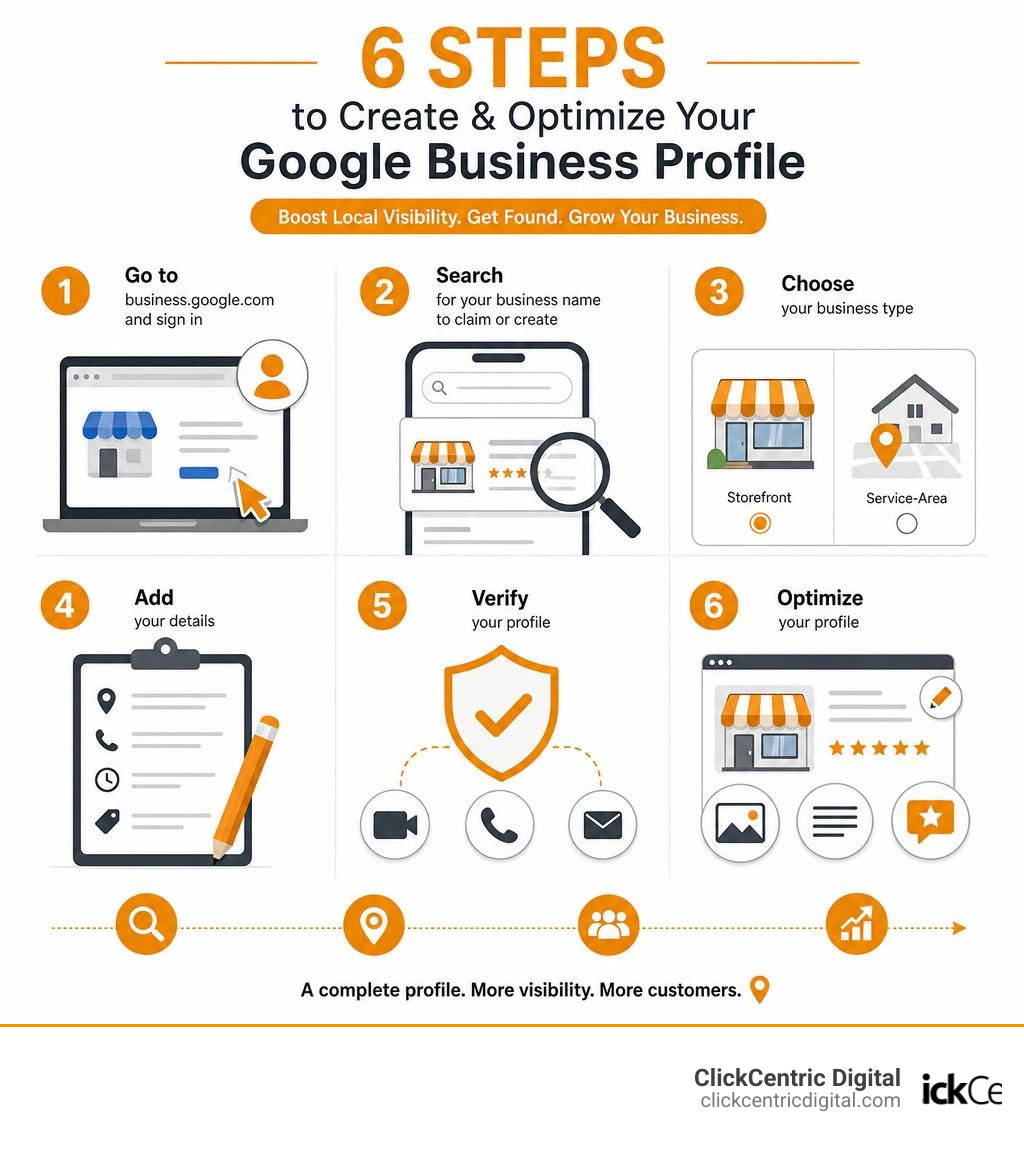
Here’s a quick overview of how to get started:
- Go to business.google.com and sign in with a Google Account
- Search for your business name to claim an existing profile or create a new one
- Choose your business type — storefront or service-area business
- Add your details — address, phone number, hours, and category
- Verify your profile — via video, phone, or email
- Optimize — add photos, a business description, and respond to reviews
That’s the short version. Keep reading for the full step-by-step breakdown.
If a potential customer searches for what you offer right now, can they find you? For most local businesses, the answer depends almost entirely on whether you have a verified, optimized Google Business Profile.
The numbers are hard to ignore. 66% of people trust Google as their top platform for researching local businesses. 98% read online reviews before making a decision. And 45% rely on Google Maps specifically to find businesses near them.
Without a Google Business page, you’re invisible in all of those moments.
It’s not just about being listed. Your profile is often the first — and only — thing a potential customer sees before deciding whether to call, visit, or move on to a competitor.
What is a Google Business Page and Why Does Your Local Business Need It?
A google business page (officially called a Google Business Profile) is a free tool provided by Google that allows local business owners to manage how their physical locations and service areas appear across Google products, including Google Search and Google Maps. It acts as your digital storefront—a dynamic, interactive portal that feeds directly into Google’s local search index and its massive Knowledge Graph.
If you want to understand how this impacts your bottom line, look no further than the “Local Pack” (also known as the Map Pack). When someone searches for a local service—say, “best coffee shop in Grand Rapids” or “plumber in Kalamazoo”—Google displays a map followed by three prominent local business listings.
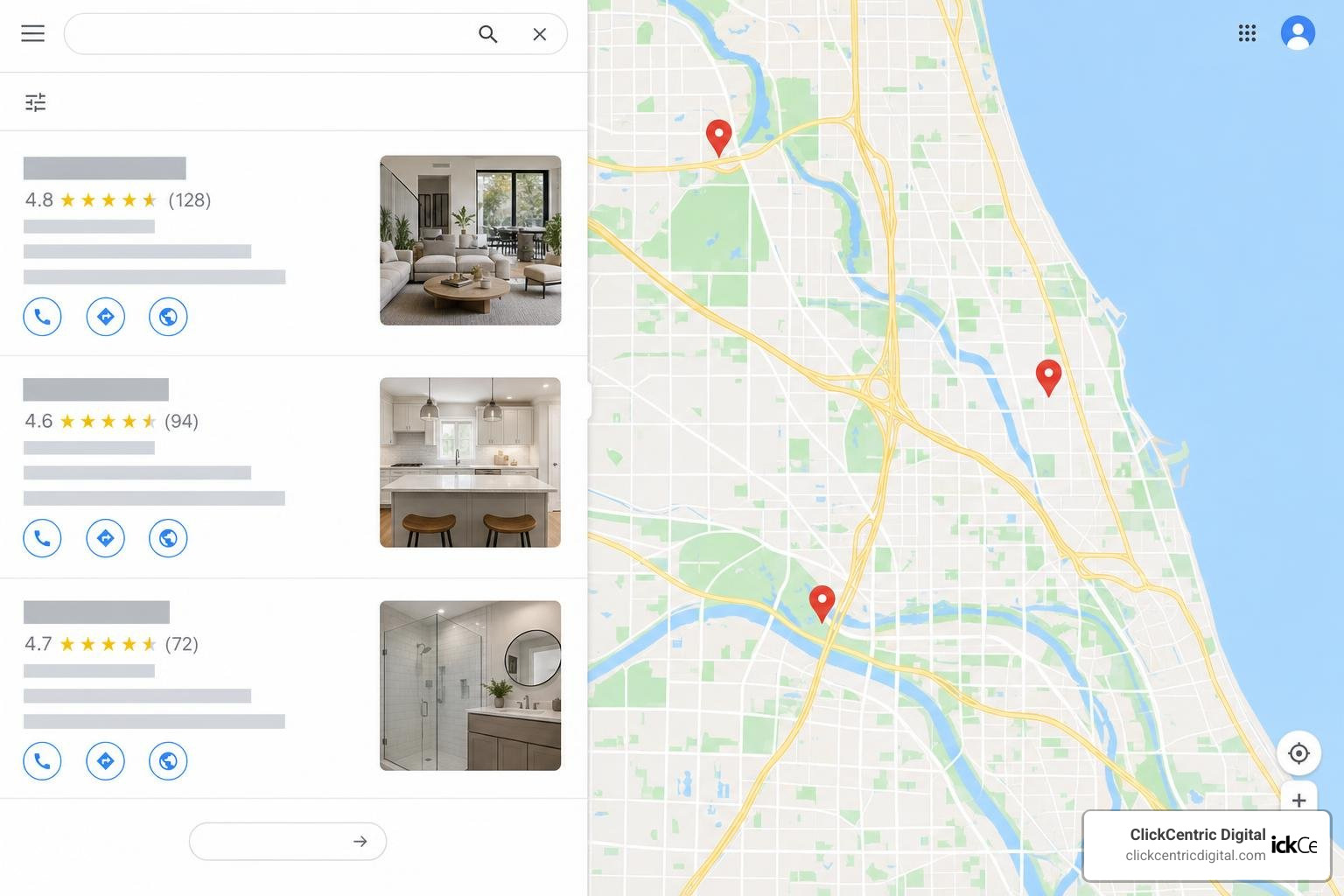
Without an active Google Business Profile, it is mathematically impossible to appear in these coveted top-three Map Pack spots. You are effectively locked out of the most visible real estate on the search engine results page (SERP).
Furthermore, having a verified profile is critical because of the rise of “zero-click searches.” In 2026, more than half of all search engine users find the information they need—such as physical addresses, operating hours, phone numbers, and customer reviews—directly on the SERP without ever clicking through to a business’s website. If your profile is complete, a customer can call you, book an appointment, or request directions in a single tap.
Your profile also brings together rich, user-generated content (UGC). Customers can upload their own photos, ask public questions, and leave reviews. While you cannot control every piece of content users post, actively managing your profile allows you to steer the narrative and build massive credibility. If you want to dive deeper into getting your listing established, check out our guide on how to Get Your Business on the Map and Stay There.
To put it simply, if you want local buyers in West Michigan to find you, you must Get Listed on Google – Google Business Profile.
Step-by-Step Guide: How to Create and Verify Your Profile
Setting up your google business page is a straightforward process, but it requires precision to avoid delays or verification loops. Here is the step-by-step process to get your business set up correctly.
Step 1: Create or Use a Dedicated Google Account
Before you begin, ensure you are logged into the Google Account you want associated with your business. We highly recommend using a company-specific email address linked to a Google Account (e.g., info@yourwestmichiganbusiness.com) rather than a personal Gmail account. This makes it much easier to transfer ownership or grant access to employees or digital marketing agencies down the road.
Step 2: Access the Setup Gateway
Navigate to the official sign-up page. You can follow the official steps outlined in the guide on how to Get started with Google Business Profile – Google Business Profile Help. Click “Manage Now” or “Start Now” to begin.
Step 3: Enter Your Business Name
Type your official business name. If a drop-down menu appears with your business name, it means a profile already exists (see the section below on how to claim it). If not, click “Create a business with this name.” Be sure to use your exact real-world business name as it appears on your physical signage and stationery. Do not stuff keywords into this field, as Google’s automated systems are quick to flag and suspend listings that violate this guideline.
Step 4: Choose Your Business Type
You will be asked to select how you serve your customers:
- Online Retail: If you sell products through an e-commerce store (note: online-only businesses without physical customer contact are not eligible for a local profile and should focus on Google Ads instead).
- Local Storefront: If you have a physical location where customers visit you (like a retail boutique in Holland MI or a restaurant in South Haven MI).
- Service-Area Business (SAB): If you deliver products or services directly to your customers at their locations (like a mobile detailer in Grand Haven MI or an HVAC technician servicing West Michigan).
Step 5: Select Your Primary Category
This is one of the most critical local SEO decisions you will make. Your primary category tells Google exactly what your business is, not just what it has. Choose the most specific category available. For example, choose “Pizza Delivery” or “Italian Restaurant” instead of just “Restaurant” if that is your specialty.
Step 6: Add Your Location or Service Area
- For Storefronts: Enter your exact physical address. Do not use P.O. boxes, virtual offices, or remote mailboxes. Google will reject these.
- For Service-Area Businesses: If you operate out of a residential home or don’t want your address public, you must hide your physical address. Instead, define your service area by entering specific cities, counties, or zip codes (e.g., Grand Rapids, Holland, Grand Haven, South Haven, Kalamazoo).
Step 7: Add Contact Details
Provide a local phone number that is under your direct control (avoid national call centers) and your website URL.
Step 8: Verify Your Profile
To prevent spam, Google requires all businesses to verify their identity and location. You cannot skip this step if you want your listing to go live to the public.
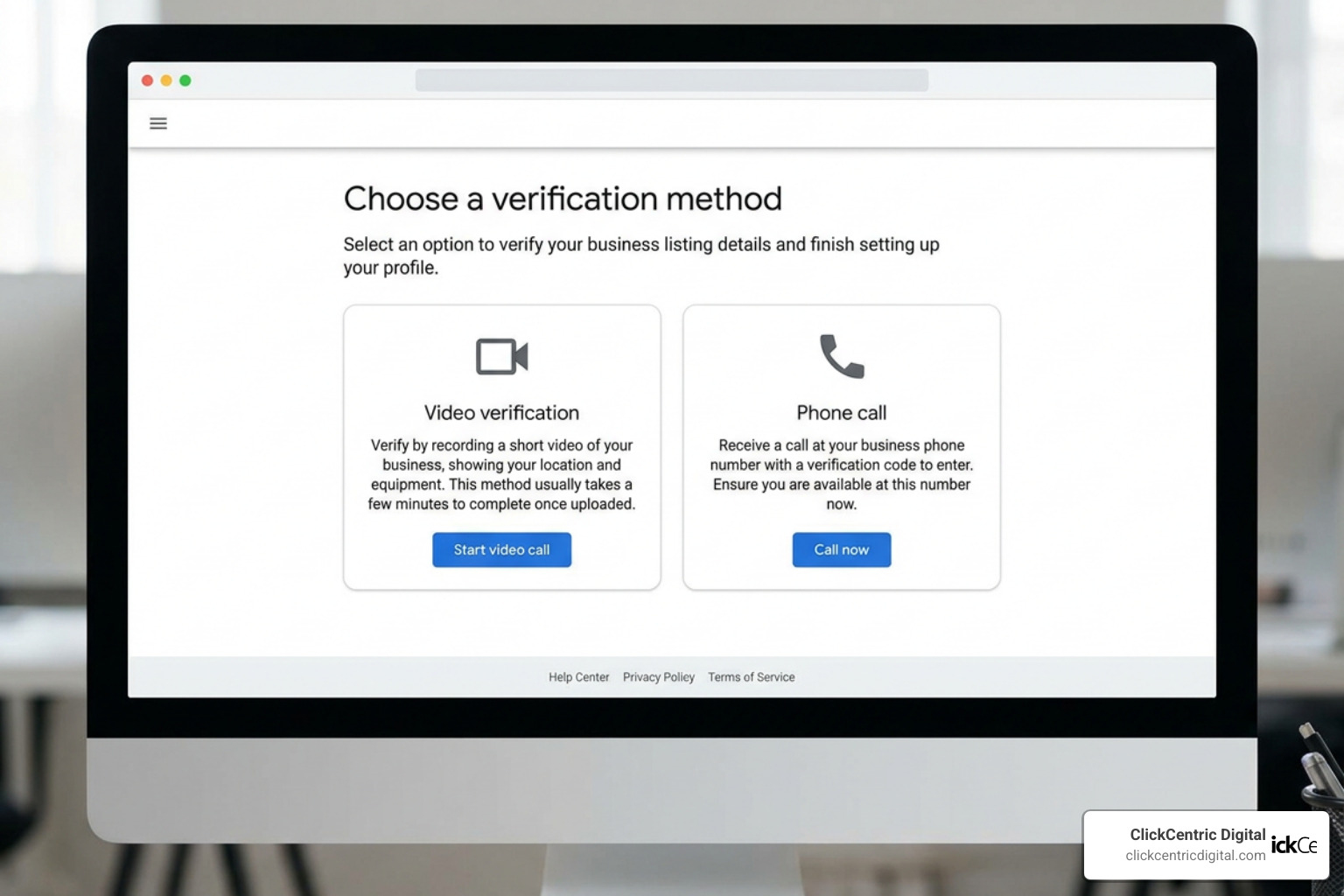
Google will present you with one or more verification options:
- Video Verification (Most Common): You will be asked to record a continuous, unedited video showing your physical surroundings. This must include your street sign or building number, your interior workspace/equipment, and proof that you manage the business (such as unlocking the front door, showing your business license, or logging into your POS system).
- Phone or SMS Verification: Google sends a automated text or voice call with a one-time PIN.
- Email Verification: A verification code is sent to your business email address.
Once you submit your verification, Google’s team reviews the details. This process typically takes anywhere from a few hours to a few business days.
How to Claim an Existing Google Business Page
It is incredibly common to search for your business during setup and discover that a profile already exists. This happens because Google automatically generates listings using user reports, licensed directory data, and public web scans. If this is the case, you must claim it.
- Search for your business name and city on Google Search or Maps.
- Look for a link that says “Own this business?” or “Claim this business.”
- Click “Manage Now” and follow the prompts.
- If the profile is unverified, you can proceed directly to the verification steps.
- If the profile has already been verified by someone else, Google will show a redacted email address that currently owns it (e.g., ko… @gmail.com). Click “Request Access” and fill out the form to ask the current owner to transfer ownership to you.
If you manage multiple properties or need to clean up duplicates across West Michigan, you can manage your portfolio directly through the Google Business Locations page.
How to Optimize Your Listing for Maximum Local SEO Visibility
Creating your profile is only half the battle. To outrank your competitors in Grand Rapids, Kalamazoo, and beyond, you must optimize every field. An optimized profile acts as a beacon for Google’s local search algorithm.
To illustrate the difference optimization makes, compare these two approaches:
| Feature | Unoptimized Profile | Optimized Profile |
|---|---|---|
| Business Name | Grand Rapids Plumbing Pros | Grand Rapids Plumbing |
| Primary Category | Plumber | Plumber (with “Drain Cleaning” & “Water Heater Repair” as secondary categories) |
| Business Description | We do plumbing. Call us. | Family-owned plumbing business serving Grand Rapids and West Michigan since 2010. Specializing in emergency drain cleaning, water heater installation, and residential repiping. |
| Operating Hours | 24/7 (even if closed) | Accurate daily hours + updated holiday/special hours |
| Attributes | Left blank | Women-owned, LGBTQ+ friendly, wheelchair accessible entrance |
| Visual Content | 1 blurry smartphone photo | 20+ high-res interior, exterior, team, and product photos |
| UTM Tagging | Standard website link | Website link with custom UTM tracking parameters |
To maximize your local search presence, implement these best practices:
- Select Secondary Categories: You can add up to nine secondary categories. Use these to capture search traffic for specific services. If your primary category is “Auto Repair Shop,” add secondary categories like “Brake Service,” “Oil Change Service,” and “Car Battery Store.”
- Write a Compelling Business Description: You have 750 characters to describe your business. Focus on your history, what makes you unique, and your core services. Do not include promotional links, pricing, or spammy keyword lists. Keep it professional and engaging.
- Leverage Attributes: Add factual attributes (such as “Wi-Fi available” or “Outdoor seating”) that help searchers filter their results.
- Utilize UTM Tagging: To track exactly how much traffic and revenue your google business page is driving, append UTM codes to your website URL (e.g.,
https://yourwebsite.com/?utm_source=google&utm_medium=organic&utm_campaign=gbp). This allows you to see precise performance metrics inside Google Analytics 4. - Add Products and Services: Use the built-in catalog features to list your menu items, retail products, or service packages with pricing and descriptions. Google often showcases these directly in search results when users query specific items.
For a deeper dive into how Google evaluates these signals, read our analysis of the Google Maps Ranking Factors for 2025. You can also check out our strategic guide on How to Make Google Fall in Love with Your Business Profile to elevate your optimization game.
For more advanced map strategies, explore our resources on the ultimate guide to Google Maps marketing, learn about search engine optimization Google Maps ranking, and stop playing the guessing game by reading how to stop guessing your local map ranking.
If you need to make quick updates to your operational details, refer to the official instructions on how to Edit your Business Profile – Google Business Profile Help.
Best Practices for Managing Your Google Business Page Photos and Reviews
Visual appeal and social proof are the two most powerful conversion triggers on your profile. If your listing lacks photos or has a low review rating, searchers will scroll past you, no matter how high you rank.
Mastering Your Profile Photos
According to Google, listings with high-quality photos receive significantly more requests for driving directions and website clicks. To make your business look its absolute best, follow these guidelines:
- Format & Size: Use JPG or PNG files between 10 KB and 5 MB. The recommended resolution is 720×720 pixels (minimum 250×250 pixels). Ensure they are well-lit, sharp, and free of heavy filters or AI alterations.
- Exterior Photos (At least 3): Take photos from different angles and directions to help clients recognize your building as they drive down the street.
- Interior Photos (At least 3): Capture the atmosphere and design of your space so customers know what to expect when they walk in.
- Photos at Work (At least 3): Show your team performing services (e.g., installing a furnace, styling hair, or serving food). This humanizes your brand.
- Product/Food Photos: Highlight your most popular inventory items, menu dishes, or drinks.
For category-specific photo tips, refer to Tips for business-specific photos on your Business Profile – Google Business Profile Help.
Managing and Mastering Customer Reviews
Reviews are a major local search ranking factor. You must actively build a system to request, monitor, and respond to reviews.
- Ask Consistently: Train your team to ask for reviews at the point of sale or send automated follow-up emails with your direct Google review link.
- Respond to Every Review: Always reply to both positive and negative reviews. When replying to positive reviews, thank the customer and naturally mention a service or location keyword (e.g., “Thanks for the review, Sarah! We love being your go-to boutique in downtown Holland!”).
- Handle Negative Reviews Professionally: Never get defensive. Apologize for their experience, keep your response brief, and offer to take the conversation offline to resolve the issue. This shows prospective customers that you care about service quality.
To build a flawless review acquisition system, read The Business Owner’s Guide to Google Review Mastery. For step-by-step scripts on handling tough customer feedback, review our guide to Manage Your Google Review Responses Like a Pro.
Additionally, you can read about Mastering Local Reviews to Win More Customers and evaluate tools to automate this process with our roundup of The Best Review Monitoring Services to Save Your Brand’s Reputation.
Frequently Asked Questions
Is a Google Business Profile completely free to use?
Yes, creating, claiming, and managing a google business page is 100% free. There are no hidden subscription fees or premium tiers. While Google frequently prompts you to try Google Ads to boost your visibility, advertising is entirely optional. You can enjoy full organic visibility in Google Search and Maps without spending a single penny.
What should I do if my profile gets suspended?
If your profile is suspended, it is usually because Google’s automated filters detected a policy violation. This often happens due to keyword stuffing in the business name, using a virtual address, or making too many rapid changes to your core information.
Do not create a new profile to bypass a suspension, as this will complicate the reinstatement process. Instead, carefully review the Guidelines for representing your business on Google – Google Business Profile Help to identify and correct any compliance issues. Once your listing is fully compliant, submit an official reinstatement request through the Google Business Profile Help Community.
Can online-only businesses have a Google Business Profile?
No. Google’s strict eligibility guidelines state that a business must have a physical storefront or travel to meet customers face-to-face to qualify for a profile. Online-only e-commerce brands, digital agencies without local clients, and virtual brands are not eligible. If you operate an online-only business, you should focus your marketing efforts on traditional SEO, content marketing, and Google Ads.
Conclusion
Your google business page is the single most important asset for local customer acquisition. It places your business directly in front of active buyers in Grand Rapids, Holland, Grand Haven, South Haven, Kalamazoo, and throughout West Michigan at the exact moment they are ready to purchase.
However, setting up your profile is not a set-it-and-forget-it task. To maintain top rankings, you must regularly upload fresh photos, update your operating hours for holidays, post weekly updates, and actively manage your incoming reviews.
If you want to take complete control of your online reputation and turn searchers into loyal customers, start by reading The Business Owner’s Guide to Google Review Mastery.
Need help managing your local search presence, optimizing your maps marketing, or scaling your business with targeted paid traffic? Contact us at ClickCentric Digital today. We help West Michigan businesses dominate local search rankings and acquire customers through highly targeted organic and paid search strategies.
Sorry, the comment form is closed at this time.