


08 Oct How to Build a Winning Small Business Google Advertising Campaign
How to Build a Winning Small Business Google Advertising Campaign
Build a Small Business Google Ads Strategy Around Buyer Intent
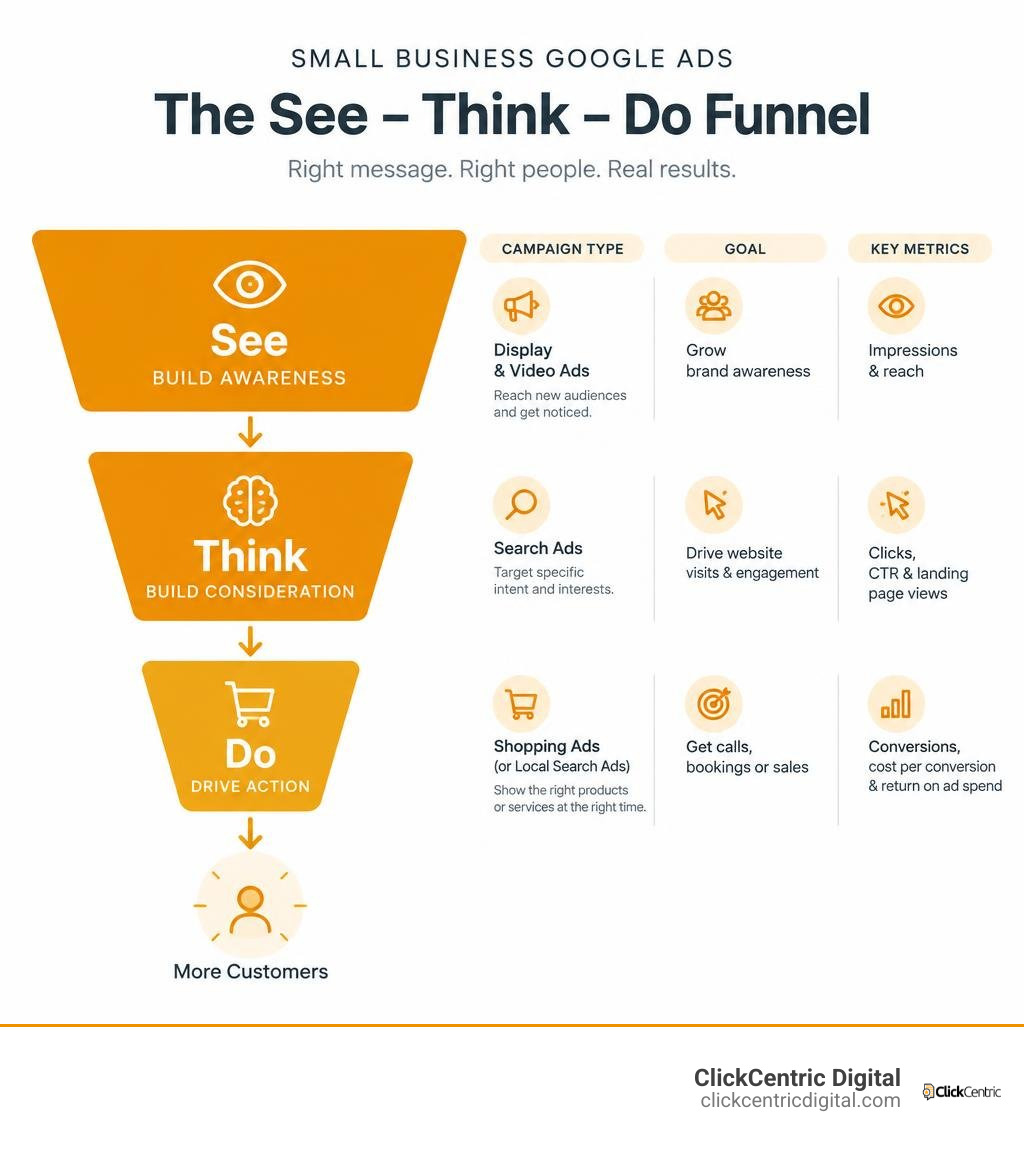
Start with people ready to buy. Run local Search ads for services or Shopping ads for products. Target specific searches, set a budget you can afford to test, and track calls, bookings, or sales. Add negative keywords to cut wasted clicks, and send visitors to a page that matches your ad. Once you know what brings in customers, test remarketing and broader awareness ads.
You do not need to be everywhere at once. You need to know which ads reach likely customers and whether the results are worth the spend. I’m Fred Dirkse, and I’ll show you how to build that plan step by step.
Relevant articles related to google ads strategy for small business:
Core Campaign Types and the See-Think-Do Framework
Every dollar in your paid search budget must serve a concrete purpose. A common misstep is launching campaigns without matching the ad type to customer intent. If you target an audience researching options with an aggressive, hard-sell search ad, you pay high click costs with low return.
By categorizing campaigns across the buyer journey, you allocate capital efficiently. The table below outlines how the primary ad formats fit into a balanced budget:
| Campaign Type | Primary Funnel Stage | Best Used For | Typical Cost Structure |
|---|---|---|---|
| Search | Do / Think | Capturing immediate intent, commercial queries, branded terms | Pay-Per-Click (PPC) |
| Shopping | Do | Direct product sales, visual e-commerce inventory | Low to moderate PPC |
| Display | See / Retargeting | Visual brand awareness, banner remarketing | Cost-Per-Mille (CPM) / Low PPC |
| Video (YouTube) | See / Think | Product demonstrations, storytelling, brand recall | Cost-Per-View (CPV) / CPM |
Applying the See-Think-Do Google Ads Strategy for Small Business
The See-Think-Do framework, popularized by Avinash Kaushik, helps small businesses avoid wasted ad spend by segmenting campaigns based on user intent:
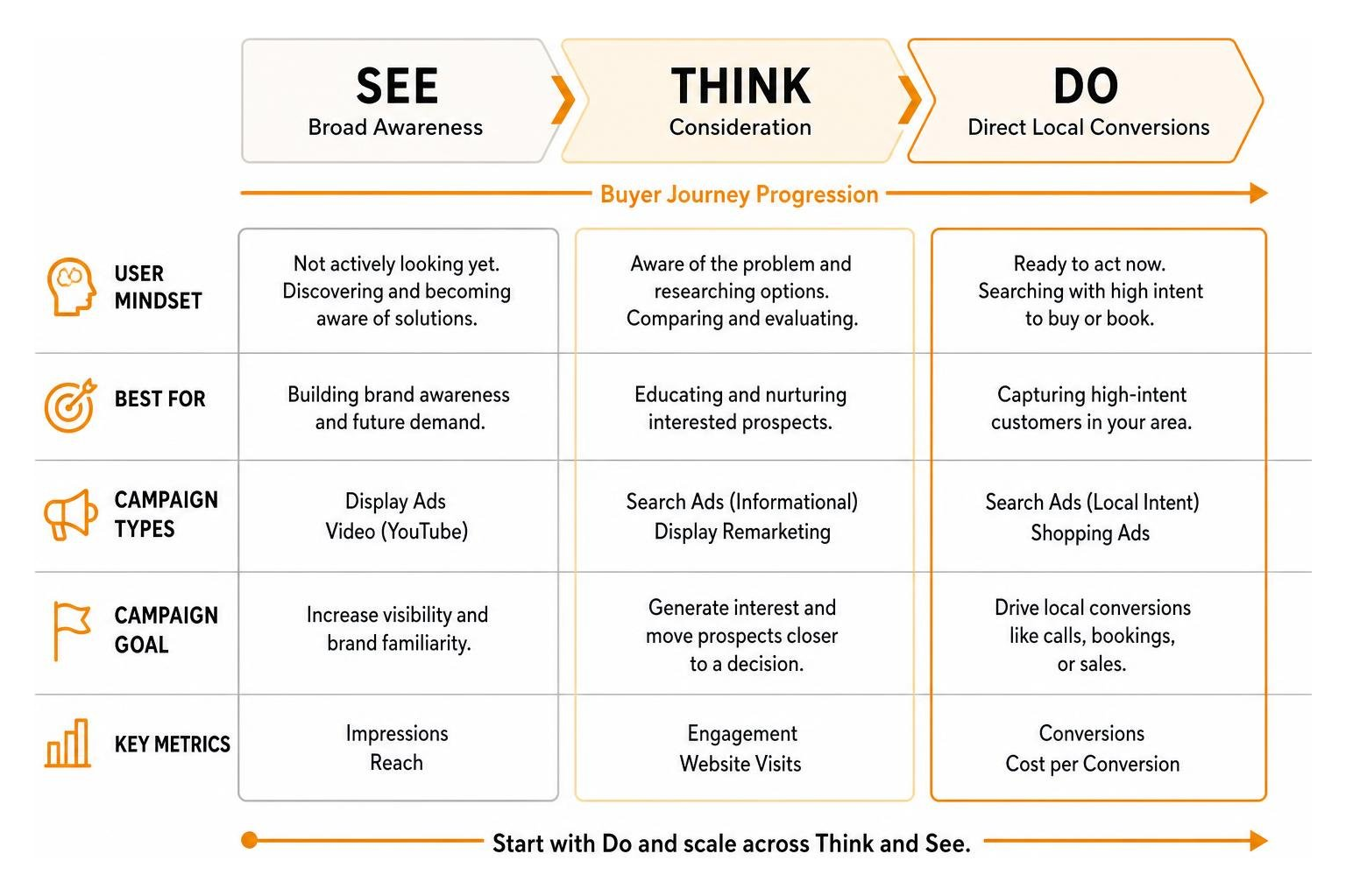
- The Do Stage (High Commercial Intent): This audience is ready to act immediately. They search for terms like “furnace repair Holland MI” or “emergency plumber near me.” Target this stage first. These users convert at the highest rates, generating the cash flow needed to fund top-of-funnel marketing.
- The Think Stage (Consideration and Comparison): These users know they have a problem and are evaluating solutions. Queries include “best roofing materials for Michigan winters” or “ductless vs central air cost.” Educate these searchers with helpful content, lead magnets, and targeted search ads.
- The See Stage (Broad Awareness): This is the largest qualified audience. While not actively searching for your service today, building familiarity pays dividends later. Users familiar with your brand are 2 to 3 times more likely to click your ads over competitors when intent arises. You can easily reach customers across YouTube and Search with Google Ads to establish brand presence before potential clients enter the buying cycle.
Search, Shopping, Display, and Video Ad Formats
Search campaigns remain the cornerstone of local lead acquisition. Text ads placed at the top of Google results capture users at the exact moment of demand. For service providers, pairing search terms with ad assets like call extensions, sitelinks, and local address information drives direct phone inquiries.
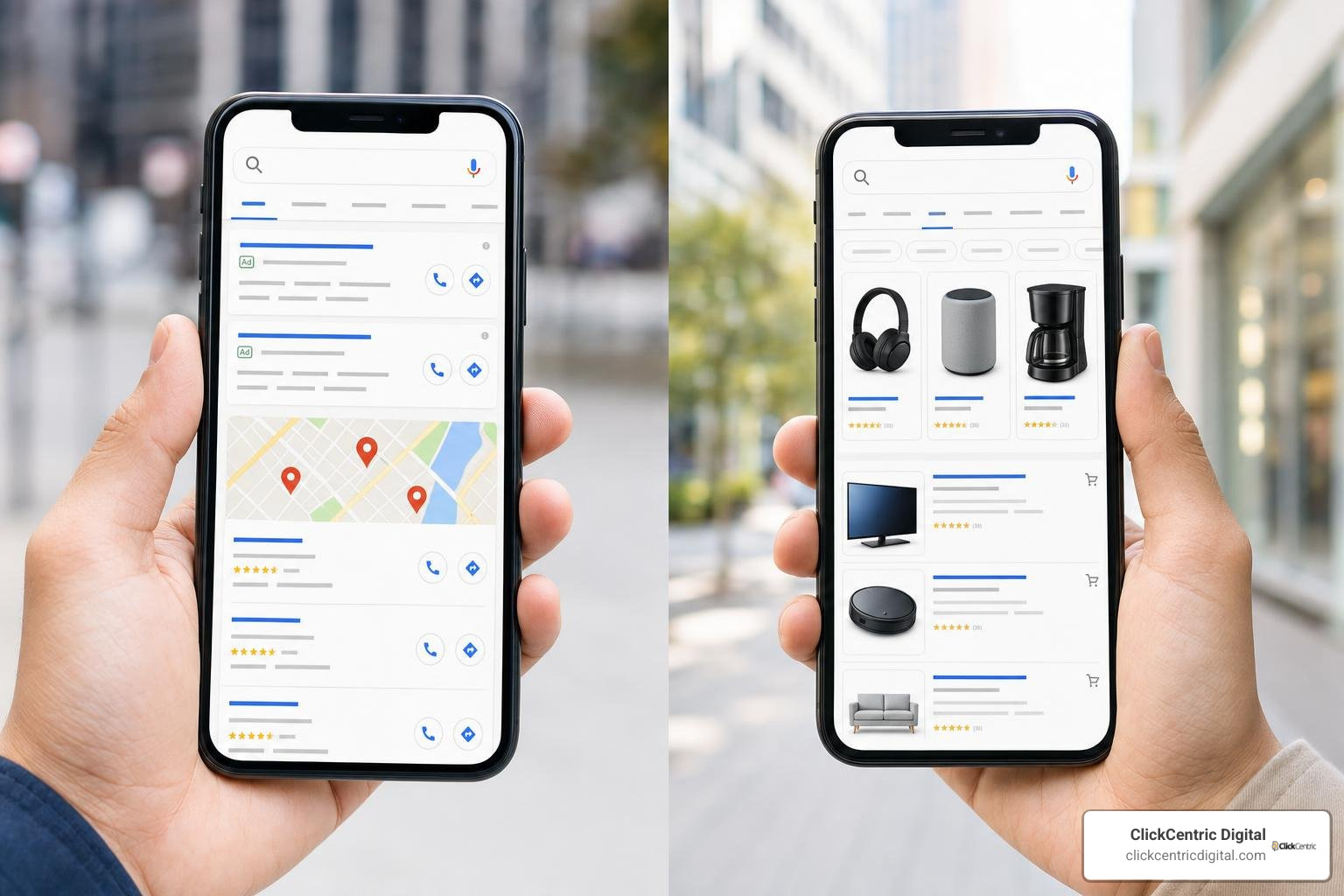
For retailers, Shopping campaigns frequently convert at higher rates and lower click costs than standard Search ads. Unbranded shopping queries can drop as low as $0.05 to $0.07 per click, pulling product data directly from your Merchant Center feed.
Display and YouTube ads provide visual touchpoints. Back in 1994, the first internet banner ad saw a 78% click-through rate. While the “Law of Click-through Decay” has brought modern Display CTRs down significantly, banner and video ads excel when used for local brand recall and remarketing. Applying little-known ways to target local customers with Google Ads ensures your visual campaigns show only within specific zip codes, preserving your daily budget.
Google Ads vs. Smart Campaigns vs. Local Services Ads (LSAs)
Small business owners are often presented with simplified advertising options that promise fast setups. However, understanding platform differences prevents costly mistakes:
| Platform | Best For | Pros | Cons |
|---|---|---|---|
| Full Google Ads | Scalable lead generation & e-commerce | Total control, negative keywords, detailed bid adjustments | Requires active management and monitoring |
| Smart Campaigns | Total beginners with micro-budgets | Fast setup, automated management | High budget waste, no negative keywords, limited targeting |
| Local Services Ads (LSAs) | Qualified local service businesses | Pay-per-lead, top-of-page placement, Google Guaranteed badge | Limited category availability, strict screening |
For a deeper dive into platform selection, review Google’s official breakdown of Google Ads vs Local Services Ads for small business marketing.
Why Smart Campaigns Often Underperform for Local SMBs
Google Smart Campaigns (formerly AdWords Express) offer a five-minute setup that appeals to busy owners. However, industry survey data reveals the trade-offs:
- 88% of SEOs and SMB practitioners state that standard Google Ads is more effective than Smart Campaigns.
- 78% report that Smart Campaigns deliver low ROI for local businesses.
- 57% find Smart Campaigns ineffective at generating traffic.
- 30% of businesses that tested the automated platform abandoned it as unsuccessful.
Smart Campaigns remove critical optimization controls. You cannot add negative keyword lists, refine audience exclusions, or adjust granular bids. The algorithm often directs budget toward low-intent, informational searches, draining ad spend. Reviewing a practical buyers guide for local PPC management in 2026 can help identify when full-featured campaign control is the smarter financial move.
Setting Up and Optimizing Google Local Services Ads
For trade and home service professionals, Google Local Services Ads (LSAs) represent high-converting real estate. Positioned above standard paid search ads and organic map packs, LSAs operate on a direct pay-per-lead model—you pay only for valid phone calls, messages, or booked appointments rather than impressions or clicks.
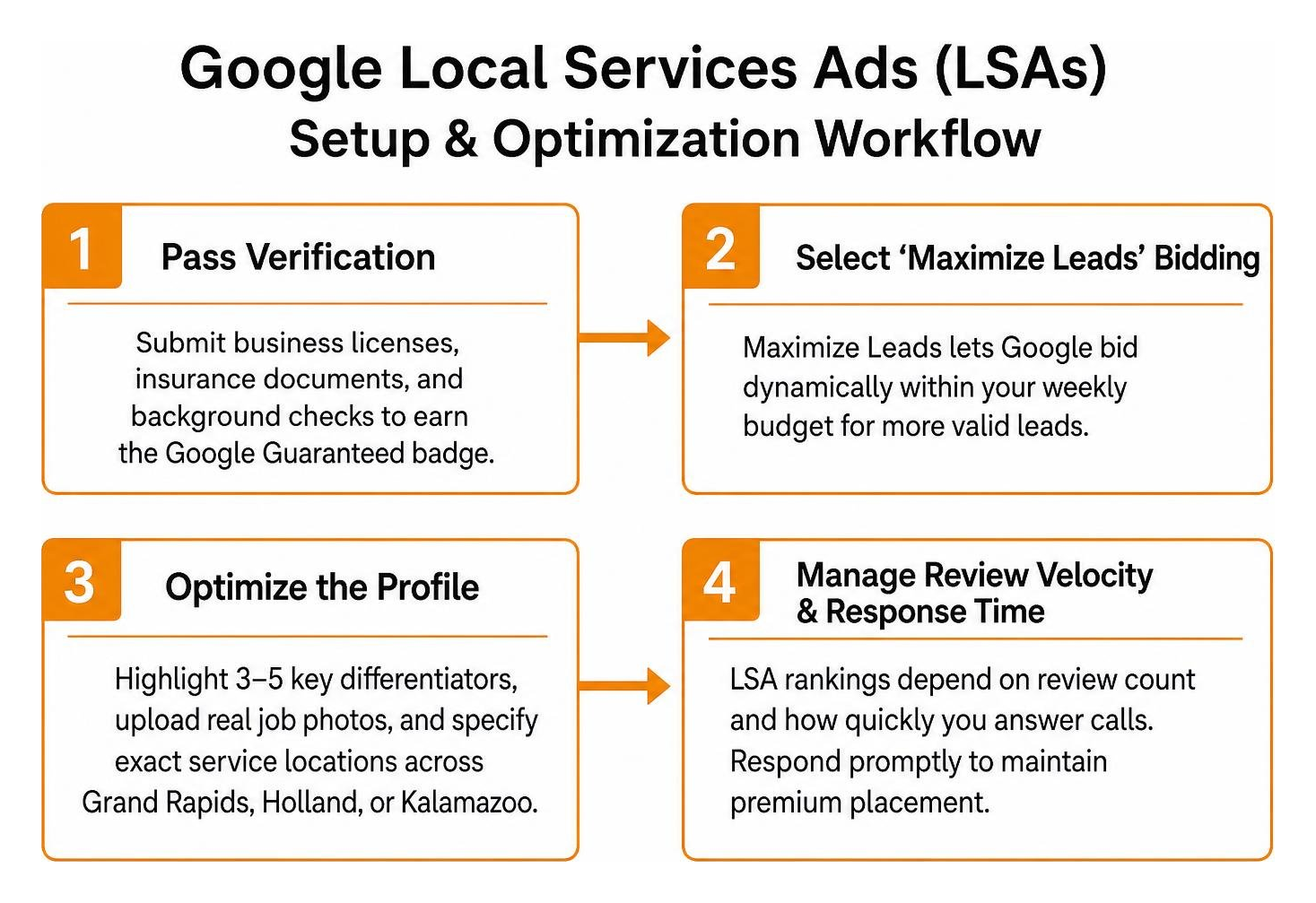
To maximize your return on LSAs:
- Pass Verification: Submit your business licenses, insurance documents, and background checks to secure the green Google Guaranteed badge.
- Select ‘Maximize Leads’ Bidding: Setting aggressive lead caps often starves campaign delivery. Maximize Leads allows Google’s algorithm to bid dynamically within your weekly budget.
- Optimize the Profile: Highlight 3 to 5 key business differentiators, upload real job photos, and specify exact service locations across Grand Rapids, Holland, or Kalamazoo.
- Manage Review Velocity and Response Time: LSA rankings depend heavily on your review count and how quickly you answer incoming calls. Respond promptly to inquiries to maintain premium placement. Check our comprehensive Google Ads home services guide for specialized LSA optimization tactics.
Step-by-Step Google Ads Strategy for Small Business Budgets
Managing a tight ad budget requires strategic bidding and tight targeting controls. Reviewing the small business guide to Google Ads costs and budgets provides clear benchmarks before setting your daily parameters.
High-Intent Keyword Targeting and Negative Keyword Management
Avoid dumping broad-match terms into a single campaign. Instead, build focused ad groups centered on phrase match and exact match keywords carrying clear commercial intent (e.g., "commercial roof replacement" or [boiler repair grand rapids]).
Negative keywords protect your budget by filtering out irrelevant searches. If you offer residential plumbing, add negative keywords such as:
- free, cheap, DIY, jobs, salary, course, training, apprentice
Regularly review your Search Terms Report to identify and exclude queries that burn budget without converting. Conducting a periodic review using a beginner’s guide to a Google Ads audit ensures negative lists remain up to date.
Audience Retargeting with RLSA and Dynamic Remarketing
Most first-time visitors leave your website without contacting you. Retargeting captures these warm prospects across their decision journey:
- Remarketing Lists for Search Ads (RLSA): Increase your bids when previous site visitors search for relevant service keywords. Because they already know your brand, they convert at higher rates.
- Dynamic Display Remarketing: For retail and e-commerce, dynamic feeds serve ads showcasing the exact products an abandoned shopper viewed.
- Customer Match Lists: Upload email lists of past clients to serve specialized upsell or seasonal maintenance campaigns across Search and YouTube.
Tracking Performance and Avoiding Costly Small Business PPC Mistakes
Data drives campaign profitability. Integrating Google Ads with Google Analytics (GA4) provides complete visibility into what happens after a user clicks your ad. Using a Google Ads analyzer for better ROI allows you to isolate underperforming ad groups and reallocate spend toward top-performing segments.
Measuring Funnel KPIs from Brand Awareness to Direct Conversions
Track performance metrics tailored to each stage of your funnel:
- Do Stage KPIs: Cost Per Acquisition (CPA), Return on Ad Spend (ROAS), Total Qualified Leads, and Conversion Rate.
- Think Stage KPIs: Click-Through Rate (CTR), Landing Page Engagement Depth, Form Submissions, and Assisted Conversions.
- See Stage KPIs: Impressions, Video Completion Rates, and lifts in Branded Search Volume.
Aligning KPIs with campaign intent prevents prematurely pausing awareness campaigns that drive offline and branded conversions down the line. If conversion tracking feels overwhelming, understand why working with a certified PPC expert helps safeguard your investment.
Critical Google Ads Strategy for Small Business Mistakes to Avoid
Small business budgets are vulnerable to structural campaign errors. Avoid these common pitfalls:
- Relying Solely on Broad Match: Unrestricted broad match matches queries tangentially related to your business, depleting your budget on unqualified clicks.
- Sending Traffic to a Generic Homepage: Ads must direct users to dedicated, fast-loading landing pages that match the exact promise made in the ad copy.
- Ignoring Mobile Experience: Over 60% of local service queries occur on mobile devices. Ensure call buttons and contact forms are accessible on small screens.
- Setting and Forgetting: Google Ads requires continuous monitoring. For structured workflows, read our guide on mastering Google PPC management.
Frequently Asked Questions About Small Business Google Advertising
What is the minimum recommended budget for small business Google Ads?
For local service businesses, starting with a daily budget of $30 to $50 ($900 to $1,500 monthly) provides sufficient click volume to test keywords and gather conversion data. In smaller niches, testing budgets as low as $15 to $20 per day can work if keywords are tightly targeted to exact-match local terms.
How do I choose between Local SEO and Google Ads?
Local SEO builds long-term organic authority and map pack visibility without direct click fees, but takes months to compound. Google Ads delivers immediate traffic and top-of-page placement. Combining both provides short-term lead flow while organic rankings mature. Learn more about choosing between Local SEO and Google Ads to balance your marketing channels.
How long does it take for Google Ads to generate profitable leads?
Search ads can generate leads on day one. However, campaigns typically require 30 to 60 days of active optimization—pruning negative search terms, refining ad copy, and letting automated bidding algorithms exit their learning phase—to reach peak cost-efficiency.
Conclusion
Building a profitable Google Ads engine does not require an enterprise budget. By anchoring your strategy around high-intent Do-stage search terms, leveraging the trust of Local Services Ads, and reinvesting returns into remarketing and brand awareness, small businesses can achieve sustainable, predictable growth.
At ClickCentric Digital, we specialize in helping local businesses across Grand Rapids, Holland, Grand Haven, South Haven, and Kalamazoo dominate search results and acquire high-value customers. When you are ready to stop wasting ad spend and scale your pipeline, partner with our team to grow your revenue with full-service PPC management.
Sorry, the comment form is closed at this time.