


19 Aug How to Choose Between Local SEO and Google Ads for Your Business
How to Choose Between Local SEO and Google Ads for Your Business
Local SEO or Google Ads: Which Drives Local Customers?
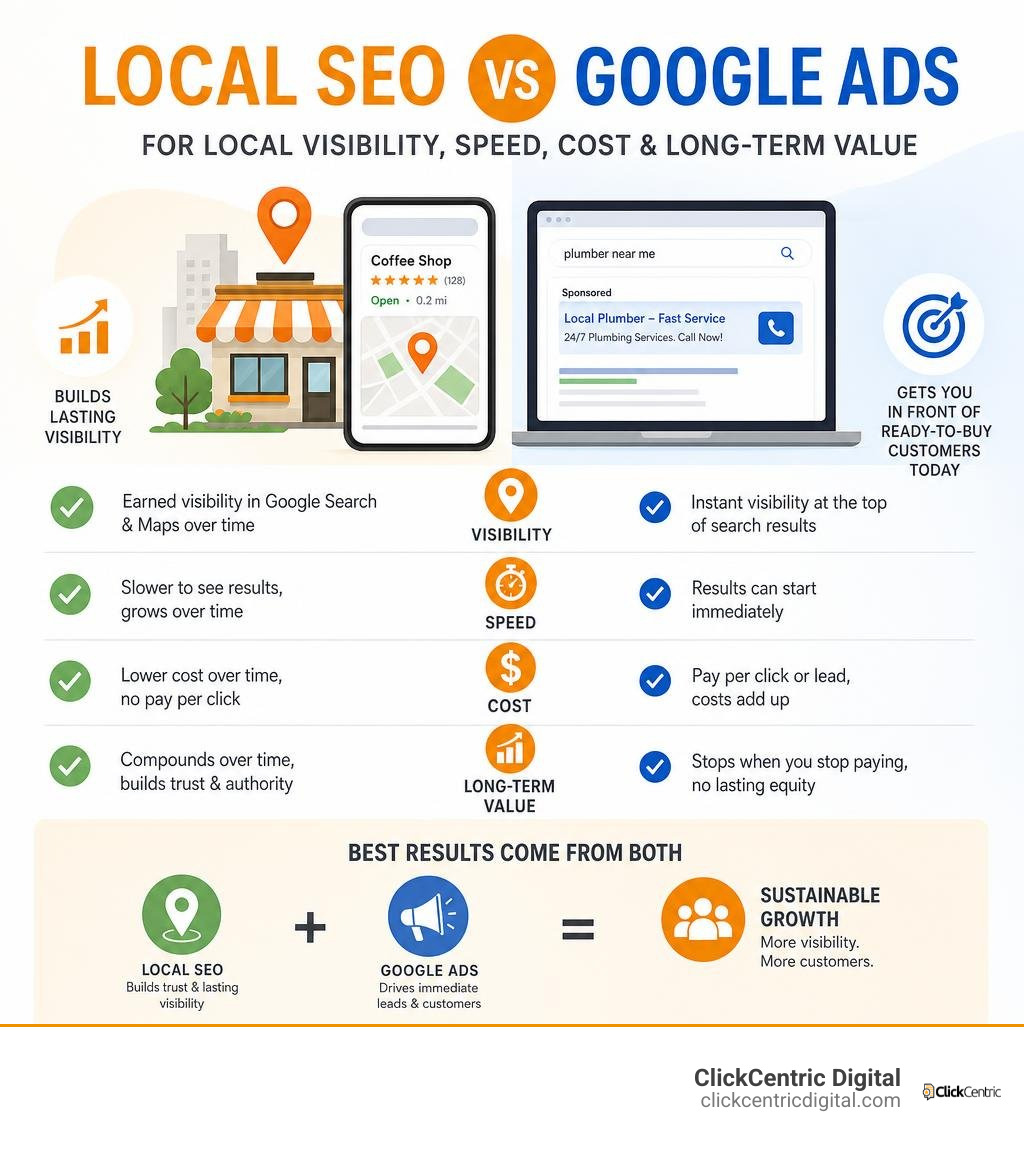
Local SEO Google Ads work best together, but they solve different problems. Local SEO helps your business appear in unpaid Google Search and Maps results over time. Google Ads can put you in front of ready-to-buy customers today, but you pay whenever an ad interaction or qualified lead occurs.
| If your main goal is… | Start with… | Why |
|---|---|---|
| Long-term visibility in Google Maps and local results | Local SEO | Builds trust, reviews, and organic presence that can keep attracting customers without paying per click. |
| Calls, bookings, or visits quickly | Google Ads | Reaches people actively searching for a local provider right now. |
| Sustainable growth and faster lead flow | Both | Ads create immediate demand while SEO strengthens the visibility you own. |
The choice matters because local search is where decisions happen. Research shows that 46% of Google searches have local intent, and 97% of consumers read reviews before choosing a business. A weak Google Business Profile, poor reviews, or low Maps visibility can cost you leads even when your website is solid.
Google Ads can close that gap quickly. But clicks alone do not equal customers. The strongest local strategy connects paid campaigns with a complete Business Profile, clear service pages, credible reviews, and tracking for calls, form leads, directions, and sales.
I am Fred Dirkse, and this guide will help you choose the right mix based on how your customers search, buy, and contact your business.
Relevant articles related to local seo google ads:
Local SEO vs Google Ads: Core Differences and Performance Breakdown
When local business owners ask us whether they should dump their budget into organic search optimization or pay-per-click advertising, we always remind them that they are looking at two engines designed for completely different travel speeds.
Local SEO builds digital real estate that you own over time, whereas local seo google ads tactics purchase high-intent placement on demand. Because 46% of all searches on Google carry distinct local intent, ignoring either channel can mean leaving half of your potential customer base to your local competitors across West Michigan, from Grand Rapids to Kalamazoo.
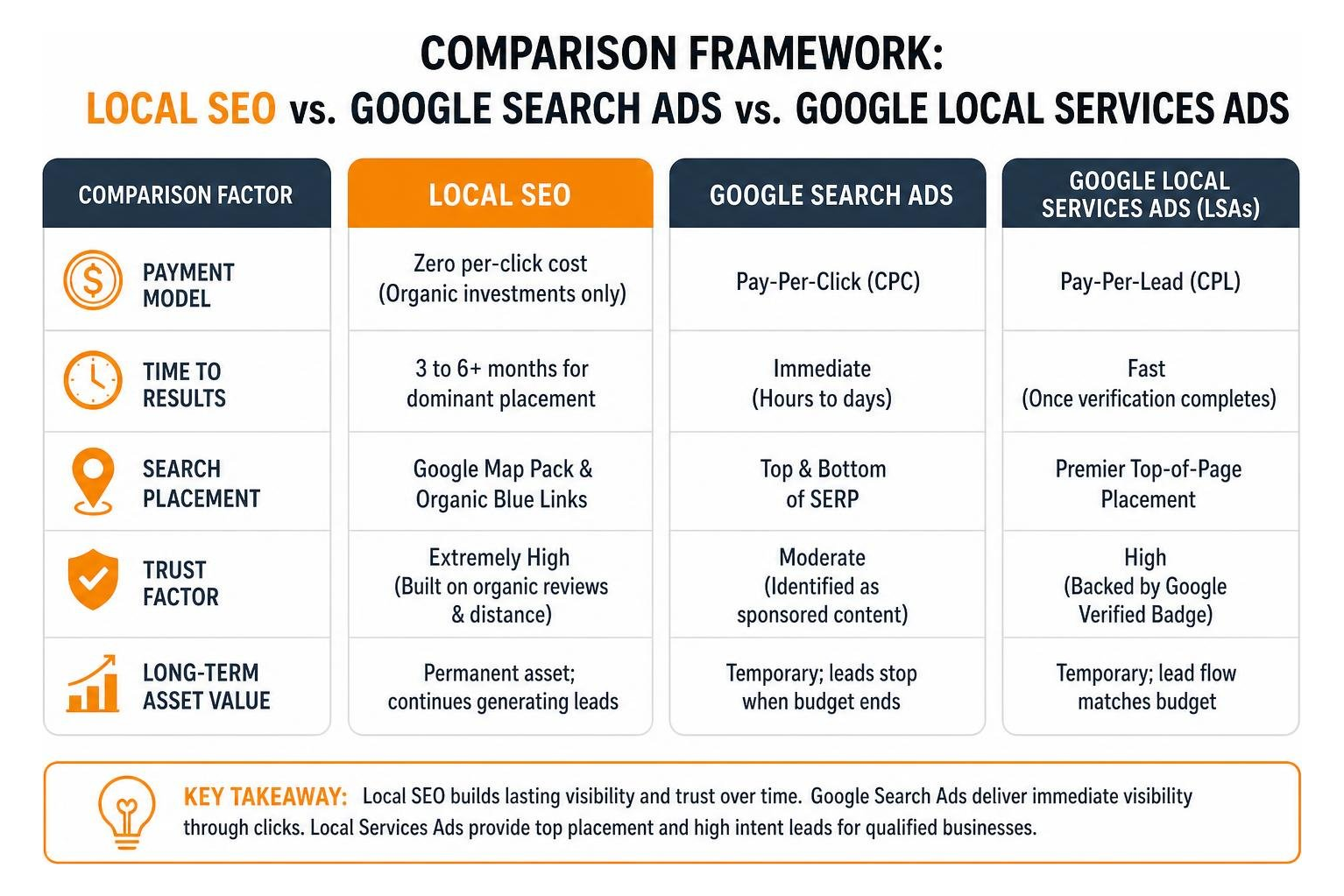
| Feature / Metric | Organic Local SEO | Standard Google Search Ads | Google Local Services Ads (LSAs) |
|---|---|---|---|
| Payment Model | Zero per-click cost (Organic investments only) | Pay-Per-Click (CPC) | Pay-Per-Lead (CPL) |
| Time to Results | 3 to 6+ months for dominant placement | Immediate (Hours to days) | Fast (Once verification completes) |
| Search Placement | Google Map Pack & Organic Blue Links | Top & Bottom of SERP | Premier Top-of-Page Placement |
| Trust Factor | Extremely High (Built on organic reviews & distance) | Moderate (Identified as sponsored content) | High (Backed by Google Verified Badge) |
| Long-Term Asset Value | Permanent asset; continues generating leads | Temporary; leads stop when budget ends | Temporary; lead flow matches budget |
To determine where your marketing dollars belong right now, learn more about How to Win the Local Pack in 2026 and Beyond.
Understanding Organic Local SEO and Maps Optimization
Organic local SEO revolves around claiming, optimizing, and maintaining your Google Business Profile (GBP) alongside your website’s structural authority. For any storefront or service-area business (SAB) operating without a physical customer counter, Map Pack prominence is the crown jewel of local visibility.
When a homeowner in Holland MI searches for emergency repairs, Google calculates three core signals before displaying the top 3-Pack:
- Relevance: How closely your GBP categories, service pages, and review content match the exact search term.
- Proximity: How close your business base or defined service area is to the user making the query.
- Prominence: Your overall digital reputation, including total review count, star rating, local directory citations, and inbound link authority.
For service-area businesses, Google allows you to specify up to 20 service areas within roughly a two-hour driving radius. Proximity plays a smaller role for hidden-address profiles than for physical storefronts, placing far heavier weight on active review acquisition and regional link authority. If you want to ensure your Google Business Profile remains competitive in local searches, review our actionable guide on how to Get Your Business on the Map and Stay There.
How Google Local Services Ads Differ from Standard Search Ads
Understanding how Google Local Services Ads (LSAs) differ from traditional Google Search ads is critical before setting your monthly ad budget. Traditional Google Search campaigns operate strictly on a Cost-Per-Click (CPC) model. You pay every time someone clicks on your ad link, whether that person fills out your contact form, calls your office, or leaves your website three seconds later.
Google LSAs flip this model completely by charging on a Pay-Per-Lead (CPL) basis. You only pay when a potential customer directly calls your office or sends an instant message inquiry directly through the LSA ad unit.
LSAs also offer a built-in lead dispute framework. If a lead turns out to be a wrong number, an automated spam call, a job inquiry, or someone seeking service outside your designated coverage zone, you can submit the recording or chat log for credit reimbursement.
Additionally, activating message leads within LSAs can dramatically reduce your overall customer acquisition costs. Data shows that message leads in Local Services Ads cost on average 50% less than direct phone call leads. For detailed developer guidelines and native functionality, check out official documentation like About Local Ads.
Strategic Setup for Local SEO Google Ads Campaigns
Setting up a high-performing local seo google ads campaign requires more than just picking a few local keywords and writing a catchy headline. A successful strategy requires syncing your Google Ads account directly with your verified Google Business Profile, selecting the correct campaign architecture, and dialing in geographic boundaries to avoid burning cash on non-local searchers.
Step-by-Step Setup: Earning the Google Verified Badge and GBP Sync
Earning top-of-page trust in 2026 relies heavily on obtaining the Google Verified badge (which replaced the legacy Google Guaranteed and Google Screened badges). This verification system displays a badge right next to your business name in local search modules, assuring prospective buyers that your company is legitimate.
To earn your Google Verified status and set up your campaigns properly, follow these steps:
- Verify Your Google Business Profile: Ensure your business operating name, exact address, primary phone number, and operating categories are verified and public on Google Maps.
- Complete Screening Requirements: Submit your business license documents, proof of general liability insurance, and request background checks for field technicians (required for eligible home and field services).
- Select Primary and Sub-Categories: Match your targeting strictly to your primary lines of work. For example, if you specialize in residential HVAC, do not select commercial refrigeration unless you actively staff for it.
- Link Location Assets: Inside your Google Ads account, navigate to Assets > Location Assets, and link your Google Business Profile directly to enable native location extensions across Search and Maps.
For home service providers looking to streamline this onboarding journey, refer to our detailed Google Ads Home Services Guide 2026.
Choosing Search vs Performance Max for New Campaigns
One of the most frequent mistakes we fix for local business accounts is launching a Performance Max (PMax) campaign on day one without any existing account tracking data. PMax relies heavily on historical account signals and machine learning to distribute assets across Search, YouTube, Display, Discover, Maps, and Gmail.
If your ad account has fewer than 30 trackable conversions per month, launching PMax right away forces Google’s automated bidding algorithms to “learn” using your ad budget. The smart play is starting with a traditional, controlled Search campaign.
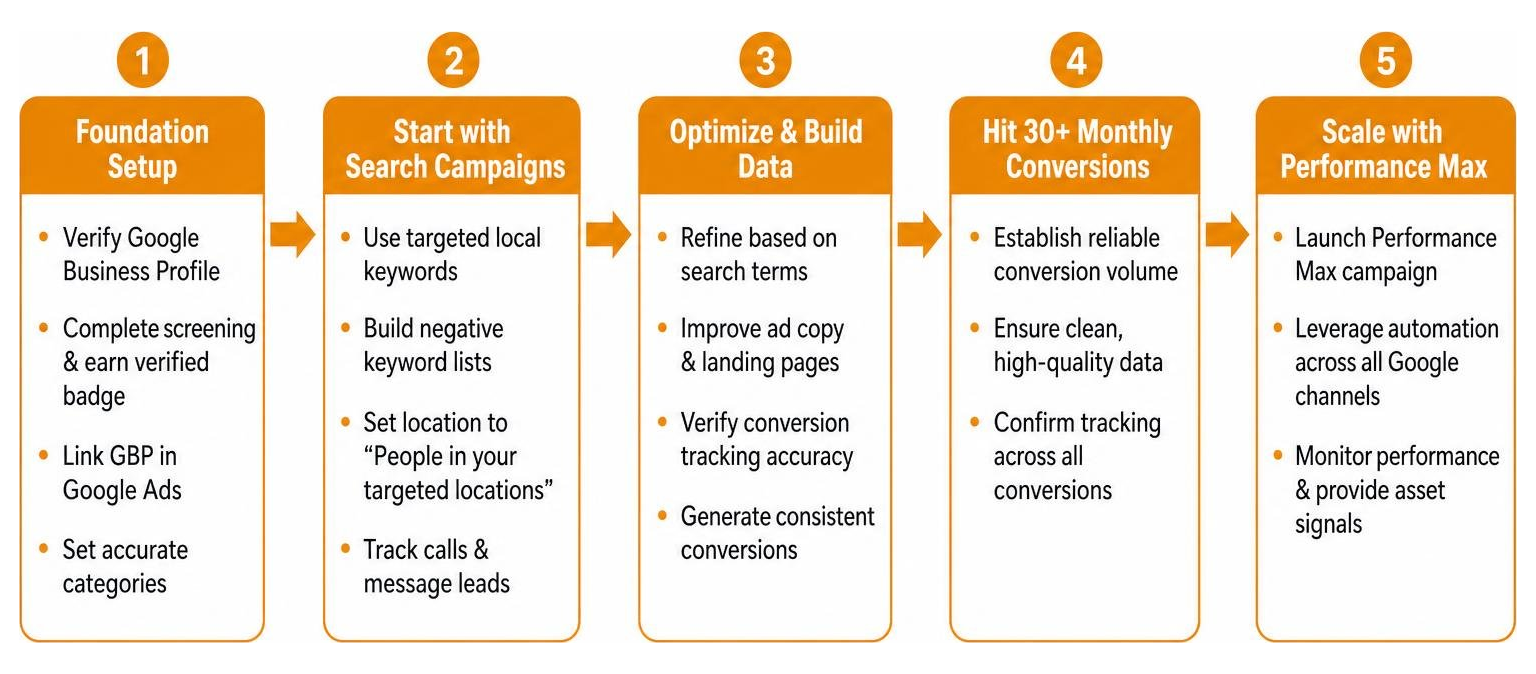
Starting with standard Search allows you to manually curate negative keyword lists, inspect user search terms, verify phone conversion tracking accuracy, and feed clean conversion data into your account. Once your campaign consistently generates at least 30 conversions per month, you can confidently scale into Performance Max without wasting capital.
Mastering Geographic Targeting and Bidding with Under 30 Monthly Conversions
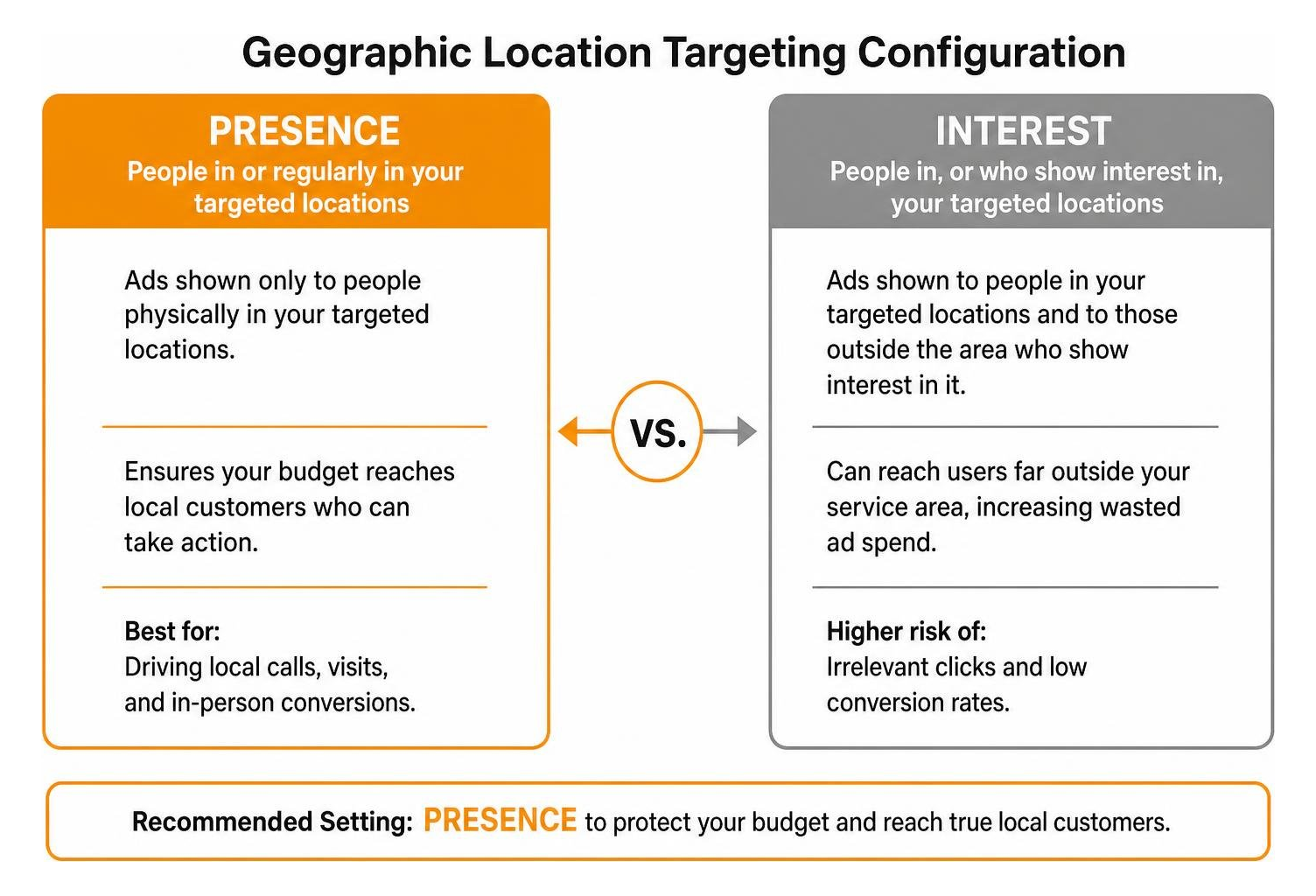
Improper geographic targeting is responsible for vast amounts of wasted local ad spend. By default, Google Ads sets campaign locations to “People in, or who show interest in, your targeted locations.” This default setting allows someone sitting across the country searching for regional terms to trigger your local ads.
To protect your budget, update your location settings immediately to “Presence: People in or regularly in your targeted locations.”
When establishing your geographical targeting boundaries:
- Use specific driving-radius parameters around your main location (e.g., a 15-mile radius around Grand Haven MI or South Haven MI) rather than target entire regional TV markets.
- If your account gets fewer than 30 conversions per month, avoid automated Smart Bidding strategies like Target CPA (Cost Per Acquisition). Instead, utilize Maximize Clicks with a max CPC cap or Manual CPC bidding. This keeps keyword costs constrained while gathering the initial performance data your account needs.
For deeper insights into controlling manual campaign levers, explore our guide on Mastering Google PPC Management Without Losing Your Mind.
Advanced Google Ads Tactics to Maximize Local ROI in 2026
As Google’s advertising ecosystem relies more heavily on AI automation, remaining competitive requires knowing which automated tools deliver real results and which ones eat up your budget without returning value.
Leveraging AI Max for Local SEO Google Ads Strategies
Google’s AI Max for Search represents a major upgrade in how campaign automation processes user search intent. Rather than relying solely on strict keyword match types, AI Max uses contextual algorithms to analyze full query intent, landing page content, and user location signals to match your ads with high-converting local searches.
Advertisers activating AI Max for Search see an average +14% increase in conversions at the same CPA/ROAS. When paired with Smart Bidding Exploration, AI Max delivers a +19% lift in conversions alongside an +18% expansion in unique search query categories.
The trick to activating AI Max safely is testing it via Google Ads One-Click Experiments. Set up a 50/50 split test against your standard Search campaign for 30 days. This allows you to measure conversion volume lift without risking your core lead flow.
Building the Power Pack: Integrating PMax, Demand Gen, and Waze
For established local businesses operating in competitive markets like West Michigan, relying on a single campaign type is no longer enough. The most effective advertisers use the Power Pack framework—a multi-channel strategy that captures high-intent search queries while maintaining brand visibility across local maps and navigation apps.
- Demand Gen for Local Objectives: Early performance data shows Demand Gen campaigns focused on local objectives yield an average +20% increase in conversions. These visual campaigns show ads on YouTube Shorts, Discover feeds, and Gmail to local audiences before they start actively searching for services.
- PMax for Store Goals with Waze: Waze boasts over 150 million monthly active users globally. By running Performance Max for Store Goals, your physical business locations automatically trigger branded “Promoted Pins” on both Google Maps and Waze navigation screens.
These Promoted Pins show as distinct square logos along driving routes, encouraging nearby drivers to drop in or tap for directions. Learn more about capturing local foot traffic in our article on Local PPC Campaigns That Actually Bring People Through the Door.
Navigating the February 2027 Call-Only Sunset and Negative Keyword Filtering
Google has officially announced the complete deprecation of legacy Call-Only Ads, taking effect in February 2027. If your local business relies on Call-Only campaigns to drive inbound call volume, you should migrate those ad groups today rather than waiting until the deadline.
The Migration Action Plan:
- Replace legacy Call-Only Ads with Responsive Search Ads (RSAs).
- Apply high-visibility Call Assets directly to your RSAs and configure your campaign asset settings to prioritize call buttons on mobile devices.
- Build robust, pre-qualifying ad copy. Because 78% of local searchers expect ad content to match their specific location or immediate need, state your service area and price ranges directly in your headlines (e.g., “Emergency Plumbing in Holland – Flat Rate Service”).
Equally critical is building an extensive negative keyword list on day one. Pre-emptively exclude unqualified terms like “DIY”, “how to”, “cheap”, “free”, “jobs”, and “licensing course”. Pre-qualifying searchers through clear ad text and negative keyword exclusions ensures your budget is spent strictly on paying local customers.
Measuring True Local Performance: Offline Conversion Tracking and Key Metrics
Clicks and impressions are vanity metrics. A campaign generating thousands of monthly ad clicks means nothing if your team’s phones aren’t ringing and your appointment schedule remains empty. Measuring true ROI from local seo google ads investments requires connecting online ad clicks with real offline business conversions.
Tracking Calls, Store Visits, and Offline Conversions
Data confirms that 60% of local service contacts begin with a phone call rather than a website contact form. If you rely strictly on default Google Analytics 4 (GA4) web form tracking, you are missing more than half of your actual lead data.
To establish full conversion visibility across channels:
- Implement Dynamic Mobile Call Tracking: Use third-party call tracking tools or Google’s native call conversion assets to set minimum call duration thresholds (e.g., calls lasting longer than 60 seconds) as biddable conversions.
- Import Offline CRM Conversions: Sync your internal CRM sales data back into Google Ads. Uploading offline conversions allows Smart Bidding algorithms to optimize for actual revenue and booked service calls rather than unverified form submissions.
- Track Store Visit Conversions: For physical storefronts meeting Google’s threshold criteria, enable Store Visit reporting. This metric uses privacy-compliant location history data to connect ad views with actual foot traffic entering your building.
Key Metrics for Local SEO Google Ads That Matter Beyond Clicks
To accurately gauge whether your local campaigns are profitable, focus your weekly reviews on key bottom-line business metrics:
- Cost Per Lead (CPL): The total ad spend divided by qualified inbound phone calls and form submissions.
- Qualified Lead Rate: The percentage of incoming inquiries that match your target customer profile and service location.
- Phone Call Rate: The percentage of total ad clicks that convert directly into a phone call to your team.
- Direction Requests: The volume of local users tapping “Get Directions” via Map location assets embedded in your ads.
- Cost Per Acquisition (CPA): The actual ad cost required to secure a paying, closed customer.
To discover tools that streamline performance tracking, check out our guide to the Top Tools for Google Ads Management That Actually Work.
Frequently Asked Questions about Local Search Marketing
Local Services Ads or traditional Google Ads: which is better?
Neither platform is universally “better”—they perform best at different points in the customer decision cycle. Google Local Services Ads (LSAs) are ideal for urgent, high-intent service categories like emergency plumbing, locksmith services, roof repairs, or immediate legal consultations. LSAs feature a pay-per-lead model with built-in dispute protections, making them extremely efficient for direct lead generation.
Traditional Google Search Ads offer far greater control over ad messaging, landing page experiences, target keywords, and visual branding. They work better for services with longer consideration periods, complex offerings, or niche B2B local solutions. For most local service companies, combining both ad formats generates maximum local search coverage.
Why am I getting clicks from outside my designated service area?
Receiving clicks from outside your service area almost always stems from leaving Google Ads’ location settings on the default selection: “Presence or Interest: People in, regularly in, or who’ve shown interest in your targeted locations.”
When set to “Interest,” a user located hundreds of miles away who includes your city name in a search query can see and click your ad. To fix this immediately, update your campaign location settings to “Presence: People in or regularly in your targeted locations.” Additionally, check your negative keyword lists to exclude outside city names and neighboring counties you don’t serve.
When is the right time to activate AI Max for Search campaigns?
The ideal time to activate AI Max for Search is after your campaign has accumulated consistent conversion history—typically a minimum of 30 conversions per month over at least 60 days. AI Max relies on historical conversion data to evaluate search intent accurately.
When you’re ready to launch AI Max, avoid applying it across your entire campaign instantly. Instead, set up a One-Click Experiment within Google Ads to run a 50/50 split test against your control Search campaign for 30 to 45 days. This allows you to measure conversion volume lift and cost-per-acquisition performance without risking your baseline lead flow.
Conclusion
Choosing between Local SEO and Google Ads isn’t an either-or decision—it’s about building a balanced local customer acquisition strategy. Local SEO creates long-term organic authority and map visibility that grows over time. Google Ads provides instant, targeted visibility that delivers ready-to-buy customers to your business today.
By combining both strategies, your business gains top-of-page real estate across sponsored ads, Google Local Services Ads, and organic Google Maps results.
Our team at ClickCentric Digital helps local businesses refine their search strategies, optimize paid ad spend, and build consistent lead generation systems. If you’re ready to scale your business with performance-driven campaigns, explore how we can help you Grow Your Business with Expert Paid Traffic Management.
Sorry, the comment form is closed at this time.