

11 Aug Spot It, Flag It, Bin It: How to Delete Fake Google Reviews
Spot It, Flag It, Bin It: How to Delete Fake Google Reviews
How to Delete Fake Google Reviews Without Hurting Your Reputation
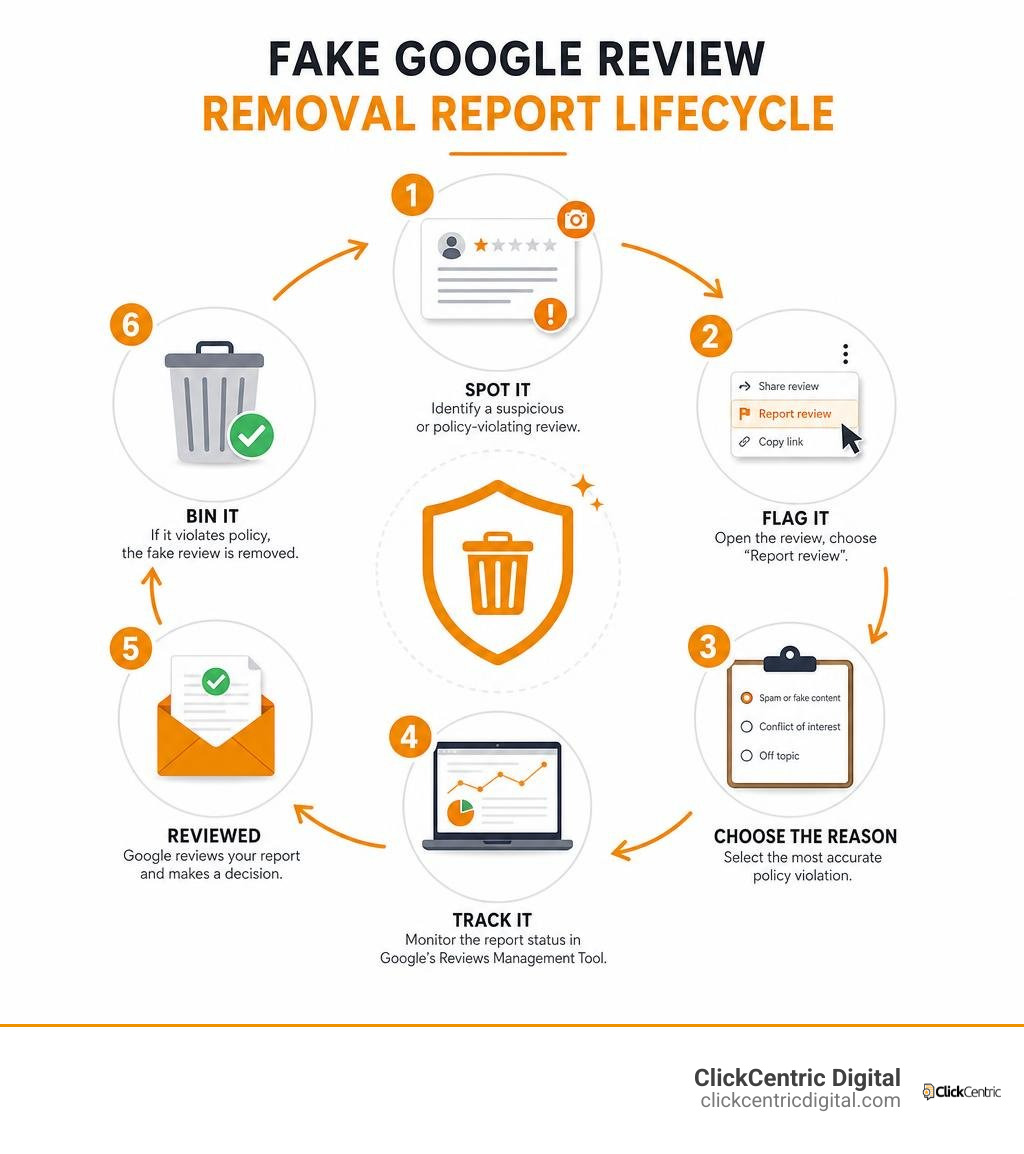
How to delete fake Google reviews starts with reporting the review to Google under the right policy violation. You cannot remove a review yourself, and Google will not delete it simply because it is negative or unfair. But reviews from non-customers, competitors, bots, former staff with a conflict of interest, or coordinated spam campaigns may violate Google’s rules.
- Save screenshots of the review, reviewer profile, date, and any signs it is not from a real customer.
- Open the review on Google Maps or your Business Profile, select the three-dot menu, then choose Report review.
- Pick the most accurate reason, such as Spam or fake content, Conflict of interest, or Off topic.
- Track the decision in Google’s Reviews Management Tool and use the one-time appeal option if Google denies the first report.
This matters because one suspicious one-star review can hit a small business much harder than a company with hundreds of reviews. Google also removes huge volumes of bad content: it removed or blocked 292 million policy-violating reviews in 2025. Still, its automated systems cannot catch every fake review without a clear report and solid evidence.
The goal is not to erase honest criticism. It is to separate a real customer complaint from content that breaks Google’s policies, then protect customer trust while Google reviews your report.
I am Fred Dirkse, and I will walk you through how to spot suspicious reviews, report them properly, and limit their impact on your business.
How to delete fake google reviews definitions:
- can owners delete google reviews
- can you get a bad review removed from google
- how to delete google business review
Identifying Fake Google Reviews vs. Bad Reviews According to Google Policy
Before jumping into the removal process, we have to know what we are fighting. Google receives millions of review submissions every day. In fact, Google removed over 170 million fake reviews in 2024 using its AI enforcement systems, and that figure climbed to 292 million policy-violating reviews in 2025. However, Google enforces strict distinctions between a customer who had a genuinely terrible experience and a fraudulent account posting made-up stories.
Google explicitly refrains from acting as a mediator in customer disputes. If a customer paid for service at your Grand Rapids or Kalamazoo store, left unhappy, and posted a glowing account of why your customer service was dreadful, Google will keep that review online. However, if the review violates Google’s official Maps User Generated Content policies, it is eligible for permanent removal.
According to Google’s rules, content qualifies as fake or policy-violating under specific categories:
- Fake Experiences & Deceptive Content: Content that does not reflect a real experience at your business, including bot-generated text or fabricated stories.
- Conflict of Interest: Reviews left by current or former employees, direct commercial competitors, or people paid to manipulate ratings.
- Off-Topic Content: Feedback discussing political rants, socio-economic commentary, or services your business does not offer (for instance, criticizing a plumbing business in Holland, MI for bad pizza delivery).
- Spam and Commercial Content: Promotional links, duplicate reviews posted across multiple profiles, or repeated gibberish.
- Harassment, Hate Speech, and Profanity: Personal attacks, doxxing, explicit language, or slurs.
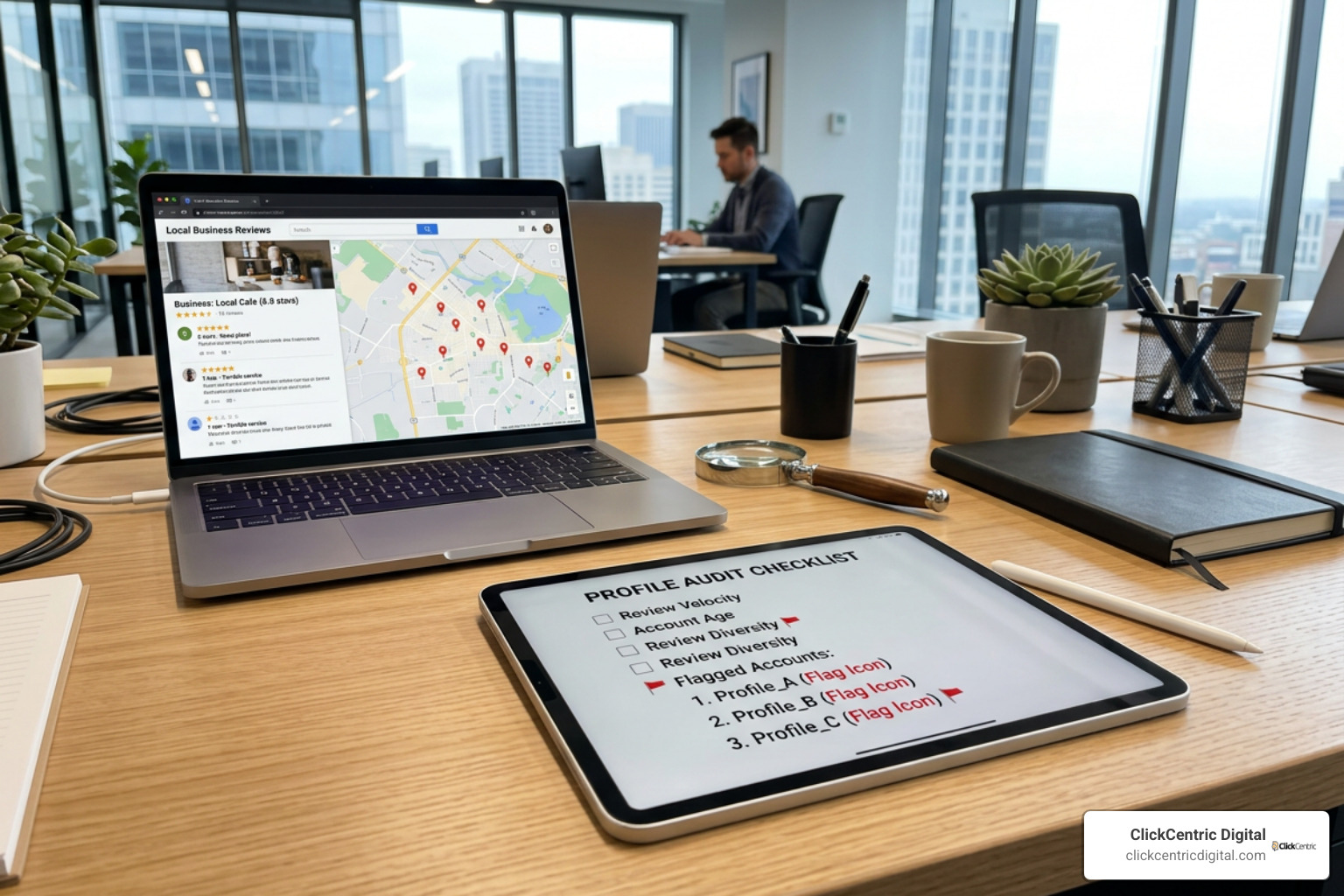
To check if a review is truly fake, perform a quick internal audit. Cross-reference your customer relationship management (CRM) system, appointment books, and point-of-sale logs. Does the reviewer’s name match any job history? Did the alleged service happen on a day your shop was closed? Check the reviewer’s profile by clicking their avatar on Google Maps. If they have a brand-new account, zero other local reviews, or have dropped 15 identical one-star ratings on similar local businesses across West Michigan within 20 minutes, you are looking at a classic fake review campaign.
Google uses advanced Gemini-based AI detection models to evaluate review velocity, account age signals, and geographical anomalies. However, automated systems still produce false positives and miss subtle human-written hit jobs. To review Google’s baseline policies, you can read the official policy guide on inappropriate reviews or dive deeper into our analysis to learn if you can actually delete Google reviews.
Step-by-Step Guide: How to Delete Fake Google Reviews on Your Business Profile
When you uncover a illegitimate review tanking your local score, immediate, precise action is necessary. A single bad review left sitting at the top of your Google Business Profile can cost a small local operator anywhere from 30 to 70 customer calls every single month. Because 63.6% of consumers check Google reviews before visiting a business and 94% actively avoid businesses with unaddressed negative ratings, taking action is vital.
Here is the exact step-by-step workflow we follow at ClickCentric Digital when preparing a report for Google. For more general guidance on handling bad feedback, check out our step-by-step guide to removing bad reviews.
Flagging the Review via Google Maps and Business Console
The initial step is submitting a clean, policy-categorized report directly to Google’s automated review system.
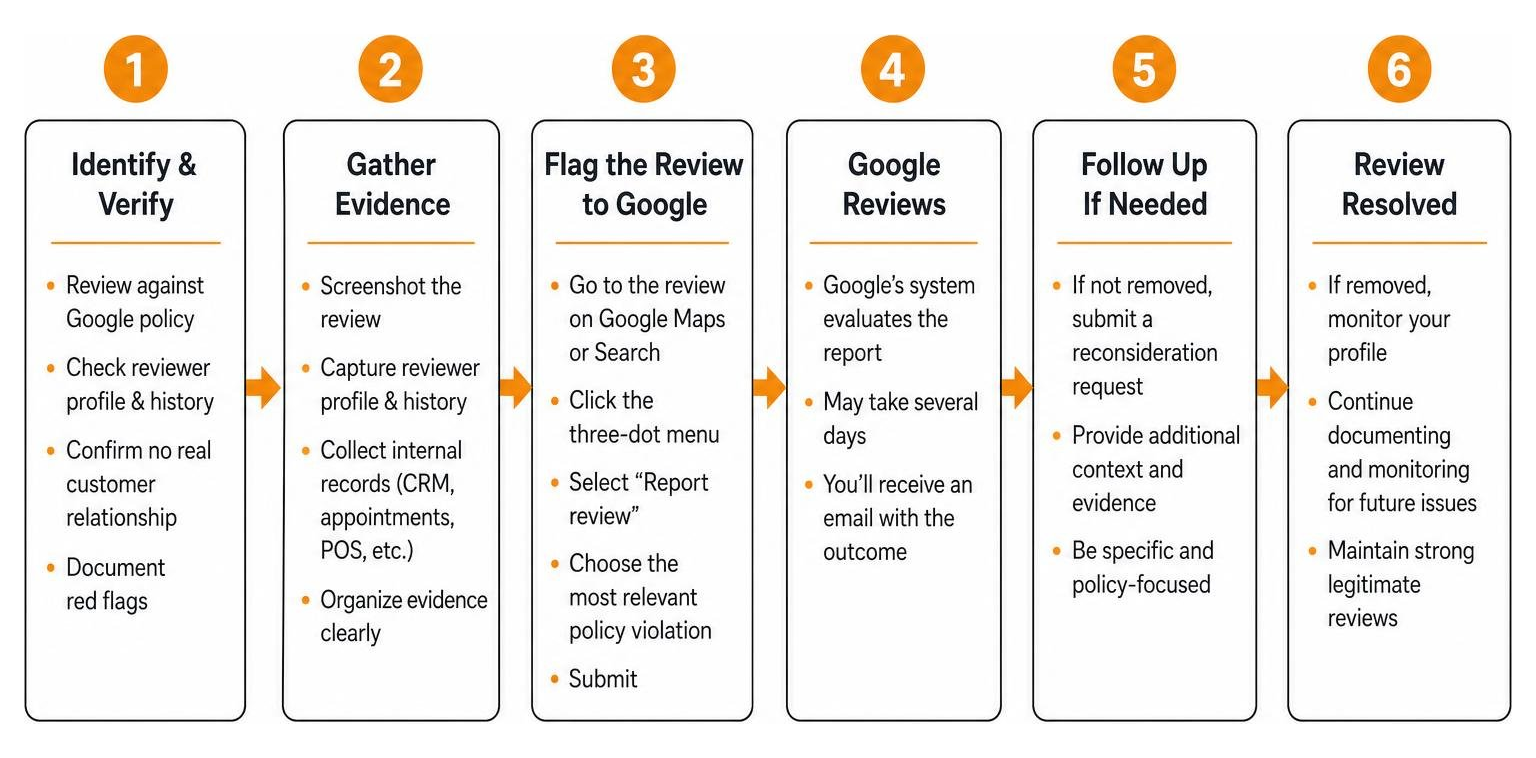
- Freeze the Evidence: Take clear, timestamped screenshots of the fake review, the reviewer’s public profile, their review history, and your internal CRM records showing zero transaction history.
- Open Google Maps or Google Search: Search for your exact business name (e.g., your storefront in Holland or South Haven, MI) while logged into the Google account that manages your profile.
- Locate the Review: Scroll to your review section and find the offending comment.
- Click the Three-Dot Menu: Click the three dots in the upper right corner of the review block and select Report review.
- Select the Precise Policy Violation: Choose the option that best fits the situation:
- Select Spam or fake content if the reviewer was never a customer or used a bot script.
- Select Conflict of interest if a rival local business or ex-employee posted it.
- Select Off topic if the text describes services or locations unrelated to your operations.
- Select Profanity or Harassment if it contains slurs, threats, or personal identification details.
- Submit and Record the Date: Click submit. Make a note on your calendar, as automated evaluation typically takes 3 to 5 business days.
Avoid asking all your family members or employees to flag the review simultaneously from the same office Wi-Fi network. Google’s algorithms flag identical IP flagging spikes as manipulation, which can cause Google to ignore your report entirely.
What to Do When Google Refuses to Remove the Review: Appeals and Escalation
If 5 business days pass and Google sends an automated email stating the review “does not violate our policies,” do not panic. Initial automated decisions are frequently rejected. That initial response is simply the automated layer at work—human escalation is where real policy enforcement occurs.
When an initial flag fails, use these direct escalation avenues:
- Submit a One-Time Appeal via the Reviews Management Tool: Go to Google’s official Business Profile Reviews Management Tool. Confirm your account email, select your business location, and view your reported reviews. If the status reads “Report reviewed – no policy violation,” select the review and click Submit a one-time appeal. Google allows you to select up to 10 rejected reviews at once and upload specific photo proof, CRM logs, or explanation context for a human reviewer.
- File a Business Redressal Complaint Form: If you are facing a coordinated review-bombing attack from a local rival, the standard flagging tool might feel inadequate. Submit the Google Business Redressal Complaint Form, which allows you to submit pattern evidence, email threads, or extortion demands directly to Google’s trust and safety team.
- Request Support via the Google Business Profile Community Forum: Post your issue on the official GBP Community Forum. Product Experts (trusted volunteers with direct lines to Google staff) can review your documentation. If your evidence clearly demonstrates a breach of Google guidelines, a Product Expert can escalate the case internally.
- Submit a Legal Defamation Removal Request: If the fake review contains slanderous fabrications that cause severe financial damage, submit a formal request via Google’s Legal Removal Troubleshooter citing local laws and defamation statutes.
For additional tactics on speeding up resolution times, read our guide on removing negative Google reviews quickly.
Public Response Strategies, Legal Recourse, and the FTC

While you wait for Google’s support team or appeal tools to render a decision, the fake review remains visible to every potential customer in Grand Haven, South Haven, and Grand Rapids. Leaving a fake review sitting empty with zero management response causes severe conversion harm. Research proves that publishing a calm, professional public response stating a lack of customer records reduces the conversion damage of a fake review by approximately 60%.
When drafting your public response to an unverified review, stick to these core principles:
- Keep It Professional and Objective: Never express anger, call the reviewer a liar, or make emotional accusations.
- Highlight Your Inability to Find Transaction Records: State clearly that you searched your customer database and found no record of service under that name.
- Reaffirm Commitment to Quality: State your standard of customer care so prospective buyers see your professional approach.
- Offer an Off-Platform Resolution Path: Provide a direct phone number or email address for a manager to resolve any legitimate issues offline.
- Avoid Exposing Private Information: Comply strictly with customer privacy guidelines; never post full names, phone numbers, or account details in a review response.
Here is a proven template you can adapt:
“Hello [Reviewer Name]. We take customer satisfaction very seriously, but we have searched our records and cannot find any record of a transaction or service provided under your name. We have no record of this issue occurring at our business. If you are indeed a client, please contact our general manager directly at [Phone/Email] so we can investigate and make things right immediately.”
Beyond public responses, understanding regulatory enforcement gives you major leverage. Under the FTC Consumer Review Rule (16 CFR Part 465), updated federal regulations impose civil penalties of up to $53,088 per violation for businesses that post, buy, or organize fake reviews. If a local competitor is orchestrating a fake review campaign against your business, file an official report at ReportFraud.ftc.gov and notify your State Attorney General’s Consumer Protection Division.
If you are considering legal action against an individual reviewer, keep in mind that Section 230 of the Communications Decency Act shields platform hosts like Google from legal liability for user-submitted text. You cannot successfully sue Google for hosting the review; any direct lawsuit or subpoena for IP identification must target the individual reviewer. Litigating online defamation typically costs between $5,000 and $25,000, making formal platform appeals and review dilution far more cost-effective options for most local business owners.
Timeline and Expectations for How to Delete Fake Google Reviews
Patience is vital when navigating Google’s support structure. Here is what to expect during the removal lifecycle:
- Initial Automated Flagging: 3 to 5 business days for automated systems to scan policy compliance.
- One-Time Appeal Review: 7 to 14 business days for a human specialist to review submitted CRM records and screenshots.
- Community Forum Escalation: 1 to 3 weeks depending on Product Expert availability and thread activity.
- Legal & Defamation Requests: 2 to 8 weeks depending on legal complexity and documentation completeness.
To review additional timeline scenarios, read our reality check on deleting Google feedback.
Common Mistakes to Avoid When Trying How to Delete Fake Google Reviews
When business owners encounter malicious feedback, panic can lead to costly mistakes. Avoid these common traps:
- Indiscriminate Flagging: Flagging every honest negative review from unhappy actual customers trains Google’s automated systems to flag your account as abusive, which lowers the likelihood of approval when you report genuine fake reviews.
- Engaging in Public Flaming Wars: Arguing with reviewers online destroys prospective client trust faster than the bad rating itself. 88% of shoppers evaluate online reviews before choosing a business, and they pay close attention to how management handles conflict.
- Review Gating: Filtering unhappy customers away from Google via private survey gates before asking satisfied clients for public reviews violates Google’s explicit policies and FTC regulations.
- Hiring Unscrupulous “Guaranteed Removal” Paid Services: Paying third-party agencies that promise guaranteed review removal is highly risky. Google makes all removal decisions internally. Unethical removal services often use spam-flagging bots or extortion schemes that can result in your Business Profile being permanently suspended.
For additional reading on managing alternative platforms, explore our guide on how businesses deal with bad Yelp reviews without losing their minds.
Long-Term Protection and Diluting Unwanted Feedback
The most effective, reliable strategy for mitigating fake or unfair negative reviews is maintaining a consistent, proactive inflow of real customer ratings. A business with only 12 reviews on Google Maps can have its overall score devastated by a single fake 1-star entry. However, a local West Michigan business backed by 250 positive ratings barely sees a ripple in its average score from an occasional bad mark.
By setting up automated post-service email or SMS review requests, you can establish an active review velocity that dilutes negative feedback naturally.
| Strategy Dimension | Reactive Review Removal | Proactive Review Accumulation |
|---|---|---|
| Primary Focus | Fighting individual bad/fake reviews via reports | Consistently generating authentic 5-star customer feedback |
| Time Investment | High effort spent gathering proof and monitoring appeals | Low maintenance once automated request workflows are set up |
| Business Impact | Prevents localized profile score drops | Builds brand authority and improves local map rankings |
| Risk Factor | Dependent on Google support approval | Fully compliant with platform policies and consumer trust |
| Conversion Benefit | Reduces customer conversion loss by ~60% | Increases overall sales conversions and inbound leads |
To build a complete strategy for protecting and scaling your local online presence, read the business owner’s guide to Google review mastery and explore our comprehensive guide covering Google reviews: everything you need to know.
If you have not claimed or set up your local Business Profile correctly yet, our walkthrough on claiming your Google review page without the headache will get you up and running smoothly.
Frequently Asked Questions About Google Review Removal
Can you pay a service to delete fake Google reviews safely?
No. No legitimate third-party company has direct administrative access to delete Google reviews from your profile. Third-party services that advertise “guaranteed” review removal often rely on illegal bot-flagging software or automated script tactics that violate Google Terms of Service. If Google detects artificial reporting activity on your account, it may penalize or permanently suspend your Google Business Profile. Always stick to official Google Business Console reporting, appeal channels, or accredited reputation management partners.
What should you do if a competitor is review-bombing your business?
If you notice a sudden wave of fake negative reviews hitting your profile within a few hours, freeze evidence immediately by collecting screenshots, profile URLs, and timestamps. Avoid flagging each review individually as separate issues; instead, file a consolidated batch report using the Google Business Redressal Complaint Form. Include proof showing matching language patterns, brand-new accounts, or timing that links the campaign to a rival. Furthermore, submit a complaint to the FTC at ReportFraud.ftc.gov and notify your State Attorney General, as organizing fake review campaigns carries fines of up to $53,088 per violation.
Does Google automatically remove fake reviews using AI?
Yes, Google relies heavily on automated detection frameworks powered by AI models. Google’s automated systems removed over 170 million policy-violating reviews in 2024 and expanded enforcement to remove or block 292 million bad reviews in 2025. These AI platforms analyze account age, geolocation data, IP addresses, and sentiment trends. However, automated systems do not catch every fake review, especially if a malicious actor uses realistic phrasing or customized text, which is why manual reporting and human appeals remain essential.
Conclusion
A fake Google review can feel like a direct attack on your business, but you don’t have to leave your online reputation to chance. By identifying policy violations quickly, saving clear evidence, filing reports through Google’s official channels, and maintaining professional public responses, you can protect your profile and keep customer trust intact.
At ClickCentric Digital, we specialize in helping local businesses across Grand Rapids, Holland, Grand Haven, South Haven, and Kalamazoo safeguard their brand, improve local map rankings, and generate a steady stream of authentic positive reviews. To secure your online presence and build a resilient local brand, explore our specialized solutions and protect and grow your business with professional reputation management.
Sorry, the comment form is closed at this time.