

06 Aug How to Remove Bad Google Reviews in 7 Days
How to Remove Bad Google Reviews in 7 Days
Can You Remove Bad Google Reviews? Policies and Eligibility
Can you remove bad Google reviews? Yes — but only if the review breaks Google’s content policies. You cannot remove a review just because you dislike it or disagree with it.
Here’s a quick breakdown:
| Situation | Can It Be Removed? |
|---|---|
| Review contains spam or fake content | Yes |
| Review includes profanity or hate speech | Yes |
| Review is from a competitor or ex-employee | Yes, with evidence |
| Review contains personal/private information | Yes |
| Review is a negative but honest customer opinion | No |
| Review is a low star rating with no text | Rarely |
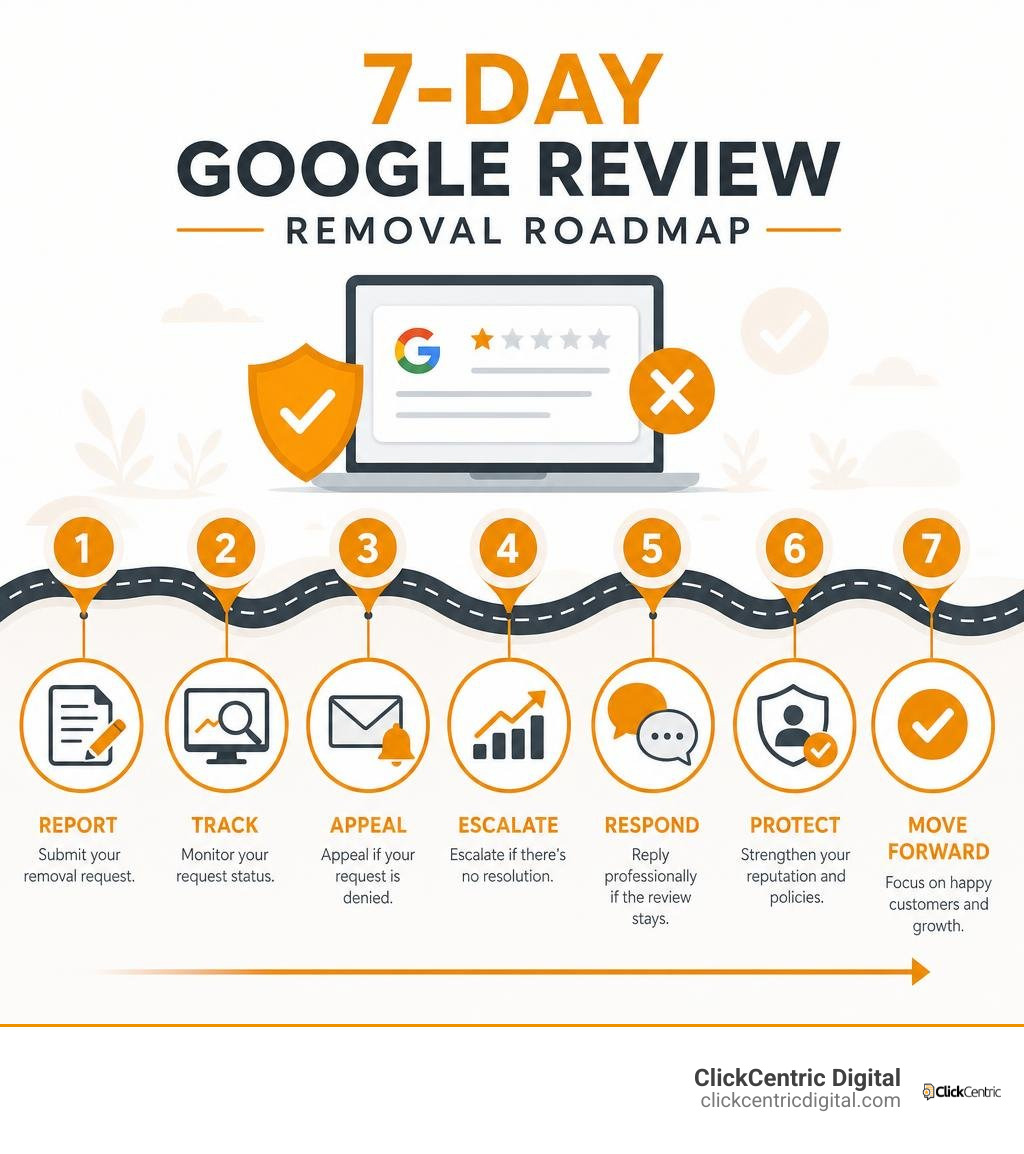
If a review does violate policy, Google typically processes removal requests within 3 business days.
That matters more than most business owners realize. 83% of consumers read Google reviews before choosing a local business. One damaging review — fake or not — can quietly cost you customers every single day it stays up.
The good news? Google gives you free tools to report violations, track the status of your request, and even appeal a rejected decision. Most business owners just don’t know how to use them effectively.
In this guide, I’m Fred Dirkse, and I’ll walk you through exactly what works — step by step — so you can protect your reputation and get back to growing your business.
Every month, hundreds of thousands of business owners search for answers when a frustrating review hits their profile. Whether you run a storefront in Grand Rapids, MI or offer professional services across West Michigan, seeing a 1-star rating pop up can feel like a direct punch to your hard-earned reputation.
When client inquiries drop or customer trust falters, business owners urgently ask: can you get a bad review removed from google or are you stuck with it?
The answer lies in Google’s strict boundary line: Google acts as a platform host, not an arbitrator of truth. Google will not mediate factual disputes or judge whether a customer service experience was “good” or “bad.” If a customer had a genuine service experience and leaves a stinging 1-star rating detailing their dissatisfaction, Google considers that legitimate consumer feedback.
However, Google enforces clear policy guidelines regarding prohibited and restricted content. If feedback violates platform rules, it becomes eligible for complete removal.
| Criteria | Policy-Violating Review (Eligible) | Legitimate Negative Feedback (Not Eligible) |
|---|---|---|
| Content Focus | Off-topic, fake engagement, or commercial promotion | Direct account of customer experience |
| Language | Profanity, explicit harassment, hate speech | Critical, disappointed, or unhappy tone |
| Identity | Competitor, ex-employee, or bot network | Real client or verified customer |
| Private Data | Contains full names, phone numbers, or addresses | Refers strictly to business interactions |
| Google Stance | Violates Terms of Service; removed upon report | Protected commentary; Google remains neutral |
Identifying Violations of Google’s Prohibited and Restricted Content
To get a review taken down, you must map the text directly to a specific violation under Google’s Prohibited and Restricted Content policy. Understanding these categories is the foundation of a successful removal request:
- Spam and Fake Content: Reviews written by bots, automated accounts, or fake profiles intended to manipulate ratings.
- Conflict of Interest: Reviews posted by current or former employees, business owners reviewing their own company, or direct competitors attempting to sabotage a rival.
- Profanity and Obscenity: Language featuring explicit swear words, sexually explicit remarks, or crude insult strings.
- Hate Speech and Harassment: Content attacking individuals or protected groups, including targeted bullying or doxxing.
- Off-Topic Rants: Feedback focusing on political, social, or personal commentary unrelated to the actual business location or transaction.
- Misinformation and Legal Hazards: Allegations of illegal acts, unsubstantiated health claims, or false statements that create severe legal exposure.
Can You Remove Bad Google Reviews That Are Rating-Only Star Ratings?
One of the most frustrating encounters for a local business is receiving a 1-star rating with zero accompanying text. Business owners frequently ask if can you remove bad google reviews when there are no words to point to as policy violations.
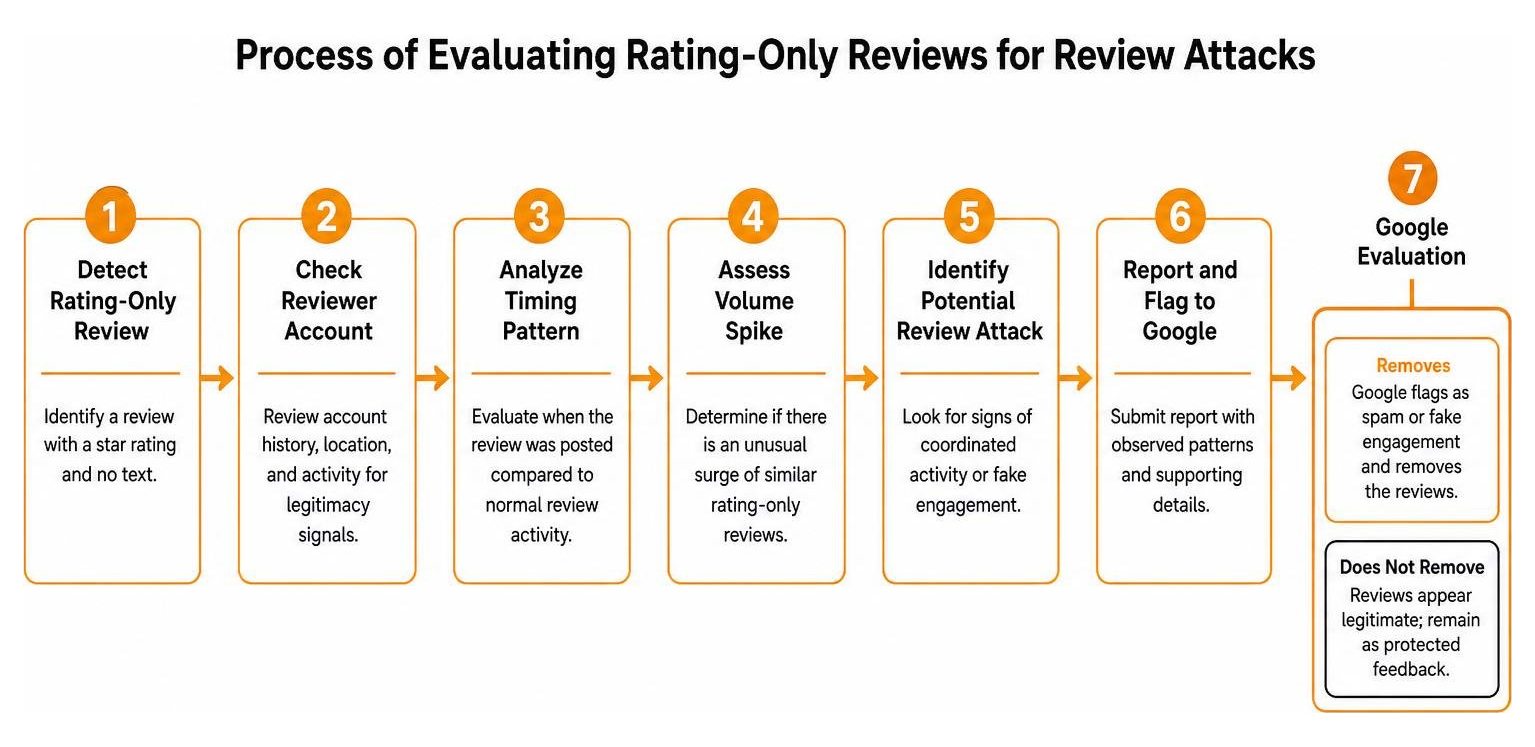
Rating-only reviews are notoriously difficult to remove. Because there is no text, you cannot easily prove profanity, off-topic commentary, or personal harassment. Google’s default assumption is that a customer simply preferred to leave a quick score without writing a full paragraph.
However, removal is not entirely impossible. If a rating-only review arrives as part of a coordinated review attack—such as receiving ten 1-star ratings within two hours on an account that normally receives one review a month—Google’s automated spam filters or appeal team may flag and remove the cluster for fake engagement. In our detailed guide on whether can you actually delete google reviews a realistic guide for businesses, we explore how timing anomalies and pattern recognition can occasionally help bust rating-only attacks.
Step-by-Step Process to Report and Flag Inappropriate Reviews
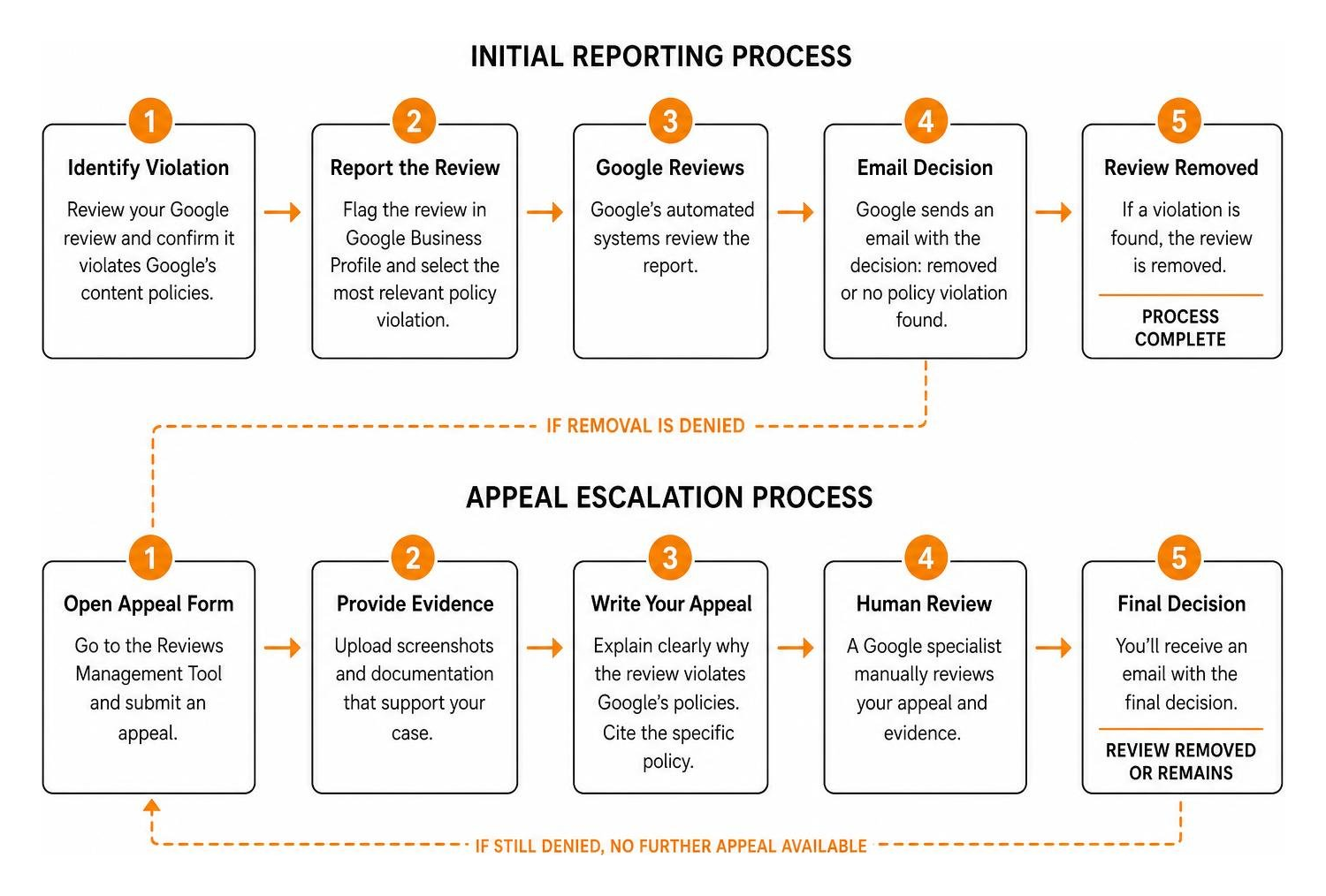
When you spot a review that violates Google’s policies, acting quickly and methodically increases your chances of a swift removal. Most reported reviews are evaluated within 3 business days, provided you follow the correct submission channels.
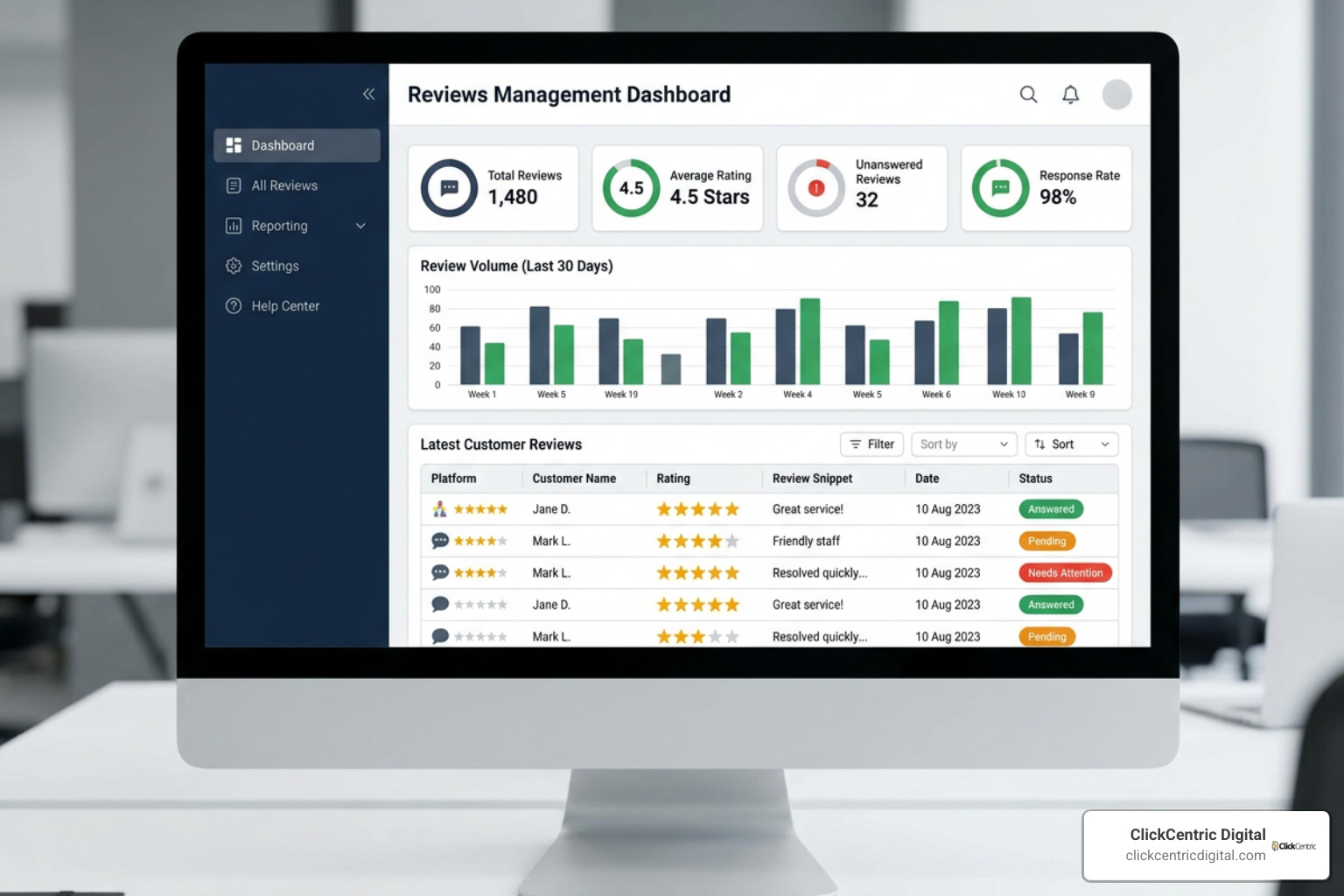
Google offers two primary ways to flag content: directly through your Google Business Profile (via Google Search or Maps) and through the dedicated Reviews Management Tool.
To report policy-violating content right away, you can use Google’s official guide to Report inappropriate reviews on your Business Profile.
How to Report Reviews via Business Profile and Reviews Management Tool
If you manage a business in Holland, Kalamazoo, or South Haven, keeping your local listings spotless requires a clean workflow. Here is the exact step-by-step procedure to flag an inappropriate review:
- Locate the Review: Open Google Maps or Google Search while logged into the Google Account associated with your Google Business Profile. Search for your business name.
- Select Flag Option: Find the offending review, click the three vertical dots in the upper right corner of the review card, and select Report review.
- Choose the Appropriate Violation Category: Select the exact policy category that matches the violation (e.g., Spam, Conflict of interest, or Harassment). Avoid picking a random category just to submit quickly; matching the correct rationale is vital.
- Use the Reviews Management Tool: For enhanced tracking, navigate directly to the Google Business Profile Reviews Management Tool. Select your specific business location, view your recently reported reviews, and monitor their status (e.g., Report submitted, Decision pending, or Report reviewed – no policy violation).
If you oversee multiple business locations across Grand Haven MI or Holland MI, using the Reviews Management Tool provides a centralized dashboard so no reported review falls through the cracks.
How Can You Remove Bad Google Reviews Written by Competitors or Ex-Employees?
Competitor sabotage and disgruntled former employees present a clear conflict of interest under Google guidelines. Google explicitly forbids people from reviewing their current or former employers, as well as posting negative reviews on direct competitors’ listings.
However, Google’s automated systems won’t automatically know that “John Smith” was fired from your shop last Tuesday or owns the rival company down the street. To succeed, you must provide verifiable context:
- Document Employment History: Keep payroll records, termination letters, or official communications ready to prove former employment status.
- Cross-Reference Profiles: Check if the reviewer’s public Google profile, LinkedIn, or Facebook matches a competitor’s staff directory or a former employee’s profile.
- Highlight Policy Violations: When flagging, select Conflict of Interest. If initial automated checks miss the connection, prepare these matching records for the formal appeal stage.
Pairing proactive review monitoring with expert reputation management strategies ensures these malicious entries are isolated before they do long-term damage to your online presence.
Handling Employee Targets, Personal Information, and Extortion Scams
Bad reviews occasionally cross from unfair criticism into dangerous territory, targeting specific staff members or engaging in digital blackmail.
Google maintains strict safety policies protecting individual privacy. When an angry reviewer names lower-level staff, uses slurs against workers, or posts private contact details, Google prioritizes removal to prevent harassment.
In extortion cases where malicious actors demand payments to take down 1-star ratings, never pay the ransom. Scammers will simply demand more money later. Instead, gather clear screenshots of the message, email, or chat, and submit the evidence directly through Google Business Profile support channels.
How to Appeal a Denied Removal Decision with Solid Evidence
What happens if Google sends an email stating: “Report reviewed – no policy violation found”? Don’t panic. Automated scanners process the first round of review flags, and they frequently miss subtle context, regional slang, or hidden conflicts of interest.
Google allows business owners to submit a one-time appeal through the Reviews Management Tool. This opens a human review ticket where you can present detailed facts.
If you hit a roadblock during your initial reporting, community discussions on Deleting a bad review – Google Business Profile Community offer helpful peer insights on handling stubborn flags.
Gathering Compelling Evidence and Writing a Successful Appeal
When submitting a review removal appeal, treat your narrative like evidence presented in a formal legal proceeding. Neutral, precise, and well-documented arguments win appeals.
- Direct Policy Citations: Quote the exact line from Google’s Prohibited Content guidelines that the review breaks.
- Clear Evidence Attachments: Include screenshots of public profiles, job titles, court documents, or receipt logs showing no transaction occurred.
- Dictionary Definitions: Because support representatives may evaluate requests globally, explicitly define industry terms or regional jargon if the review uses deceptive or misleading wording.
- Batching Review Attacks: If your business was targeted by a swarm of fake reviews, Google allows you to batch up to 10 reviews in a single appeal submission, making it easier for support staff to spot coordinated pattern attacks.
- Objective Tone: Avoid emotional outbursts, insults, or long complaints about lost revenue. Stick strictly to verified facts and policy rules.
Escalating Complex Cases to the Google Business Profile Community
If your formal appeal is rejected and you possess indisputable proof of a policy violation, your final resort is the official Google Business Profile Help Community.
Here, Google Product Experts (volunteer community leaders certified by Google) can review your case details. If they agree that a clear violation was overlooked, they can escalate your specific Case ID directly to Google’s internal support teams for secondary review.
When creating a thread on the community forum:
- Include your official Case ID from your rejected appeal email.
- Provide your public Google Business Profile map link.
- Post screenshots of the review alongside your concise evidence summary.
- Keep all personal identifiable details redacted to comply with forum rules.
Common Mistakes to Avoid When Reporting or Appealing Reviews
Many business owners accidentally ruin their chances of getting a bad review removed by reacting emotionally or using incorrect tactics. Avoiding these common mistakes saves time and keeps your profile safe:
- Reporting Reviews Just Because You Disagree: Flagging honest negative feedback because you dislike the customer’s opinion wastes your appeal opportunities and dilutes your credibility with Google.
- Writing Emotional Appeals: Filling appeal forms with angry rants, legal threats against Google, or emotional complaints causes support representatives to dismiss the request.
- Submitting Duplicate Flags Repeatedly: Submitting multiple identical flags for the same review within a few days clogs the system and can delay processing times. Use the Reviews Management Tool to check status updates instead.
- Falling for Paid Removal Scams: Steer clear of unverified third-party agencies promising “100% guaranteed review deletion” for upfront fees. Google does not sell review removal services, and fraudulent removal tactics can get your entire Google Business Profile suspended.
- Ignoring Public Responses: While waiting for Google’s decision, failing to leave a calm, professional public response leaves prospect buyers with only the reviewer’s side of the story.
To turn negative moments into trust-building opportunities, learn how to manage your google review responses like a pro while your formal removal request is pending.
Frequently Asked Questions About Google Review Removal
How long does Google take to process a reported review?
Most reported reviews are evaluated within 3 business days. However, during periods of high volume or when complex appeals require manual investigation, processing can take up to 5 to 7 business days. You can track real-time status updates inside the Google Reviews Management Tool.
What should you do if a bad review cannot be removed?
If Google rejects your final appeal and determines that a negative review does not break platform policy, focus on damage control:
- Post a Professional Response: Write a calm, courteous, and solution-focused public reply. Acknowledge the feedback, keep your cool, and invite the reviewer to resolve the matter offline.
- Reach Out Directly: If you know who the customer is, contact them privately to resolve their service complaint. Satisfied customers will often voluntarily update or delete their negative review.
- Generate New Positive Reviews: Offset the single bad rating by encouraging happy, loyal customers to share their legitimate 5-star experiences. Over time, fresh positive feedback dilutes the impact of an isolated low score.
Do automated spam filters ever remove legitimate reviews by mistake?
Yes. Google relies heavily on automated spam detection algorithms to analyze millions of reviews daily. Occasionally, these automated filters trigger “false positives,” accidentally removing genuine positive reviews from real customers. If legitimate reviews disappear from your profile, contacting Google Business Profile support can help restore them after manual verification.
Conclusion
When business owners ask us, “can you remove bad google reviews?” our answer is always grounded in strategy and policy precision. You do not have to sit back and watch unearned, policy-violating ratings drag down your local online reputation. By identifying clear policy infractions, organizing objective evidence, submitting formal appeals, and knowing when to escalate through official channels, you can successfully clean up your profile.
Building a strong, resilient brand across Grand Rapids, Holland, and all of West Michigan requires active review management and proactive customer acquisition. If you want to streamline your online reputation, boost your star rating, and implement step-by-step removal strategies that protect your bottom line, explore our complete blueprint on how do you get rid of bad google reviews a step by step guide or get in touch with our team at ClickCentric Digital today!
Sorry, the comment form is closed at this time.