

17 Aug Copy and Paste Google Review Request Templates for Small Businesses
Copy and Paste Google Review Request Templates for Small Businesses
Copy-and-Paste Google Review Request Examples That Get Responses
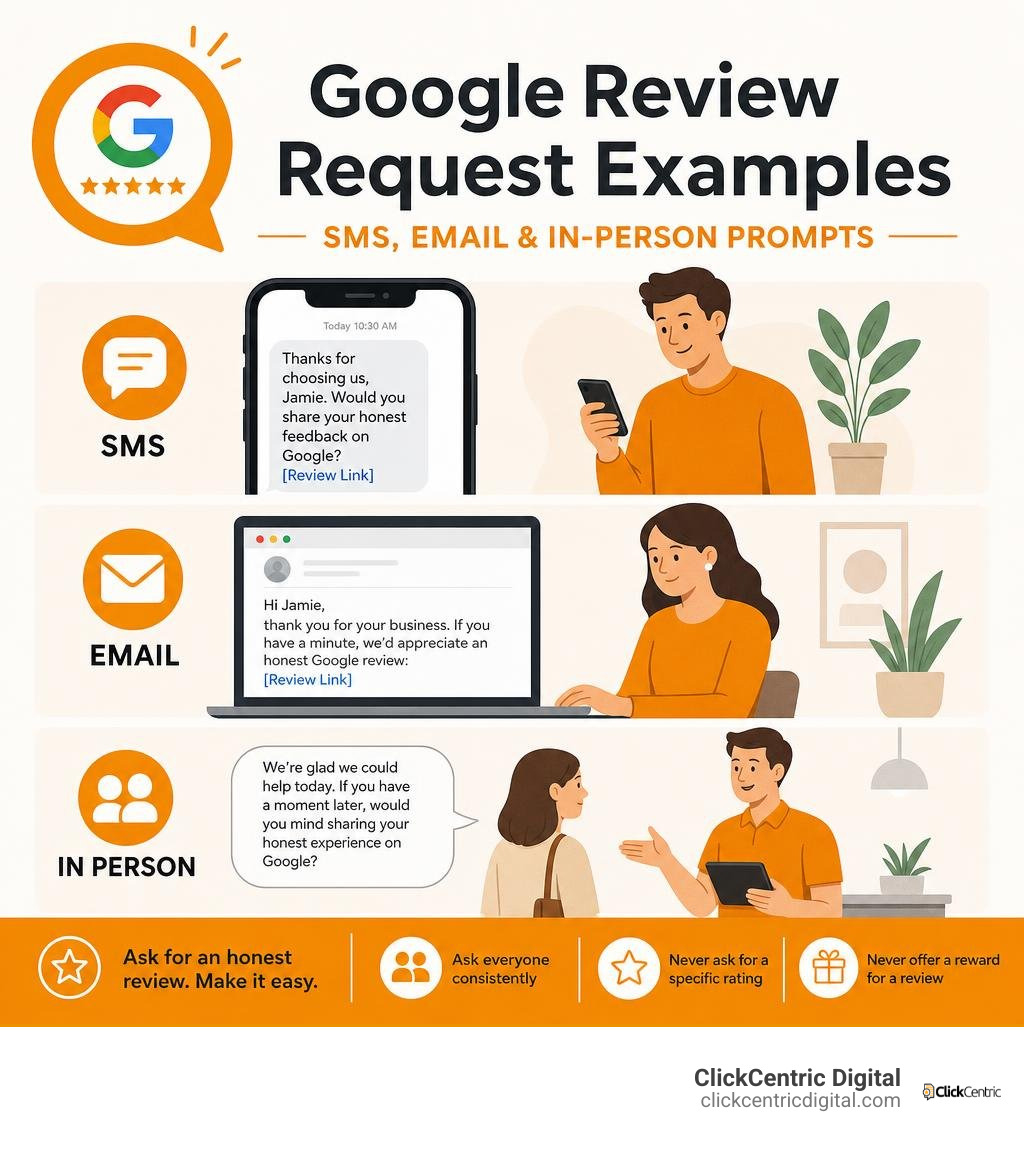
Google review request examples work best when they are short, personal, and sent soon after a real customer experience. The fastest starting point is to ask for an honest review, include a direct Google review link, and make the message fit the channel.
| Channel | Quick example |
|---|---|
| SMS | “Thanks for choosing us, Jamie. Would you share your honest feedback on Google? [Review Link]” |
| “Hi Jamie, thank you for your business. If you have a minute, we’d appreciate an honest Google review: [Review Link]” | |
| In person | “We’re glad we could help today. If you have a moment later, would you mind sharing your honest experience on Google?” |
Reviews are not just a vanity metric. Research cited across the industry shows that 81% of consumers are likely to check Google reviews before visiting a business in person, while 74% pay closest attention to recent reviews. For a local business trying to earn more calls, visits, and map visibility, a steady flow of genuine feedback matters.
The key is to make the request easy without pressuring customers. Ask everyone under a consistent process, do not ask for a specific star rating, and never offer a reward for a Google review.
I’m Fred Dirkse, and below you’ll find ready-to-use templates built for the moments when customers are most likely to respond.
Google review request examples terms to remember:
Google Review Request Examples Across Primary Channels

Selecting the right channel for asking for reviews directly impacts your conversion rate. Across local service markets, from Grand Rapids MI down through Holland, Grand Haven, South Haven, and Kalamazoo MI, customer communication preferences vary widely depending on how the interaction took place.
Text messages achieve average open rates around 98% and convert highest when sent shortly after a job finishes. Emails offer more breathing room for detailed context, making them ideal for commercial accounts or corporate clients. Verbal asks paired with physical prompts, like QR codes, capture attention during peak satisfaction moments.
The table below highlights conversion rates, response timelines, and recommended applications across primary channels:
| Channel | Average Conversion Rate | Ideal Timing Window | Best Use Cases |
|---|---|---|---|
| Text Message (SMS) | 15% – 25% | Within 2 hours of service | Residential trade services, home repairs, retail pickup, instant appointments |
| 3% – 7% | 24 to 48 hours post-service | B2B services, commercial clients, e-commerce deliveries, complex installations | |
| In-Person & QR Code | 8% – 15% | Immediately at payment/checkout | Physical storefronts, salons, dental offices, counter handoffs, completed installs |
High-Converting SMS Google Review Request Examples
Short message service (SMS) is the single most responsive channel for gathering customer reviews. Because text messages are read quickly on mobile devices, providing a direct review link eliminates extra steps that reduce completion rates. Every unnecessary step a customer must take drops conversion by roughly 30% to 50%.
To keep SMS review requests natural and effective, we recommend a simple four-part formula:
- Customer first name greeting
- Business identity and specific service reference
- One polite sentence requesting honest feedback
- Direct Google review link placed at the very end of the text
Keep texts under 160 characters whenever possible so they stay within a single segment. Avoid automated-sounding copy, and ensure you have proper TCPA consent by using opt-in checkboxes on customer intake forms or invoices. Adding an owner signature gives the text a personal touch. If you want to streamline this across your company, check out how to Stop Begging for Feedback with This Review Request Software.
SMS Template 1: Direct Ask (Universal)
“Hi [Name], thanks for choosing [Business Name] today! If you have 30 seconds, please leave us an honest Google review here: [Review Link] – [Owner Name]”
SMS Template 2: Specific Service Reference
“Hi [Name], this is [Staff Name] with [Business Name]. Hope your [Specific Service/Product] turned out great! Would you mind leaving an honest review on Google? [Review Link]”
SMS Template 3: The Gentle 24-Hour Follow-Up
“Hi [Name], just checking in to see if you had a moment to share your feedback on [Business Name]. Your honest input helps local clients find us! [Review Link]”
Professional Email Google Review Request Examples
Email allows you to reach customers who prefer digital paper trails, commercial clients, and buyers whose purchases require delivery time. While email conversion rates are generally lower than SMS, well-crafted email templates paired with clear subject lines deliver steady review volume over time.
To maximize open and click-through rates:
- Keep subject lines brief and clear rather than overly salesy (e.g., “Your water heater service with [Business Name]” instead of “We’d love your feedback!”).
- Personalize the greeting with the customer’s name and details about their project.
- Focus on a single call-to-action button or hyperlink to keep the message distraction-free.
- Send the email within 24 to 48 hours post-purchase or project completion.
Email Template 1: Post-Purchase / Post-Service Standard
Subject Line: Thank you from [Business Name] – [Customer Name]
“Hi [Name],
Thank you for choosing [Business Name] for your recent [Service/Product]. We appreciate your business!
If you have a quick moment, would you mind sharing your honest feedback on our Google Business Profile? It takes under a minute and helps others in our community learn about our work.
[Leave an Honest Google Review]
Thanks again for your support,
[Your Name / Business Name]”
Email Template 2: Owner Personal Note
Subject Line: Quick question regarding your service, [Name]
“Hi [Name],
I wanted to reach out personally and thank you for trusting [Business Name] with your [Service Name]. Our local team takes great pride in delivering reliable work across West Michigan.
Would you be open to writing an honest review of your experience on Google?
[Share Your Review Here]
Thank you for helping our small business grow!
Warm regards,
[Owner Name]
[Business Name]”
In-Person Scripts and QR Code Prompts
Asking for a review face-to-face leverages personal rapport during moments of peak customer satisfaction. When a client expresses enthusiasm for completed work, train your team to make a natural transition to a review request.
Pairing an in-person ask with physical collateral—such as counter plaques, printed receipts, or leave-behind postcards featuring a QR code—makes taking action seamless. Customers simply scan the code with their smartphone camera and open the Google review submission screen directly. To learn how to build physical collateral for your business, read how to Get More 5-Star Ratings with a Google Review QR Code.
In-Person Script 1: Checkout Counter Handoff
“Thank you so much for stopping in today, [Name]! If you were happy with everything, we’d really appreciate an honest review on Google. There’s a QR code right on your receipt—just scan it with your phone camera whenever you have a minute.”
In-Person Script 2: Field Technician Job Wrap-Up
“Glad we could get everything taken care of for you today, [Name]! As a local business, we rely on honest feedback from home services clients. I’m going to text you a direct link to our Google page—if you could leave a few words about your experience, it would mean a lot to our team.”
Compliant Google Review Request Examples by Business Type
Different business models call for different request approaches. A home services contractor completing an emergency repair operates on a different timeline than an e-commerce retailer shipping goods or a law firm wrapping up a corporate case.
Categorizing requests by customer journey stages ensures messaging feels natural and relevant.
Local Home Services and Trades
Home service businesses—such as plumbers, HVAC contractors, electricians, and roofers operating in West Michigan markets like Grand Rapids, Holland, and Kalamazoo—interact with clients during critical home maintenance moments.
Adapting the request based on job classification (emergency call, diagnostic visit, major replacement, or recurring routine service) produces better response rates than generic blasts.
Trade Template 1: Emergency Service Call
Channel: SMS
“Hi [Name], glad we could get your heating restored last night! When you have a moment, please share an honest review of our emergency repair service on Google: [Review Link] – [Business Name]”
Trade Template 2: Major Installation or Replacement
Channel: Email
Subject: Checking in on your new system, [Name]
“Hi [Name],
Now that you’ve had a few days to get settled with your new system, we hope everything is running smoothly!
Major upgrades are a big investment. Would you mind sharing an honest Google review about your installation experience with [Business Name]?
[Write an Honest Google Review]
Thanks again for choosing us,
[Business Name]”
Trade Template 3: Initial Estimate Visit
Channel: SMS
“Hi [Name], thanks for meeting with us today regarding your project estimate. If you found our consultation helpful, we’d appreciate an honest Google review of our visit: [Review Link]”
E-Commerce and Retail Stores
For online orders and retail pick-ups, timing the request after product delivery is crucial. Requesting feedback before the package arrives frustrates customers, while waiting too long reduces engagement.
- Delivery Tracking Integration: Set request triggers 2 to 3 days after confirmed package delivery so customers have time to unbox and use their product.
- Packaging Inserts: Include printed thank-you cards inside shipment boxes with QR codes pointing to your review link.
- Transactional Communication: Add subtle review prompts inside delivery confirmation emails.
E-Commerce Template: Post-Delivery Follow-Up Email
Subject Line: How is your order from [Business Name]?
“Hi [Name],
According to tracking, your order has arrived! We hope you love your new items.
If you’re enjoying your purchase, would you take 60 seconds to leave an honest review on our Google Business Profile? Your feedback helps future shoppers buy with confidence.
[Review Your Purchase on Google]
Warmly,
The [Business Name] Team”
Professional and B2B Services
Professional services—such as legal firms, accounting practices, real estate brokerages, and marketing agencies—depend heavily on long-term client trust.
Because B2B transactions often involve longer project cycles, review requests work best when aligned with major milestones, contract renewals, or post-resolution moments. If you want to dive deeper into reputation strategies for local service firms, check out Mastering Local Reviews to Win More Customers.
B2B Template 1: Milestone Achievement / Project Wrap-Up
“Hi [Name],
It has been a pleasure collaborating with you on [Project Name]. We are thrilled with the results our teams achieved together!
As we wrap up this phase, would you be willing to post an honest review of your experience working with [Business Name] on Google?
[Share Your Review on Google]
Best regards,
[Your Name]”
B2B Template 2: Post-Resolution Recovery Ask
“Hi [Name],
Thank you for working with us to resolve the recent issue with your account. We appreciate your patience as we made things right.
Since service quality means everything to us, would you mind sharing an honest account of how our team handled your situation on Google?
[Leave Honest Feedback]
Sincerely,
[Owner/Manager Name]”
Rules for Asking: Google Policies and FTC Compliance
While building a high volume of online reviews strengthens local search performance, breaking platform rules or legal regulations can result in severe penalties. Both Google and the Federal Trade Commission (FTC) enforce strict guidelines governing online review collection.
Violating these terms can lead to review removals, lost local ranking privileges, or FTC legal fines under the Consumer Review Rule.
Prohibited Review Gating and Incentive Restrictions
Google prohibits review gating—the practice of filtering customers by asking if their experience was positive before deciding whether to send them a review link, while sending unhappy customers to a private contact form. You must invite all customers to leave feedback using a neutral process.
Key rule violations to avoid include:
- No Incentives or Rewards: You cannot offer discounts, coupons, contest entries, gift cards, or free services in exchange for leaving a review, regardless of whether you ask for a positive rating or just an honest review. Google policies prohibit all incentivized reviews.
- No Conditional or Coerced Language: Never ask customers specifically for “5-star reviews” or suggest specific text they should write. Requests must remain open-ended (e.g., “share your honest feedback”).
- No On-Premises Kiosks: Do not set up a station, tablet, or front-desk kiosk for clients to post reviews while connected to your business Wi-Fi network, as Google flags multiple reviews coming from the same IP address.
To understand how to safely improve ratings while respecting Google policies, read our guide to Stop Settling for Four Stars and Generate More 5-Star Reviews Today.
Optimizing Request Timing and Automation Workflow

Automating review outreach ensures every client receives a prompt at the right moment without overwhelming your staff. Aligning triggers with customer interaction touchpoints improves completion rates.
Recommended automated workflow guidelines:
- Initial Trigger: Send your first review request via SMS within 2 hours of job completion, or via email within 24 to 48 hours.
- Single Follow-Up Limit: If the customer does not respond, send no more than one gentle reminder (5 to 7 days later for email; 24 to 48 hours for SMS). Sending excessive messages annoys customers and can harm client relationships.
- CRM Integration: Connect your review generation software to your CRM or job management tool (such as ServiceTitan, Jobber, or QuickBooks) to initiate texts or emails automatically upon invoice creation.
When evaluating automated platforms, consult our guide on How to Pick a Review Generation Platform for Local Businesses.
Frequently Asked Questions About Requesting Google Reviews
How do I generate a direct Google review link for my business?
To create a direct link that opens the review pop-up box for your customers:
- Sign in to your Google Business Profile Manager.
- Find your business listing on Google Search or Maps.
- Click the Ask for reviews button on your dashboard.
- Copy the direct review link URL provided.
- Paste this URL into your email, SMS, or QR code templates.
Can I offer discounts or incentives to customers for leaving a Google review?
No. Offering gifts, discounts, store credit, loyalty points, or contest entries in exchange for Google reviews strictly violates Google Business Profile policies and FTC rules. If Google detects incentivized reviews, it may remove all accumulated reviews from your profile or suspend your listing from Google Maps entirely.
What is the best time to send a review request after completing a service?
For same-day residential services (plumbing, cleaning, salons), the best timing window is within 2 hours of job completion while the experience is fresh. For product sales or equipment installations (HVAC replacements, roofing, e-commerce), wait 2 to 4 days so the customer has time to test and enjoy their purchase before sharing feedback.
Conclusion
Systematically collecting customer feedback using practical google review request examples is one of the most effective strategies for building online credibility, boosting local SEO visibility, and earning trust across West Michigan markets. By establishing a consistent outreach process across SMS, email, and in-person touchpoints, your business can build an authentic steady stream of reviews while staying fully compliant with Google policies.
At ClickCentric Digital, we specialize in helping local businesses optimize search rankings, automate review acquisition, and scale customer acquisition through search and paid ads.
Ready to upgrade your local search presence? Explore The Business Owner’s Guide to Google Review Mastery or contact our team today to implement a custom review strategy for your business.
Sorry, the comment form is closed at this time.