

18 Aug How to Delete Damaging Business Reviews: A GMB Guide
How to Delete Damaging Business Reviews: A GMB Guide
Why Fake Reviews on Google My Business Can Hurt Your Local Reputation
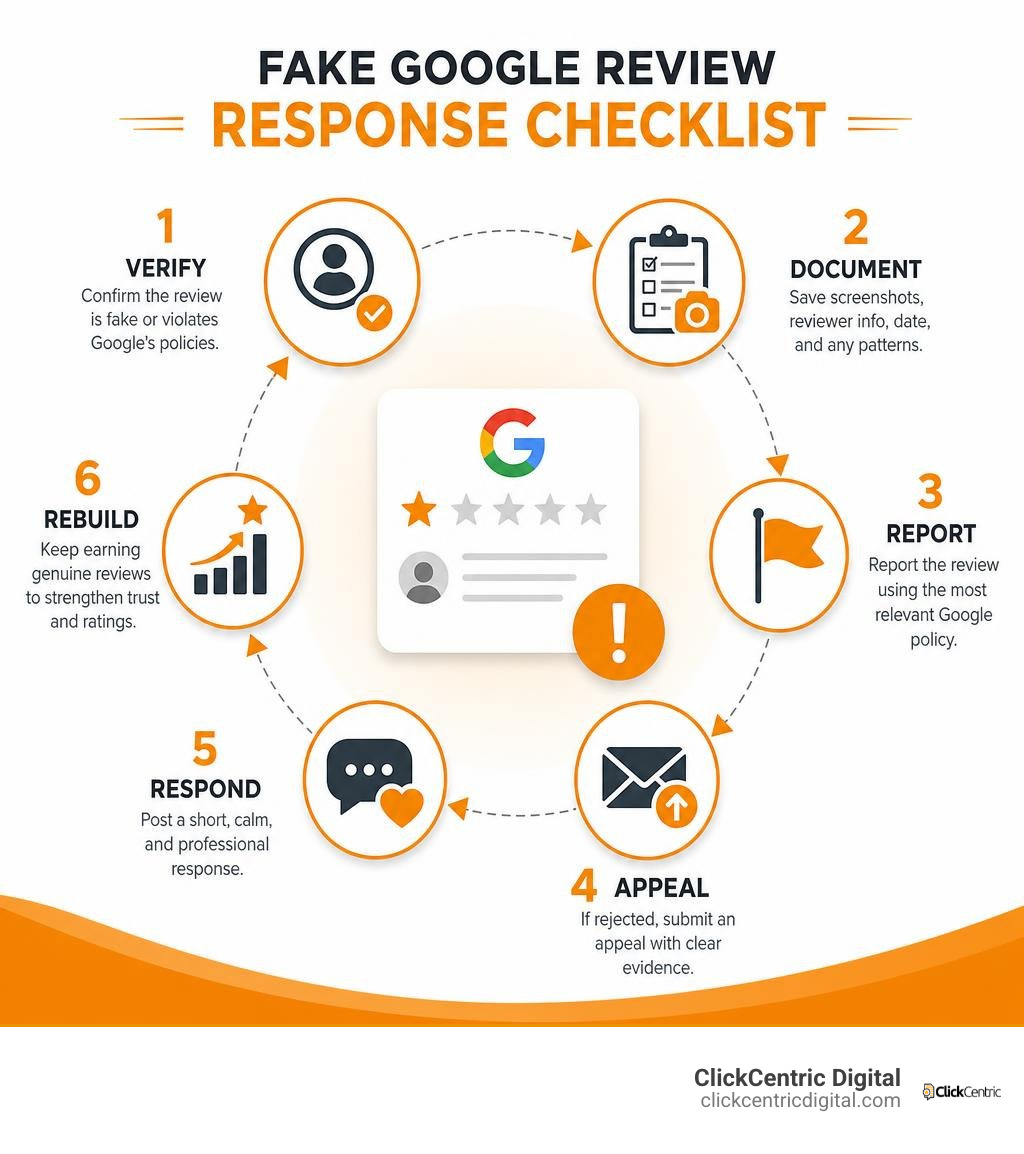
Fake reviews on Google My Business can lower your star rating, weaken trust, and make a local customer choose another business before they ever call you. The quick answer: document the review, report it under the most relevant Google policy, appeal if Google rejects the first report, and post a short, calm public response while you build more genuine customer feedback.
| What to do first | Why it matters |
|---|---|
| Check your customer records | Confirm the reviewer was not a real customer or identify clear factual errors. |
| Save screenshots | Keep the review, reviewer profile, date, and any pattern of similar reviews. |
| Flag the review in Google Business Profile | Google removes content that violates its policies, not simply reviews that are negative. |
| Respond professionally | Your response is for future customers reading the review. |
| Keep collecting honest reviews | A steady base of real feedback reduces the impact of any one damaging rating. |
Google’s own enforcement shows the scale of the problem: it removed 240 million policy-violating reviews in 2024, up 40% from the prior year. Yet some fake reviews still get through, and a single one-star post can matter greatly when your business has a small review count.
This guide explains how to spot fake feedback, use Google’s reporting and appeal options, respond without escalating the conflict, and protect your reputation over time. I’m Fred Dirkse, and we’ll start by separating genuinely unhappy customers from reviews that break Google’s rules.
Terms related to fake reviews on google my business:
- how to delete fake google reviews
- can you get a bad review removed from google
- negative review removal
Identifying and Understanding Fake Reviews on Google My Business
Before hitting the panic button or calling your legal team, you must confirm that a negative post is truly fraudulent. Understanding spotting fake feedback requires cross-referencing incoming reviews with your internal business records, customer Relationship Management (CRM) tools, and scheduling software.
When a 1-star review lands on your Google Business Profile (GBP), your first step is a CRM verification check. Search your transaction history, booking software, invoices, and communication logs for the reviewer’s display name. That people occasionally use pseudonyms or maiden names on personal Google accounts. However, if the name, timing, and service mentioned match zero historic interactions, you are likely dealing with a fabricated rating.
Off-topic content is another telltale sign. A local HVAC provider receiving a 1-star rant about cold soup or bad waiter service is a classic example of misdirected feedback or bot-generated noise. Examining reviewer profile patterns also provides clear clues. Accounts with no history, zero other local reviews, or profiles that systematically dump 1-star ratings on local businesses in Grand Rapids, Holland, or Kalamazoo within minutes are red flags for automated click farms or malicious actors.
Red Flags of Fake Reviews on Google My Business
Fake review campaigns often share predictable traits. Learning to recognize these markers helps you build a compelling removal request for Google moderation teams:
- Generic Complaints: Statements like “Terrible service, absolute scam, avoid at all costs!” without mentioning specific services, technicians, estimates, or dates.
- Rapid Review Velocity: Receiving a sudden cluster of negative 1-star reviews in 24 to 48 hours when your profile typically receives a steady stream each month.
- Competitor Attacks: Reviews left by local competitors, their employees, or newly created accounts that explicitly name and promote a rival service in West Michigan.
- Mismatched Geography: Account profiles leaving reviews for service businesses across multiple continents within hours of each other.
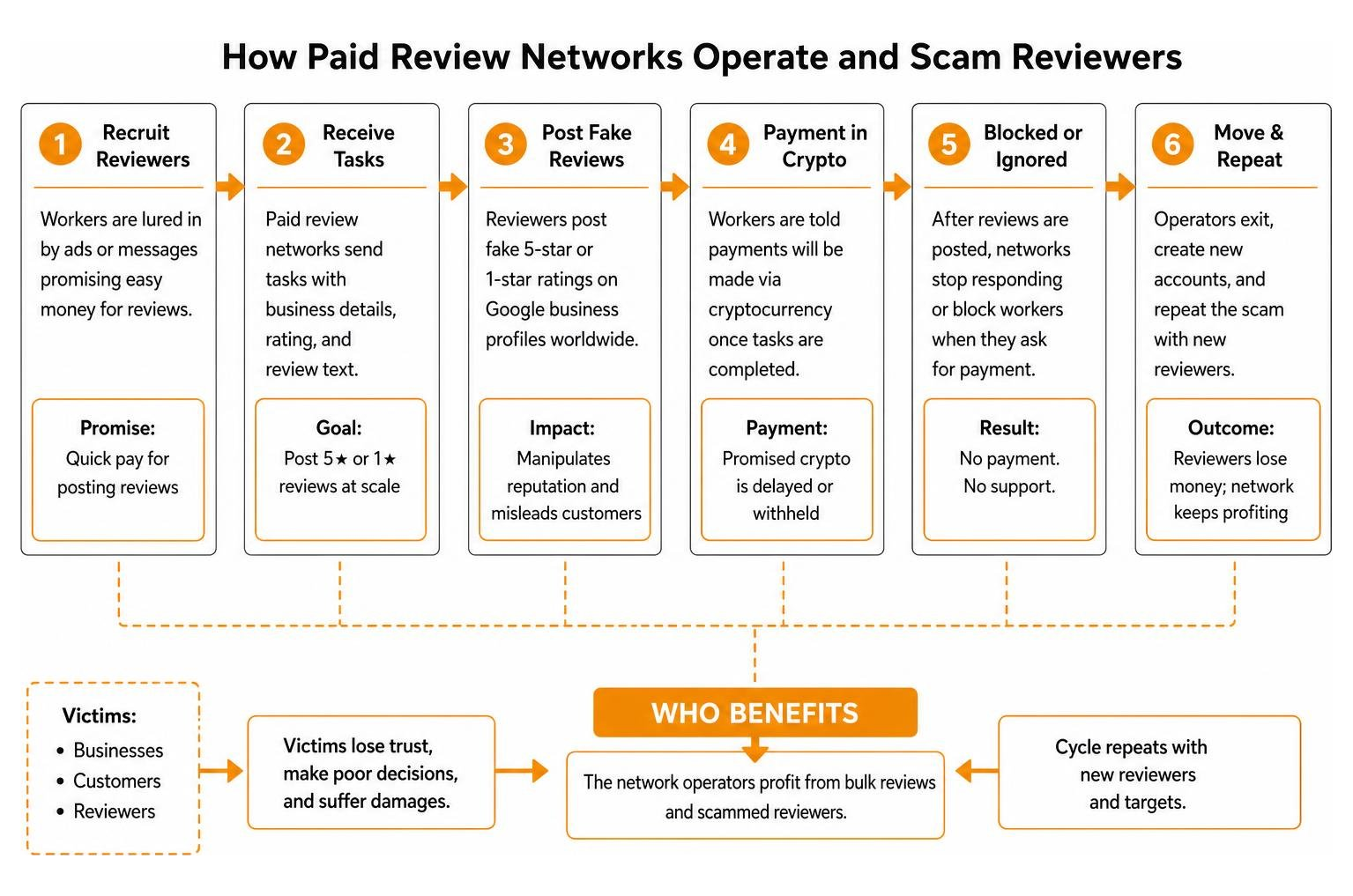
As highlighted in an undercover investigation into fake review networks, organized fraud operations frequently recruit participants through task-based schemes to post fake 5-star or 1-star ratings worldwide before scamming the workers themselves via cryptocurrency. Knowing these operations exist reminds us why keeping clear records is vital when asking Google to intervene.
Policy Violations Google Will Remove vs. Legitimate Negative Feedback
Google will not remove a review simply because you disagree with the customer’s perspective or feel their tone is unfair. Google explicitly avoids acting as an arbiter of factual truth in customer-merchant disputes. To get a review taken down, you must demonstrate that it violates specific removable Google policy violations.
Here is a breakdown of what Google’s moderation systems will act on versus what they consider standard customer feedback:
- Conflict of Interest: Reviews posted by current or former employees, direct competitors, or individuals with a financial stake in disparaging your business.
- Fake Content & Spam: Ratings from accounts that never interacted with your company, content created solely to manipulate ratings, or duplicate posts across multiple accounts.
- Off-Topic & Irrelevant Content: Rants regarding political commentary, global news, or unrelated industries that do not reflect a real customer experience with your brand.
- Profanity & Harassment: Content containing hate speech, personal attacks, slurs, explicit language, or private contact information (doxxing).
- Customer Disputes (Non-Removable): A real customer complaining that your pricing was too high, your technician arrived late, or a repair took longer than anticipated. These are deemed legitimate subjective opinions.
Understanding this boundary is critical. When flagging content to Google, you should never base your request on “This person lied about our prices.” Instead, cite explicit policy terms like Conflict of Interest or Spam and Fake Content.
Step-by-Step Removal: How to Flag, Escalate, and Respond
When a fraudulent post hits your account, follow a structured process. Rushing into reactive responses or submitting vague abuse reports can slow down resolution times. Review our detailed guide on deleting Google reviews for additional background while following the standard escalation sequence below.
Reporting Fake Reviews on Google My Business via GBP Dashboard and Reviews Tool
The initial defense against fake reviews on google my business takes place directly within your Google Business Profile dashboard or Google’s dedicated Reviews Management Tool.
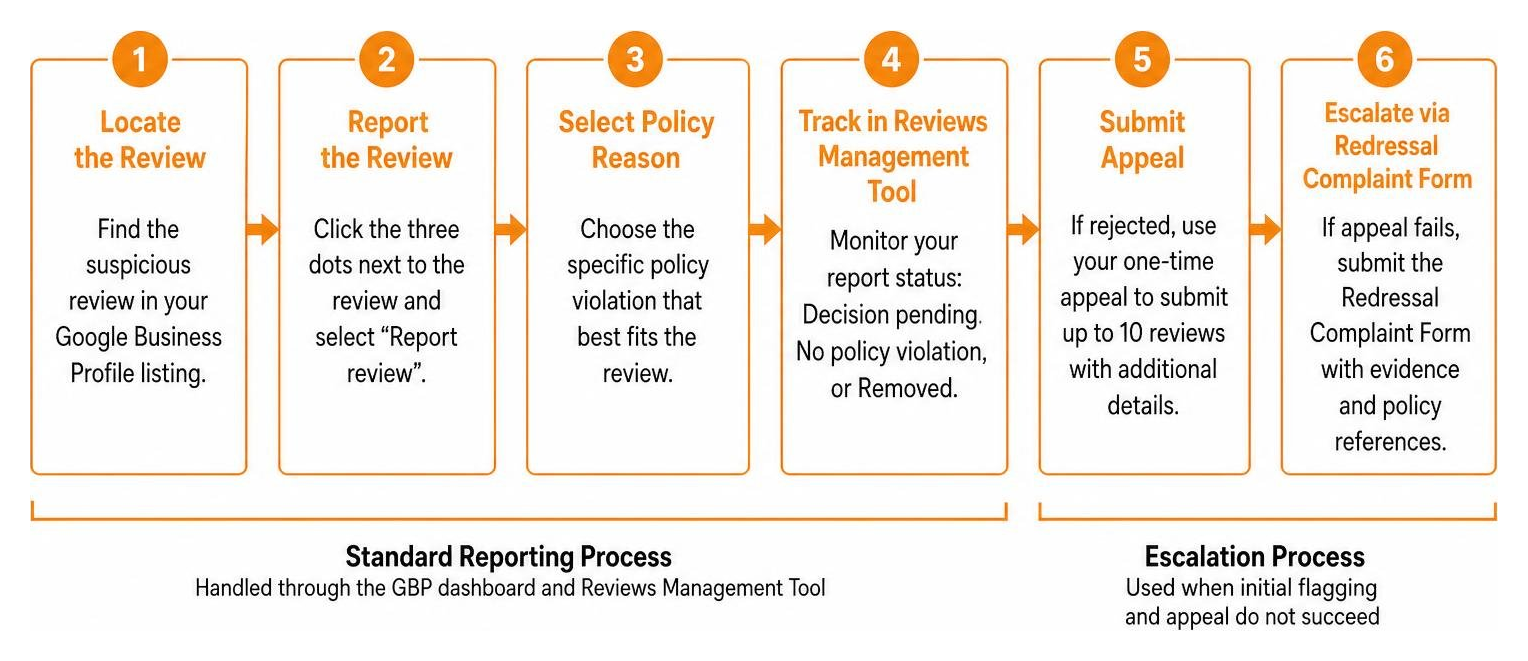
- Locate the Review: Log into the Google account associated with your Business Profile. Navigate to your Google Maps or Search listing and open the review list.
- Click the Report Flag: Click the three dots next to the suspicious review and select Report review.
- Select the Policy Reason: Choose the specific policy violation category that best fits (e.g., Spam, Conflict of Interest, or Profanity). Avoid selecting generic options if a precise policy violation applies.
- Track via the Reviews Management Tool: Open the Google Business Reviews Management Tool in your browser. This dashboard shows the status of reported reviews (Decision pending, Report reviewed – no policy violation, or Removed).
If Google’s initial automated filter rejects your flag, do not despair. You are eligible for a one-time appeal through the Reviews Management Tool. During the appeal process, you can submit up to 10 rejected reviews in a single batch and provide additional detail explaining why the posts violate platform rules.
Escalating Rejected Flags with the Google Business Redressal Complaint Form
When standard flagging and single-use appeals fail to remove clear platform violations, escalate your request using the Google Business Redressal Complaint Form.
Unlike standard automated flags, Redressal Complaint Form submissions route directly to specialized human policy teams. This form is designed to address systemic review fraud, competitor attacks, and profile manipulation. To maximize your chances of success:
- Gather Evidence: Compile detailed, timestamped screenshots of the fake review, the reviewer’s public profile, and relevant CRM records showing zero customer history.
- Document Patterns: If a competitor is launching a coordinated review attack, include links to all participating profiles and note the exact timeline of events.
- Focus on Policy Definitions: State facts clearly. Avoid emotional language. Cite specific sections of Google’s User Generated Content Guidelines that have been breached.
Submitting structured evidence through human review channels increases your odds of getting malicious content permanently expunged from your account.
How to Craft a Public Response to Fake Reviews Without Escalating
While you wait for Google’s moderation team to process your removal request (which can take anywhere from 3 to 14 days), prospective customers in Grand Haven, South Haven, or Grand Rapids will still see the bad review. Leaving it without a reply can make your business appear unconcerned.
Your public response is written for prospective clients, not the fake reviewer. Maintain a calm, factual, and professional tone.
This response signals to every future customer reading your profile that you are proactive, professional, and organized, while subtly informing the public that the post is unverified.
Legal Protections, FTC Rules, and AI Review Risks
Federal regulations and platform policies regarding online review manipulation have tightened dramatically. Business owners need to know both their legal protections against false statements and the severe federal penalties associated with improper review practices.
FTC 2024 Rules and Civil Penalties for Fraudulent Reviews
The Federal Trade Commission (FTC) finalized its landmark rule on deceptive consumer reviews (16 CFR Part 465), which took effect in late October 2024. This rule grants federal authorities expanded enforcement power against deceptive practices.
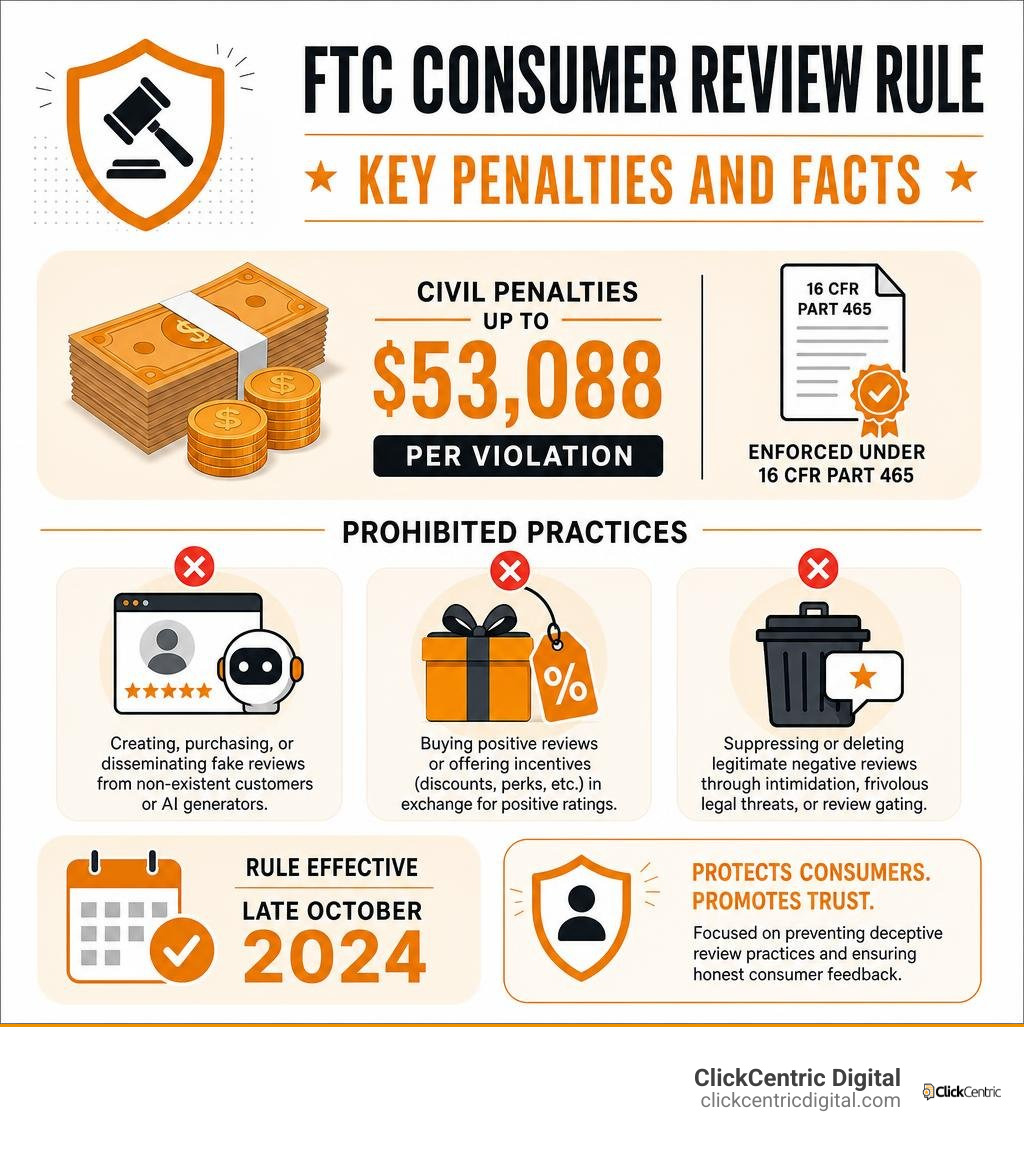
Under these updated enforcement guidelines, businesses face substantial civil penalties—up to $53,088 per violation—for engaging in review fraud. Prohibited practices under 16 CFR Part 465 include:
- Creating, purchasing, or disseminating fake consumer reviews from non-existent customers or AI generators.
- Buying positive reviews or offering financial incentives, discounts, or perks in exchange for positive star ratings.
- Suppressing or deleting legitimate negative reviews through intimidation, frivolous legal threats, or review gating practices.
- Operating employee-led review drives where staff members leave positive ratings without disclosing their employment relationship.
These federal rules protect legitimate small businesses across West Michigan by holding rogue competitors accountable for fraudulent smear campaigns.
The Severe Penalties and Risks of AI-Generated Reviews
Faced with fake negative reviews, some business owners feel tempted to fight fire with fire by using AI tools or marketing services to manufacture artificial 5-star reviews. Doing so exposes your business to severe operational and legal risks.
Google’s machine learning systems analyze review text for linguistic uniformity, account age, device fingerprints, and suspicious velocity spikes (such as review volume growing at more than 3x historical averages). When Google detects AI-generated or incentivized review patterns, penalties are swift:
- Mass Review Removals: Sweeping algorithm updates frequently wipe out years of legitimate reviews alongside artificial posts.
- Search Ranking Drops: Loss of Local Map Pack visibility, dropping your business below competitors in local search results.
- Permanent Business Profile Suspensions: A permanent listing suspension can wipe out 30% to 70% of inbound monthly lead calls for local service operations, resulting in substantial financial losses.
Furthermore, under updated FTC rules, generating synthetic review text or employing agencies that use templated review scripts carries the same heavy civil penalties as purchasing review packages outright.
Long-Term Defense: Neutralizing Bad Ratings with Genuine Feedback
The most effective long-term defense against fake reviews on google my business is maintaining a high review velocity from authentic, satisfied clients. Relying solely on review removal requests leaves your business vulnerable; building a consistent review collection engine protects your profile against occasional bad ratings.
Review volume acts as your brand’s digital immune system. If your business holds 15 total reviews, a single fake 1-star rating drops your rating to 4.7. But if you have 250 real 5-star reviews, a stray 1-star review won’t drop your overall average star rating, keeping you firmly in local search results. Exploring 5 guaranteed methods for negative review removal helps you understand the balance between removal efforts and review acquisition.
| Strategy Component | Manual Review Solicitations | Automated Review Collection Engine |
|---|---|---|
| Request Timing | Inconsistent; often sent days or weeks after service. | Sent automatically via SMS within 2 hours of job completion. |
| Customer Friction | High; requires customers to search for your profile manually. | Minimal; direct one-click review form links sent to phone numbers. |
| Conversion Rate | Low (5% – 10% average conversion). | High (35% – 50% conversion rate when combined with verbal asks). |
| Audit Risk | Low, but prone to human oversight and forgetfulness. | Zero policy risk when using authentic post-service requests. |
Building an Automated Review Generation Engine
To create a steady stream of authentic feedback, implement systematic collection processes across your daily service operations. Review our guide on mastering Google review strategy to refine your setup:
- Set the Verbal Expectation: Train technicians and staff in the field to prompt happy customers before leaving the job site: “We’re glad we could help today! You’ll receive a quick text message shortly—we’d truly appreciate your feedback on Google.”
- Send Automated SMS Prompts: Send a single SMS with a direct, friction-free link to your Google review form within 2 hours of job completion. Text messages sent within two hours enjoy response rates up to 42%, compared to under 6% for emails sent two days later.
- Avoid Review Gating: Never screen customers through pre-survey forms that redirect unhappy clients away from Google while sending only happy clients to review forms. Review gating violates Google’s explicit policies and FTC compliance guidelines.
Businesses that consistently collect authentic reviews enjoy higher local Map Pack visibility, outranking local competitors while remaining protected against fake review attacks.
Frequently Asked Questions
Can I sue someone for leaving a fake Google review?
Yes, you can file a civil lawsuit for defamation, libel, or tortious interference with business relations if a review contains provably false statements of fact that cause demonstrable financial harm. However, legal action carries major practical challenges:
- Identifying Anonymous Posters: You must file a “John Doe” lawsuit and issue subpoenas to Google and Internet Service Providers (ISPs) to unmask IP addresses and account records.
- High Costs: Filing a defamation lawsuit and conducting litigation typically costs between $5,000 and $25,000+ in legal fees before any damages are awarded.
- Section 230 Protection: You cannot sue Google directly for hosting the false review. Section 230 of the Communications Decency Act shields internet platforms from legal liability for user-generated content.
Legal action is generally reserved for severe, ongoing competitor attacks that threaten core business operations.
What should I do if Google refuses to remove a fake review?
If Google rejects your initial flag, one-time appeal, and Redressal Complaint submissions, implement tactics for removing bad reviews fast through strategic review dilution:
- Dilute the Impact: Accelerate authentic review collection. Generating 10 to 15 real 5-star reviews will bury the fake rating and restore your average score.
- Seek Help from the GBP Community Forum: Post details of the issue on the official Google Business Profile Help Community. Volunteer Product Experts (PEs) can sometimes escalate clear policy violations to internal Google review teams.
- Maintain Your Public Response: Ensure your professional public response remains active so prospective clients understand the context.
How long does Google take to process review removal requests?
Initial review flags submitted through the Business Profile dashboard typically take between 3 and 14 business days for automated systems or support personnel to evaluate. Escalated cases filed via the Business Redressal Complaint Form or GBP Help Community can take between 1 and 3 weeks depending on support ticket volume.
Conclusion
Navigating fake reviews on google my business requires patience, clear documentation, and a long-term approach to digital reputation defense. By systematically verifying customer records, reporting explicit policy violations, escalating rejected flags through appropriate support channels, and maintaining professional public responses, you can mitigate the impact of malicious feedback on your business.
At ClickCentric Digital, we specialize in helping local service businesses across Grand Rapids, Holland, Grand Haven, South Haven, and Kalamazoo protect their brand reputation, maintain strong Map Pack visibility, and turn customer trust into consistent revenue. Rather than letting unverified bad reviews dictate your search performance, build a proactive review strategy that shields your listing long-term.
Explore our professional reputation management services today to defend your Google Business Profile, capture genuine customer reviews, and dominate local search results.
Sorry, the comment form is closed at this time.