


28 Aug How to Dispute Google Review Like a Pro
How to Dispute Google Review Like a Pro
Why Knowing How to Dispute a Google Review Can Save Your Business
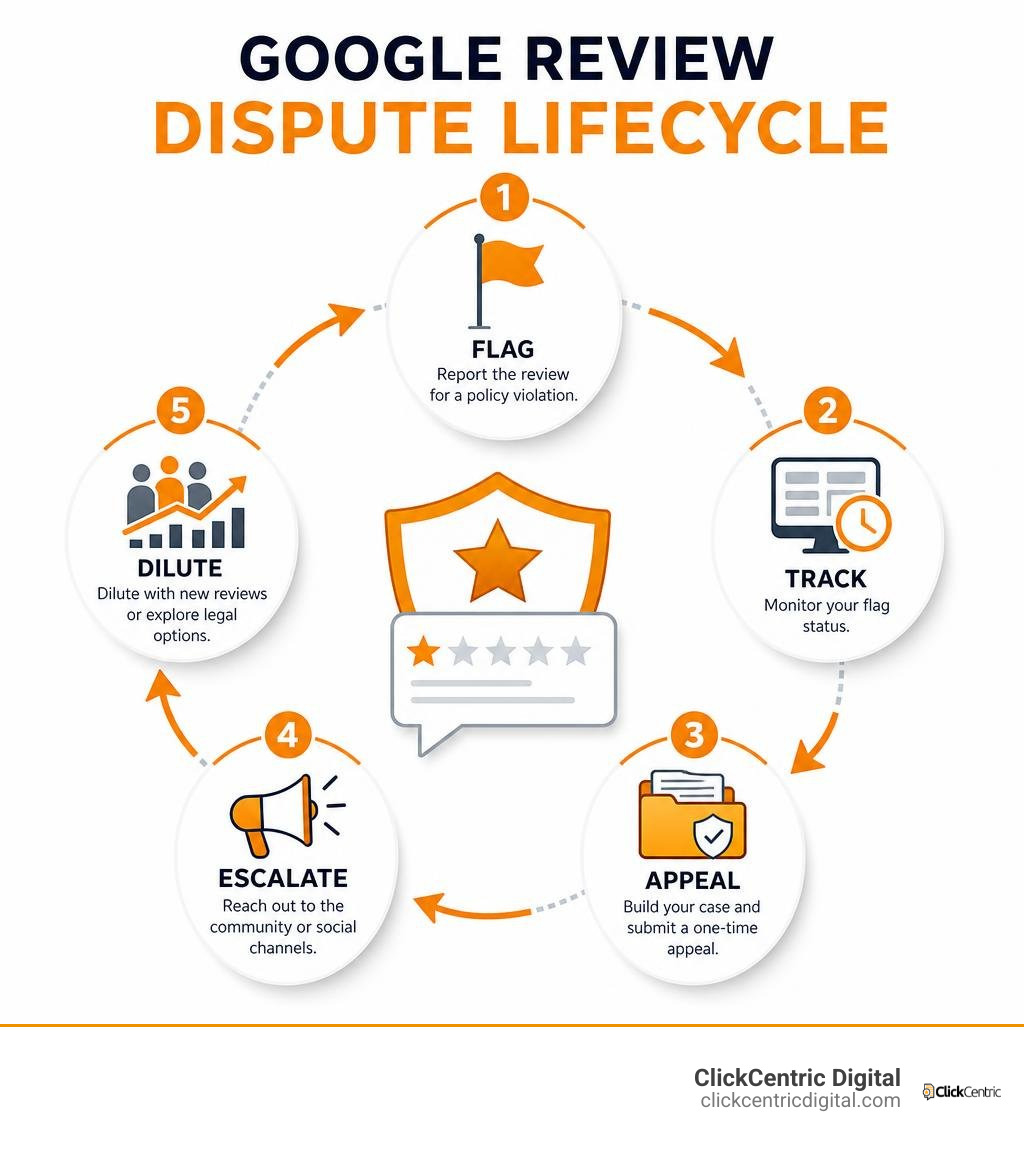
Knowing how to dispute a Google review is one of the most important skills a local business owner can have. Here’s a quick overview of the process:
- Flag the review via Google Maps or your Google Business Profile using the three-dot menu next to the review
- Select a policy violation category (fake engagement, conflict of interest, spam, etc.)
- Track your flag status in the Reviews Management Tool
- Build an evidence pack if the flag is rejected (screenshots, transaction records, communication logs)
- Submit a one-time appeal through the Reviews Management Tool for human moderator review
- Escalate to the Google Business Profile Community or @GoogleSmallBiz on X if the appeal fails
- Dilute or pursue legal options as a last resort
Picture this: you open Google on a Monday morning and there it is — a one-star review from someone you’ve never heard of, describing a service you don’t even offer. It stings. And it should worry you.
83% of consumers read Google reviews before deciding where to spend their money. A single bad review sitting at the top of your profile can cost a small business anywhere from 30 to 70 customer calls per month. That’s not a minor inconvenience — that’s real revenue walking out the door.
The good news? Google removed or blocked 292 million policy-violating reviews in 2025 alone. Many of those came down because business owners knew exactly how to dispute them. Most who failed didn’t understand the process — they just clicked “report” and hoped for the best.
This guide walks you through the full process, from identifying what Google will actually remove, to building a winning evidence pack, to escalating when the system says no.
I’m Fred Dirkse, and I’ll show you exactly how to approach this the right way — step by step.
What Google Will Actually Remove: Policy Violations vs. Unfair Feedback
Let’s get one crucial reality check out of the way: Google is not a court of law, and they will not play the role of referee in a “he-said, she-said” dispute. If a customer leaves a harsh, exaggerated, or downright unfair review of your business, Google will not remove it simply because you disagree with their version of events.
To successfully dispute a review, you must prove that the post directly violates Google’s Map User Contributed Content Policy. Google cares deeply about the integrity of its platform—not because they want to protect your feelings, but because their entire business model relies on users trusting their search results.
If you want to know the baseline strategies for general cleanup, check out our guide on How to Remove Negative Reviews: 5 Guaranteed Methods. When it comes to immediate legal liabilities, Google moves fastest on reviews containing personally identifiable information (PII). If a reviewer posts employee home addresses, personal cell phone numbers, or private medical details, you can fast-track the removal by following the steps in this guide on Remove a Google review that contains personal information (fast track) · Local Owl.
Identifying Policy Violations to Dispute Google Review
To build a case that gets a review removed, you must map the reviewer’s text to a specific Google policy violation. Here are the primary categories Google will act on:
- Harassment and Hate Speech: Content that attacks specific employees, uses slurs, or targets individuals with malicious intent.
- Off-Topic: Reviews that have nothing to do with a consumer experience at your business (e.g., rants about your political views, local parking situations, or complaints about a completely different business).
- Conflict of Interest: Reviews left by competitors, former employees, or the business owner themselves.
- Fake Engagement: Coordinated review attacks, reviews posted from multiple accounts by the same person, or paid-for feedback.
Before you invest emotional energy into fighting a bad rating, it’s worth doing a quick reality check. Read our breakdown on Review Removal Reality Check: Can You Really Delete Google Feedback? to make sure you aren’t fighting an unwinnable battle.
How FTC Rules (2024-2026) Impact Competitor Fake Reviews
The regulatory landscape around reviews has shifted dramatically. Under the Federal Trade Commission (FTC) Consumer Review Rule, which went into full effect on October 21, 2024, and remains heavily enforced here in 2026, the stakes for fake reviews are incredibly high.
The FTC can now levy civil penalties of up to $53,088 per fake review violation against businesses that buy, write, or facilitate fake reviews. This rule is a massive shield for local businesses in West Michigan—whether you are operating in Grand Rapids, Holland, or Kalamazoo. If a local competitor tries to sabotage your local search rankings by purchasing a wave of fake 1-star reviews, they are committing a federal violation.
When you dispute Google review attempts that stem from competitor sabotage, you can reference these strict guidelines. To understand how these regulatory changes reshape your defense strategy, read our analysis on How to Handle a Bad Google Review (And What to Do About Fake Ones in 2026).
How to Dispute Google Review: The Step-by-Step Flagging Process
Disputing a review is a multi-step journey. You should never just flag a review blindly and hope for a miracle. Instead, follow a structured process using your Google Business Profile (GBP) dashboard and the official Reviews Management Tool.

To keep your cool and handle this systematically, check out our walkthrough on How to Delete Google Business Reviews and Keep Your Sanity.
Step 1: Flagging the Review via Google Maps or GBP
The initial step is to submit a flag directly to Google’s automated system. You can do this in two ways:
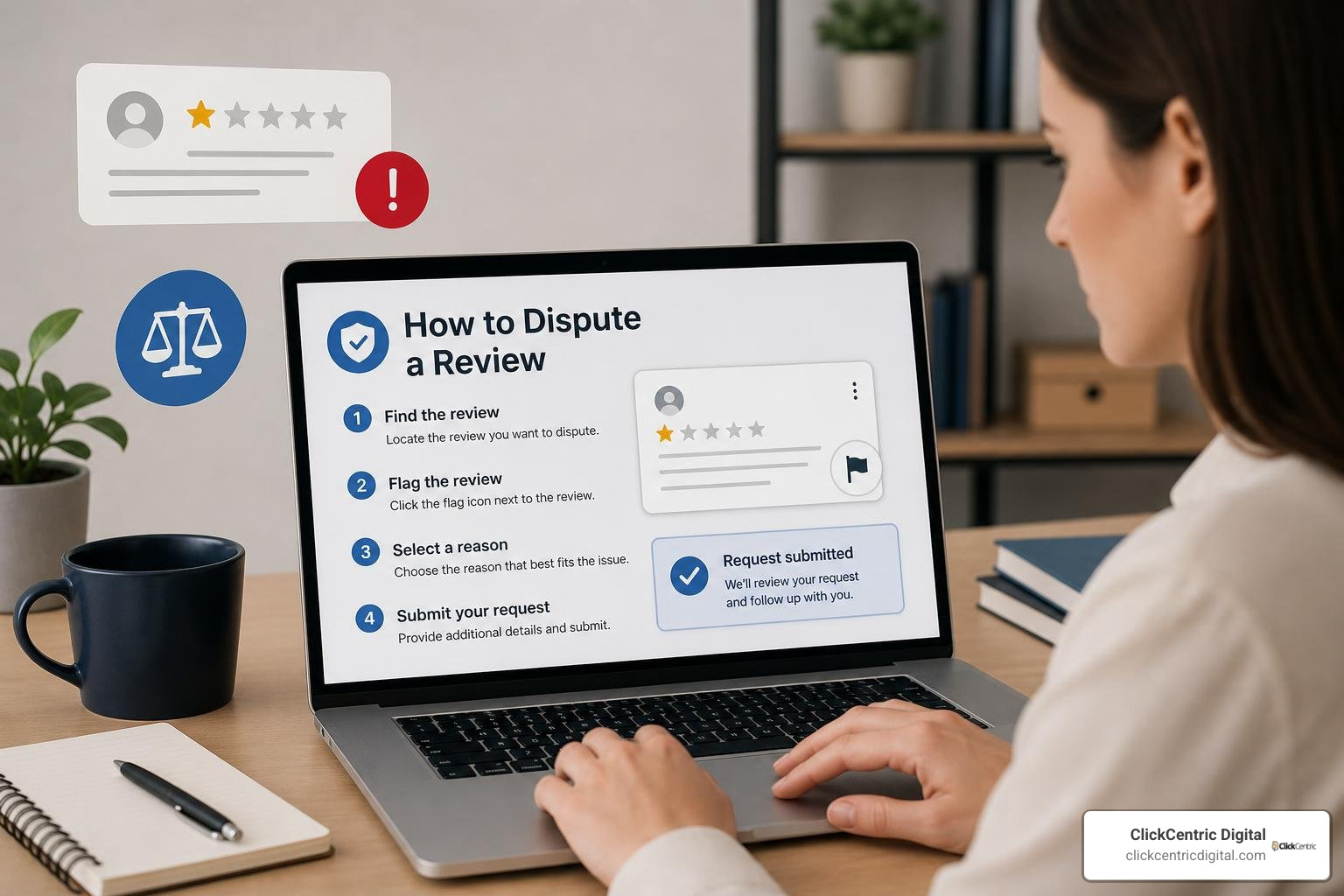
- Via Google Maps: Find your business, locate the offending review, click the three-dot menu in the top-right corner of the review card, and select Report review.
- Via Google Business Profile: Log into your GBP dashboard, navigate to the “Read reviews” tab, locate the review, click the three-dot icon, and select the appropriate policy violation category.
When choosing a category, do not just guess. Choose the one that most closely aligns with the actual text of the review. For instance, if a former employee left the review, select Conflict of Interest. If it contains excessive profanity, choose Offensive Content. If you want a deeper look at this initial step, consult our detailed guide: How Do You Get Rid of Bad Google Reviews? A Step-by-Step Guide.
Step 2: Tracking Status in the Reviews Management Tool
Once you have flagged the review, do not sit around guessing what Google is doing. Google provides a dedicated Reviews Management Tool where you can track the lifecycle of your request.
When you log in, you will see one of three statuses next to your reported review:
- Decision Pending: Google’s automated systems or initial human triage teams are still evaluating the review. This usually takes up to 3 business days.
- Report Reviewed – No Policy Violation: The initial automated sweep did not find enough evidence to remove the review.
- Escalated: The review has been pushed to a manual support queue for a closer look.
If you are wondering whether you are permanently stuck with a negative status, read our perspective: Can You Get a Bad Review Removed from Google or Are You Stuck With It?.
Why First Flags Fail and How to Build an Evidence Pack
If your first flag was rejected, do not panic. In fact, you should expect it.
Most first flags fail because they are processed entirely by an automated pattern-matching algorithm. Google’s AI scans the review text in a matter of seconds. If it doesn’t see highly obvious red flags (like phone numbers, links, or extreme profanity), it defaults to “no policy violation” to save human resources.
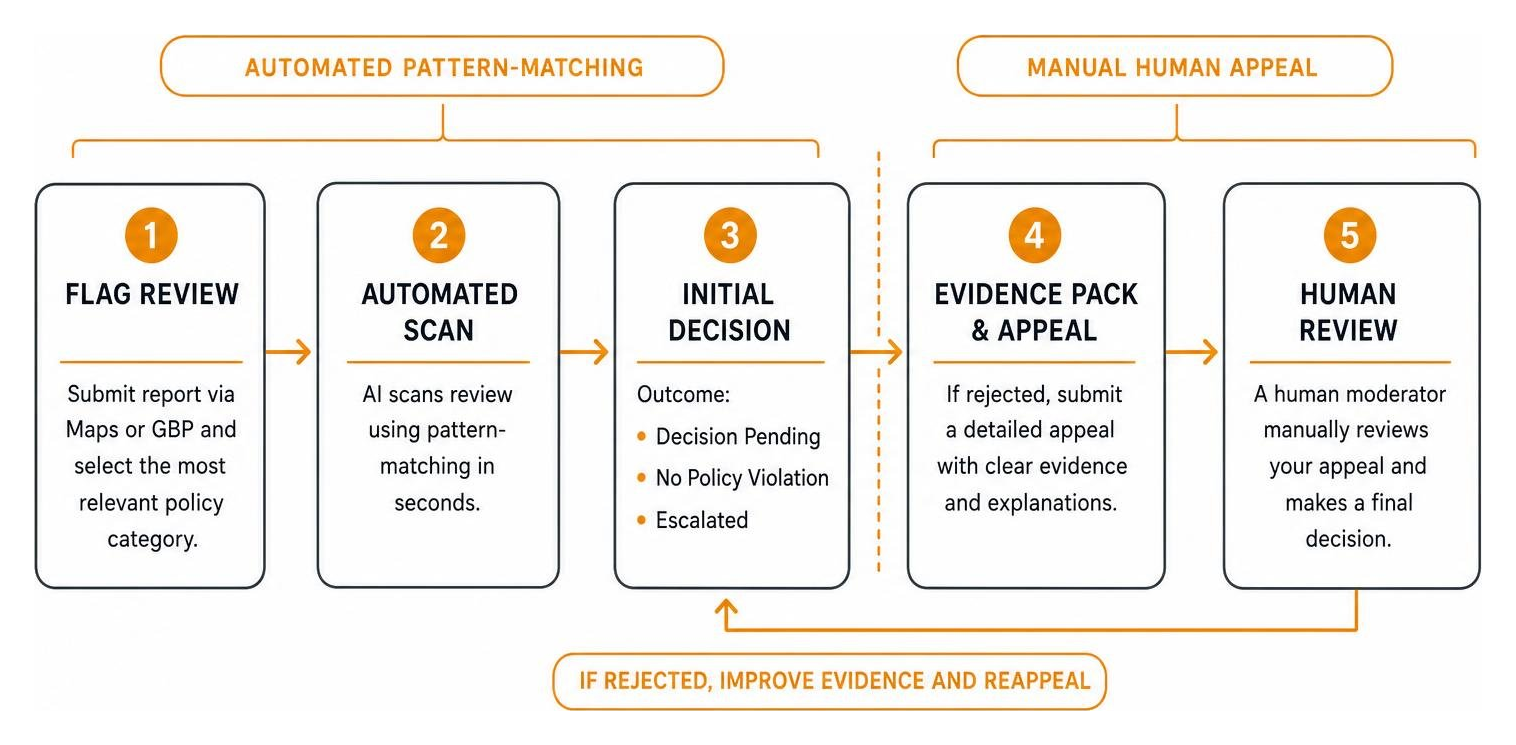
To win, you must transition your dispute from an automated machine filter to a human moderator. This is where many business owners drop the ball. To learn how to structure this transition successfully, read the breakdown on How to Dispute Google Reviews (7-Step Removal Guide) | IP.
Common Mistakes in the Initial Flag
The most common reason business owners lose their disputes is making emotional mistakes early on. These include:
- Emotional reporting: Flagging a review as “harassment” simply because the customer said your service was slow.
- The “Spam” trap: Reporting every single fake review as generic “Spam.” If a competitor leaves a fake review, it is a Conflict of Interest or Fake Engagement, not spam. Choosing the wrong category confuses the algorithm and leads to instant rejection.
- Failing to monitor: Ignoring your profile until a bad review has sat at the top of your page for weeks, influencing hundreds of potential customers.
To protect your business from these traps, you can use specialized tools. Read our guide on how to Stop the Trolls With These Reputation Monitoring Tools.
Compiling Your Review Dispute Evidence Pack
To win a manual appeal, you must build an evidence pack. Think of this as a legal brief designed for a busy Google moderator. Your evidence pack should contain:
- Screenshots of the Reviewer’s Profile: Look at their review history. Are they reviewing businesses in Grand Rapids, Michigan, and Grand Haven, Michigan, while simultaneously leaving 1-star reviews for businesses in California on the exact same day? This proves geographic inconsistency (Fake Engagement).
- Internal Transaction Records: Redacted screenshots of your CRM showing that no customer with this name, email, or service description exists in your system.
- Relationship Documentation: If the reviewer is a former employee, pull screenshots of their LinkedIn profile showing their employment history with your company, or a redacted termination letter to prove a Conflict of Interest.
- Communication Logs: If the reviewer is attempting to extort you (e.g., texting you demanding money to take down a 1-star review), screenshot these messages immediately.
The One-Time Appeal Mechanism: Winning the Human Review
Once your initial flag is rejected, Google grants you exactly one opportunity to appeal within the Reviews Management Tool.
This appeal is read by a human moderator. However, these moderators are often processing hundreds of cases a day. On average, a human moderator will spend only 90 seconds reading your appeal before making a final decision.
If you want to know how to navigate this high-stakes step, read the full playbook on How to Dispute a Google Review and Actually Win the Appeal.
Writing a 90-Second Appeal That Gets Approved
Because you only have 90 seconds of the moderator’s attention, your appeal must be short, objective, and strictly framed around Google’s policies. Do not tell a long story. Do not use emotional language or call the reviewer a liar.
Keep your appeal under 80 words and use this exact structure:
Policy Violated: Conflict of Interest (Former Employee) Evidence: The reviewer, [Name], is a former employee terminated on [Date]. Their LinkedIn profile (attached in Case ID evidence) confirms their employment history with us. Google policy explicitly prohibits former employees from posting reviews about their past employers. Please remove this review.
For a deeper dive into mastering these communication strategies with Google’s support staff, explore The Business Owner’s Guide to Google Review Mastery.
Batching Appeals for Coordinated Review Attacks
If your business in Holland, Kalamazoo, or South Haven is hit by a coordinated “review bomb” (a sudden influx of multiple fake 1-star reviews overnight), trying to dispute them one by one can be incredibly tedious.
Fortunately, Google’s Reviews Management Tool allows you to select and batch up to 10 reviews at a time for appeal. When disputing a coordinated attack, submit them together. This helps the human moderator see the broader pattern of malicious behavior, making it much easier to prove “Fake Engagement.”
To understand the mechanics of how Google groups and displays these reviews, read Google Reviews: Everything You Need to Know.
Escalation Paths and Last-Resort Channels
What happens if your one-time appeal is rejected? Within the standard Reviews Management Tool, that is the end of the road. But as a business owner, you still have highly effective escalation paths.
Escalating to the Google Business Profile Help Community
The public Google Business Profile Help Community is staffed by volunteer Product Experts. Some of these volunteers hold Gold or Diamond status, which gives them a direct escalation path to Google’s engineering and policy teams.
To successfully escalate your case here:
- Create a new post detailing your issue.
- Provide your Case ID (the unique number from your rejected appeal email).
- Share the specific review link, the reviewer’s name, and a concise summary of your evidence pack.
- If a Product Expert agrees that the review clearly violates Google’s policies, they can manually escalate it past the automated support queue.
Using Alternative Channels to Dispute Google Review
If the community forum does not yield results, you have a few last-resort channels to dispute Google review issues:
- Twitter/X (@GoogleSmallBiz): While a low-probability channel, sending a polite direct message with your Case ID and a brief summary of clear extortion or a bug can sometimes trigger a manual review.
- Google Business Redressal Complaint Form: If a competitor is systematically using fraudulent tactics to harm your local search rankings, you can bypass standard support by filing a formal Redressal Complaint.
- Legal Removal Request: If the review is clearly defamatory (making false statements of fact that cause financial harm), you can submit a formal legal removal request to Google. Google typically requires a court order proving defamation before they will act on these requests due to Section 230 protections.
What to Do When the Appeal Fails: Dilution and Legal Options
If every single dispute and escalation channel fails, you are not helpless. You must shift your focus from removal to damage control.
Your first step should always be to post a professional, calm, and factual response. Future customers are reading your response, not just the review. Learn how to write these perfectly by reading our guide: Manage Your Google Review Responses Like a Pro.
The Math of Burying Bad Reviews
The absolute best defense against a permanent bad review is review velocity. If you build a consistent stream of genuine, positive reviews, a single 1-star review becomes statistically irrelevant.
Let’s look at the math of star rating recovery:
- The 10-Review Profile: If you have 10 reviews with a 5.0 rating, a single 1-star review drops your score to 4.6. To recover your rating, you will need to generate 5 consecutive 5-star reviews.
- The 50-Review Profile: If you have 50 reviews with a 4.8 rating, a single 1-star review only drops your score to 4.7. You will only need 3 consecutive 5-star reviews to get back to where you started.
By automating your review collection on every job, you can easily build a buffer that protects your local reputation.
Legal Options and Defamation Limits
If a review is causing severe financial harm to your business, you may consider legal action. However, you must understand the legal boundaries:
- Section 230 Protection: Under Section 230 of the Communications Decency Act, Google is protected from legal liability for content posted by its users. You cannot sue Google for hosting a bad review.
- Suing the Reviewer: You can sue the individual reviewer for defamation. However, defamation lawsuits are expensive—typically costing between $5,000 and $25,000 to litigate—and you must prove that the reviewer made a false statement of fact, not just an opinion.
- Cease and Desist: Often, having a local attorney send a formal Cease and Desist letter to a known reviewer (such as a competitor or disgruntled ex-employee) is enough to make them delete the review on their own without going to court.
Frequently Asked Questions about Disputing Google Reviews
How long does Google take to process a review dispute?
Most initially flagged reviews are processed within 3 business days. If you submit a manual appeal, it can take anywhere from a few days to two weeks for a human moderator to review your evidence pack and make a final decision.
Can I dispute a Google review that has no text?
Yes, but it is much harder. Because there is no text for Google’s algorithm to analyze, you must provide clear external evidence (such as showing that the reviewer’s account is part of a coordinated review-bombing attack or matches the name of a direct competitor).
Can I offer a customer an incentive to remove a bad review?
Absolutely not. Google’s 2026 policy updates strictly prohibit offering any incentives—including discounts, free services, or payments—to get a customer to modify or remove a review. Doing so can result in your entire Google Business Profile being suspended.
Conclusion
At ClickCentric Digital, we know that maintaining a pristine online reputation is a full-time job. Whether your business is located in Grand Rapids, Holland, Grand Haven, South Haven, or Kalamazoo, your Google reviews are the lifeblood of your local search rankings and customer acquisition.
Disputing a fake or malicious Google review requires patience, a clear strategy, and a deep understanding of Google’s policies. By treating your appeals like objective, evidence-based briefs, you can protect your profile and keep your phone ringing.
If you are struggling with a persistent review attack, or want to build a proactive system to grow your local search presence, we are here to help. Explore our Reputation Management services today, and let us help you grow your business the right way.
Sorry, the comment form is closed at this time.