


16 Jun The Ultimate Guide to an SEO Friendly Website Redesign
Why an SEO Friendly Website Redesign Can Make or Break Your Rankings
An SEO friendly website redesign is one of the most high-stakes projects a business can undertake online. Done right, it can boost your traffic, improve conversions, and strengthen your search rankings. Done wrong, it can wipe out years of hard-earned visibility — sometimes overnight.
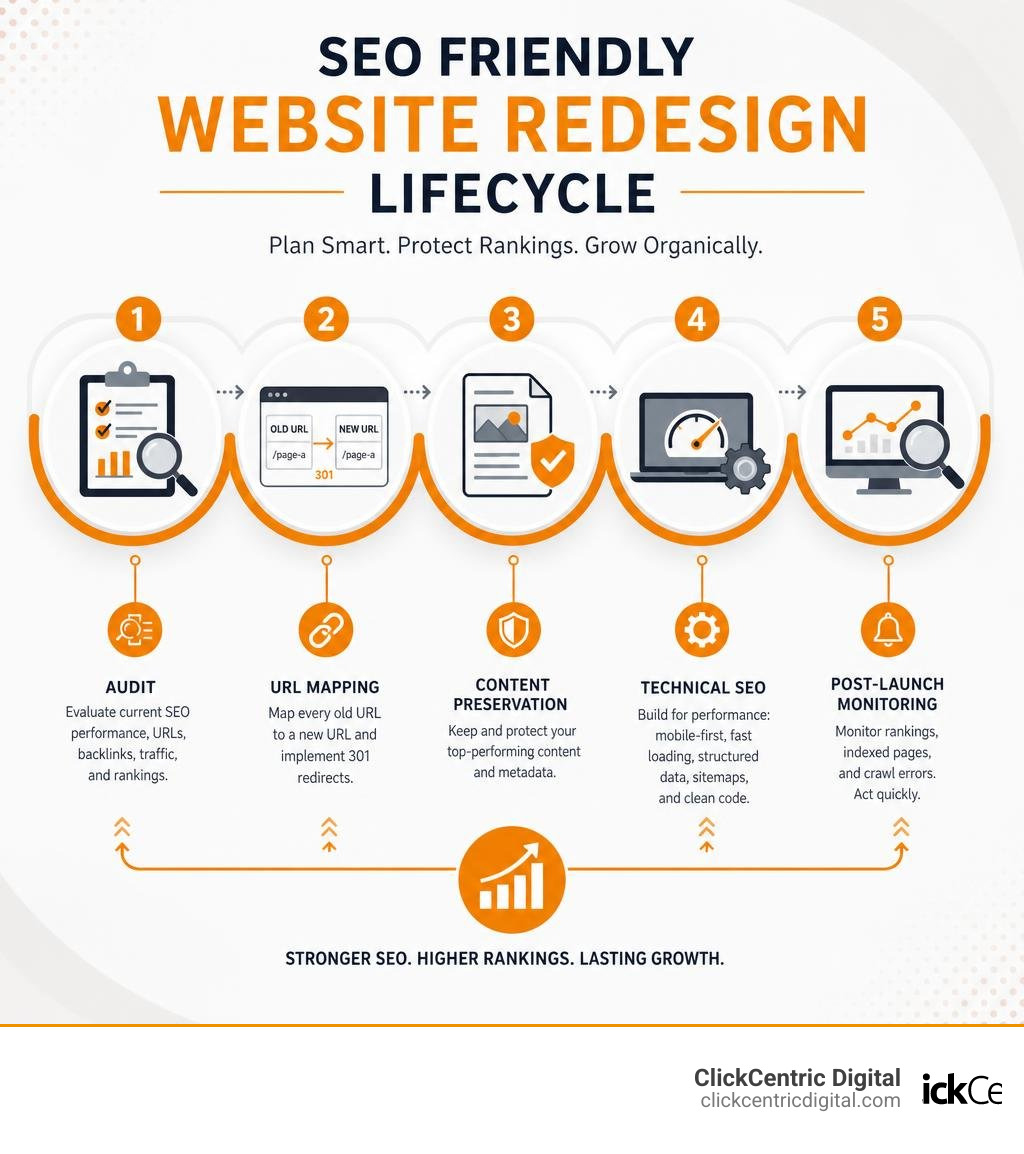
Here’s a quick answer for what an SEO friendly website redesign involves:
- Conduct a pre-redesign SEO audit — document your current rankings, traffic, backlinks, and URLs before touching anything
- Map every old URL to a new URL — and implement permanent 301 redirects so link equity is preserved
- Preserve your best content and metadata — don’t delete or rewrite pages that are already ranking
- Fix technical SEO during the build — mobile-first design, fast load times, Core Web Vitals, schema markup, and proper sitemaps
- Test on a staging site before launch — catch broken links, crawl errors, and missing redirects before Google sees them
- Monitor closely after launch — track rankings, indexed pages, and crawl errors daily for the first few weeks
The stakes are real. Studies of real-world redesigns show that sites without proper SEO planning can lose 30–80% of their organic traffic in the first 60 days — with recovery taking six months or longer, if it happens at all.
A single missed step — like forgetting to redirect old URLs — can turn your shiny new website into a search traffic disaster.
This guide walks you through every phase of the process, from the initial audit all the way through post-launch monitoring, so your redesign improves your rankings instead of destroying them.
Relevant articles related to seo friendly website redesign:
The Core Risks of a Website Redesign and How to Avoid Them
When we talk about a website redesign, most people picture fresh layouts, modern color palettes, and updated logos. But search engines don’t rank websites based on how pretty they are. Google evaluates individual web pages based on technical signals: URL structures, content relevance, internal linking patterns, schema markup, and loading performance.
When you redesign a site, you are essentially changing all of these signals at the exact same time. This is why redesigns are notoriously risky for organic search. The primary risks include:
- Complete Traffic Loss from Missing Redirects: If you change your URL structure (e.g., changing
/about-usto/about) without telling search engines, Google will crawl the old URLs, hit a 404 error, and drop those pages from the index. - Topical Authority Collapse: Deleting older blog posts or consolidating service pages without a strategic plan can ruin your topical depth, causing your entire site to lose its rankings.
- Crawlability Issues: If your web development team accidentally leaves a
disallowtag in the staging robots.txt file when pushing the site live, search engines will stop crawling your site entirely. - Broken Backlink Equity: High-value external links pointing to old, deleted pages will go to waste unless they are redirected.
To avoid these pitfalls, we must treat SEO as a core design constraint from day one, rather than a checklist item to tackle after the site is launched. For a deeper look at what happens when these risks are ignored, read our survival guide on how to prevent your site redesign from becoming a search engine horror story.
Phase 1: Conducting a Pre-Redesign SEO Audit
Before writing a single line of code or designing a new homepage in Figma, you must establish an SEO baseline. You cannot protect what you do not know exists. In a typical website, just 47 pages often drive up to 80% of all organic traffic. If you blindly delete or modify those high-performing pages, your business will suffer.
A comprehensive pre-redesign audit must document:
- Baseline Organic Traffic: Export 90 days of traffic and conversion data from Google Analytics and Google Search Console. Identify your top-performing landing pages.
- Keyword Rankings Snapshot: Track your current rankings for target keywords. This gives you a clear baseline to measure against post-launch.
- Backlink Profile: Run a backlink report to identify which pages have the highest domain authority and external links. These URLs must be preserved or carefully redirected to transfer their link equity.
- Crawl Data: Use a crawler like Screaming Frog to scan your entire live site. This creates a master spreadsheet of every existing URL, meta tag, and header structure.
If you want to make sure your baseline data is gathered flawlessly, you can check out our professional SEO audit services survival guide or explore how we handle migrations with the best website audit SEO service for people who hate losing traffic.
Mapping Existing Assets for an SEO Friendly Website Redesign
Once you have your crawl data, you need to categorize your existing assets. We recommend using a simple Keep, Update, Merge, or Retire framework for every single URL on your site.
To keep your team organized during this phase, consult this comprehensive site redesign checklist to preserve SEO & improve visibility from Search Engine Land. This step ensures that no high-value metadata, image alt text, or underlying URL structures are lost when transitioning to your new platform.
Phase 2: URL Mapping and Implementing 301 Redirects

URL mapping is the single most critical step of an seo friendly website redesign. If you get this wrong, your rankings will tank.
A redirect map is a spreadsheet that pairs every single old URL with its exact new equivalent. If you keep your URL structure identical during the redesign, your redirect mapping is simple. However, if you are changing platforms (such as migrating from a legacy CMS to WordPress or Shopify) or simplifying your site structure, your URLs will inevitably change.
When writing redirects, keep these rules in mind:
- Always use permanent, server-level 301 redirects. Do not use temporary 302 redirects, and never rely on JavaScript or meta-refresh redirects, which do not reliably pass link equity.
- Avoid redirect chains. A redirect chain occurs when URL A redirects to URL B, which then redirects to URL C. This slows down page load times and wastes your search engine crawl budget. Ensure all old URLs point directly to their final destination.
- Watch out for trailing slashes. Google treats
example.com/pageandexample.com/page/as two completely separate URLs. If your old CMS used trailing slashes and your new one does not, you must implement site-wide redirect rules to prevent massive duplicate content issues.
Step-by-Step URL Migration Process
To execute a flawless URL migration, follow this systematic process:
- Crawl the live site to generate your master list of active URLs.
- Highlight high-value URLs that have existing backlinks or drive organic traffic.
- Create the destination URLs on your staging site.
- Map old URLs to new URLs in a 1:1 format. If a page is being retired, redirect it to the closest relevant category page or parent page — never redirect all broken pages to the homepage, as Google may treat these as “soft 404s” and ignore them.
- Write the redirect rules directly in your server configuration file (like
.htaccessor Nginx configuration) or via a highly reliable server-side manager. Avoid relying on heavy SEO plugins to process redirects, as they can slow down your database.
For more hands-on tips on coordinating this technical step, read our guide on 10 tips and tricks to website redesign services.
Phase 3: Preserving Content, Metadata, and On-Page SEO
A common mistake during website redesigns is rewriting all your web copy just for the sake of “freshening things up.” If a page is already ranking on the first page of Google, its current copy is the primary reason why. Drastically changing the content, removing keywords, or shortening the text can cause your rankings to drop.
Use this strategic framework to handle your content migration:
| Content Strategy | Action Required | Best Use Case |
|---|---|---|
| Keep | Migrate the content exactly as-is, preserving all headers, body copy, and metadata. | Pages that are already driving significant traffic and ranking for target keywords. |
| Update | Keep the core structure, but refresh outdated statistics, add video elements, or optimize for newer search intent. | Pages with high impressions but low click-through rates. |
| Merge | Consolidate multiple thin or cannibalizing pages into one comprehensive “pillar” page, and redirect the old URLs to the new one. | Multiple blog posts or service pages targeting the same keyword. |
| Retire | Delete the page completely and implement a 301 redirect to the most relevant surviving page. | Outdated product pages, old event announcements, or thin content with zero traffic. |
Maintaining On-Page Elements for an SEO Friendly Website Redesign
When migrating content, you must preserve the structural HTML elements that search engines use to understand your pages:
- Meta Titles & Descriptions: Keep your high-performing title tags under 60 characters and meta descriptions under 160 characters.
- Heading Hierarchy: Ensure your pages use a logical heading structure. There should only be one
tag per page (ideally containing your primary keyword), followed by subheadings (,) to organize the content. - Image Alt Text: Do not lose your image descriptions during migration. Alt text is essential for web accessibility and helps your images rank in Google Images search.
- Semantic Depth: Expand your content naturally by including related entities and answering common user questions.
If you are a smaller brand looking to master these on-page fundamentals, check out our beginner’s guide to small business SEO.
Phase 4: Technical SEO, Mobile-Friendliness, and Site Architecture

Now that we are in June 2026, Google operates entirely on mobile-first indexing. This means Google primarily crawls, indexes, and ranks websites based on how they perform on mobile devices. Historically, mobile traffic surpassed desktop traffic years ago, and today, ensuring a fast, responsive mobile layout is a non-negotiable ranking factor.
During your redesign, prioritize these technical elements:
- Site Speed & Core Web Vitals: Nearly half of your visitors will abandon a page if it takes longer than three seconds to load. A one-second improvement can boost conversions by up to 7%. Aim for these Core Web Vitals targets:
- Largest Contentful Paint (LCP): Under 2.5 seconds.
- Interaction to Next Paint (INP): Under 200 milliseconds.
- Cumulative Layout Shift (CLS): Under 0.1.
- Structured Data / Schema Markup: Schema markup has become incredibly powerful as AI search engines and conversational agents transform the search landscape in 2026. Implement LocalBusiness, Product, Organization, and Article schema to secure rich snippets in search results.
- XML Sitemaps & Robots.txt: Update your robots.txt file to ensure search bots can access your new files. Generate a clean XML sitemap listing only your canonical, indexable URLs, and submit it to Google Search Console.
- Accessibility (WCAG 2.0): Over 15% of the global population lives with a disability that affects how they browse the web. Designing an accessible site (using proper color contrast, readable text sizes of 16px+, and keyboard navigation) not only improves user experience but also aligns with Google’s quality guidelines.
To ensure your development team aligns with Google’s exact technical specifications, review Google’s Guide to Mobile-First Indexing.
Optimizing Site Navigation and Internal Linking
Your site architecture should be designed for both human users and search crawlers. A clean, logical structure makes it easy for Google to discover your pages and understand how they relate to one another.
- The Three-Click Rule: A user should be able to reach any page on your website within three clicks of the homepage. Deeply buried pages are rarely crawled and rarely rank.
- Breadcrumb Navigation: Implement breadcrumbs to help users track their location on your site while providing search engines with clear internal linking paths.
- Descriptive Anchor Text: Avoid generic internal links like “click here” or “read more.” Instead, use descriptive, keyword-rich anchor text, such as linking to a relevant service page like Website Design & Development when discussing web design support.
To learn how to build a flexible, long-term site structure that scales as your business grows, read our analysis on how growth-driven web design saves you from redesign hell.
Phase 5: Post-Launch Testing, Monitoring, and Traffic Recovery
Launch day is not the end of your website redesign project — it is the beginning of the critical monitoring phase.
Before pointing your domain to the new site, perform these pre-launch QA checks on your staging site:
- Test your redirects: Run a crawl of your old URL list to verify that every single link correctly triggers a 301 redirect to the new page.
- Check for broken links: Fix any internal 404 errors or broken images.
- Remove staging blocks: Ensure your staging site’s password protection is removed and that no
noindextags remain on production pages.
Once the DNS cutover is complete and your new site is live, execute these immediate post-launch actions:
- Submit your new XML sitemap via Google Search Console.
- Monitor crawl errors daily for the first two weeks. Keep a close eye on the “Pages” report in Search Console to catch any unexpected 404s or crawl anomalies.
- Track your traffic recovery curve. Even with a perfectly executed migration, it is completely normal to see a temporary 10–20% dip in search impressions and traffic during the first 1 to 2 weeks as Google recrawls and re-indexes your new site structure.
Frequently Asked Questions About an SEO Friendly Website Redesign
How long does it take for organic traffic and rankings to recover after a website redesign?
With a flawless, SEO-safe migration, your organic traffic should fully recover to its baseline within 30 days. Within 60 to 90 days, as Google processes your improved site speed, structured data, and mobile layout, you should begin to see your traffic surpass pre-redesign levels. If your agency skipped critical redirect mapping or content preservation steps, your traffic could drop by 30-80% and may take 6 months or longer to recover — or it may never recover fully without extensive manual remediation.
Can I change my domain name during a website redesign without losing SEO?
Yes, but changing your domain name adds an extra layer of complexity and risk to your redesign. To safely migrate domains without losing your hard-earned authority, you must implement 1:1 server-level 301 redirects from your old domain to the new one, update all internal links, and use the “Change of Address” tool inside Google Search Console. For Google’s official step-by-step instructions, read Google’s Guide to Site Migrations with URL Changes.
What is the biggest mistake to avoid during a website redesign?
The single biggest mistake is launching a redesigned website without comprehensive 301 redirects. Leaving your old, ranking URLs to return 404 “Page Not Found” errors destroys your accumulated link equity and organic rankings permanently. Other major errors include blocking search crawlers via an accidental noindex tag left over from the staging environment, deleting top-performing content, and failing to verify mobile responsiveness.
Conclusion
Redesigning your website is a fantastic opportunity to modernize your brand, improve user experience, and accelerate your business growth. However, treating SEO as an afterthought is the fastest way to turn an exciting launch into a search engine horror story. By integrating a systematic, SEO-friendly framework into every stage of your redesign, you can protect your existing search authority and lay a powerful foundation for future traffic growth.
At ClickCentric Digital, we specialize in helping businesses across West Michigan — including Grand Rapids, Holland, Grand Haven, South Haven, and Kalamazoo — build high-performance, conversion-focused websites that preserve and boost search rankings. Whether you need a comprehensive pre-redesign audit, a flawless technical migration, or local customer acquisition strategies, we are here to help.
Ready to build a beautiful, fast, and SEO-safe website? Explore our professional Website Design & Development services today, or contact us to schedule your pre-migration consultation.
Serving West Michigan Businesses
If you are looking for a local design and optimization partner in West Michigan, ClickCentric Digital provides dedicated services across the region:
- Grand Rapids & Kent County: High-performance web design and local SEO strategies tailored to the Grand Rapids market.
- Holland & Grand Haven: Lakeshore digital marketing, responsive web development, and search engine optimization to help local businesses stand out.
- South Haven & Kalamazoo: Comprehensive website management, SEO audits, and targeted customer acquisition campaigns.
Sorry, the comment form is closed at this time.