


31 Aug How to Fix a Suspended Google Business Profile in 3 Steps
How to Fix a Suspended Google Business Profile in 3 Steps
When Your Google Business Profile Is Suspended, Every Hour Costs You
If your google business profile suspended notification has just arrived, here is what you need to know right now:
Quick Answer: How to Fix a Suspended Google Business Profile
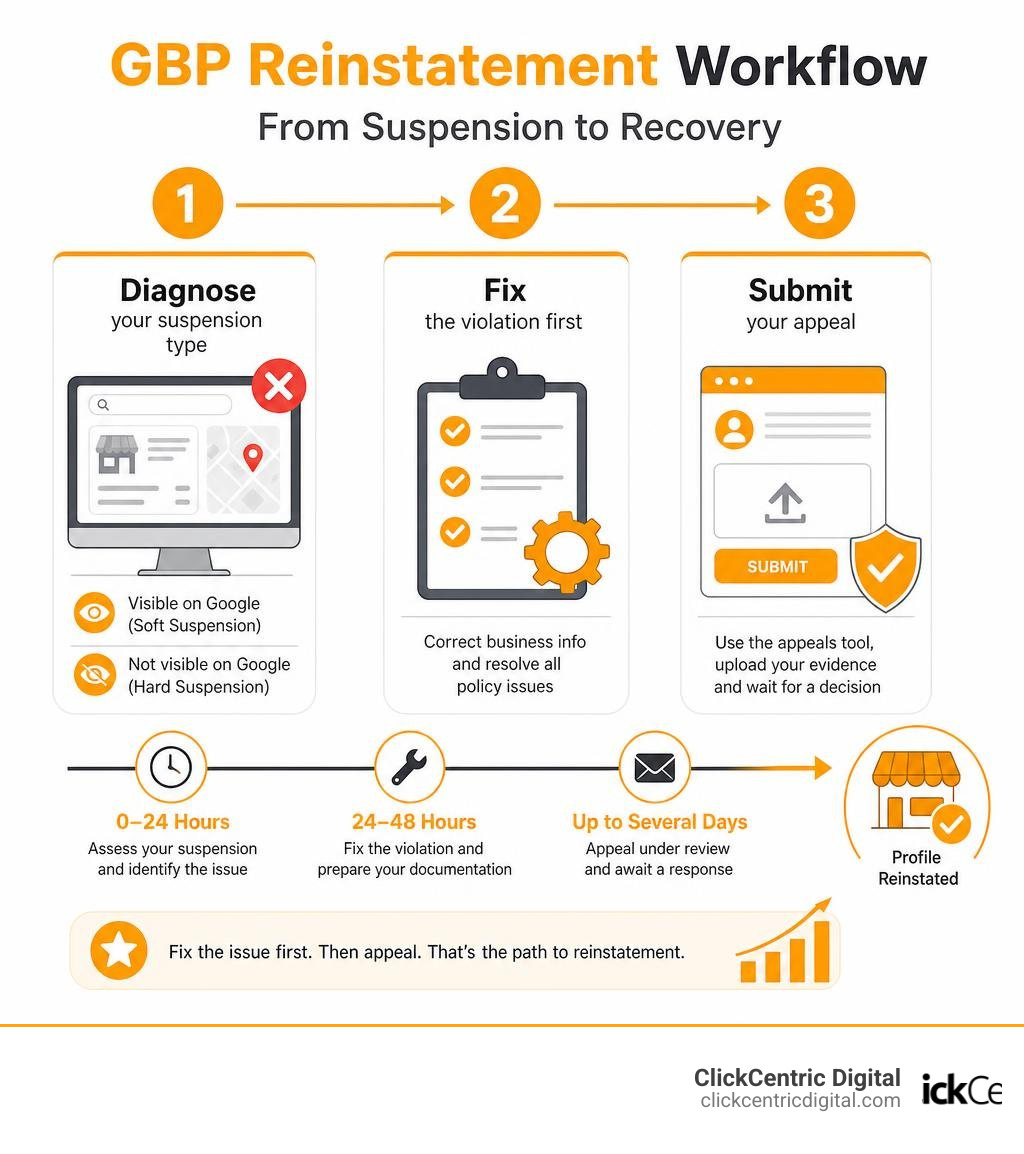
- Diagnose your suspension type — check if your listing is still visible on Google (soft suspension) or completely gone (hard suspension)
- Fix the violation first — correct your business name, address, or any policy issue before you appeal
- Submit your appeal — use the Google Business Profile appeals tool, upload your evidence within the 60-minute window, and wait for a decision
Your phone goes quiet. Map clicks drop to zero. Customers searching for your business can’t find you. That’s what a suspended Google Business Profile looks like in real life — and it can happen to any local business, even ones doing everything right.
Google suspended more than 200,000 Business Profiles in 2025 for policy violations. Many of those owners had no idea they’d broken any rules.
The good news? Most suspensions are fixable. But the order of operations matters. Businesses that fix the actual violation before appealing are reinstated at 2.4 times the rate of those who appeal without making changes first.
This guide walks you through exactly what to do — step by step — so you don’t waste weeks waiting on a doomed appeal.
Why is Your Google Business Profile Suspended?
When your profile gets taken down, it feels like Google is acting as judge, jury, and executioner. But understanding why Google enforces these rules can take some of the sting out of the situation.
Google’s primary job is to protect its users from spam and fraudulent businesses. To do this at scale, Google uses a mix of automated algorithmic sweeps and manual reviews. An algorithmic sweep is an automated cleanup targeting high-risk or heavily spammed categories (like locksmiths, plumbers, or garage door repair companies). A manual review, on the other hand, usually happens when a Google employee looks at your listing—often because a competitor or user submitted a “Suggest an Edit” or a formal redressal complaint.
If your business is located here in West Michigan—whether you are running a storefront in Grand Rapids, a service business in Holland, or a boutique in Grand Haven—falling out of compliance with the official guidelines is the fastest way to trigger these filters. You can read the complete rulebook in the official Overview of Google Business Profile policies – Google Business Profile Help.
Soft vs. Hard Suspensions: How to Diagnose Your Status
Before you panic, you need to know what kind of suspension you are dealing with. In the local SEO world, we classify these into “soft” and “hard” suspensions.
- Soft Suspension: Your business listing is actually still visible on Google Search and Maps, but it is marked as “unverified” or “suspended” in your merchant dashboard. You have lost managerial control. This is highly dangerous because your listing is now completely vulnerable to user-suggested edits—meaning competitors can easily alter your hours, phone number, or website link.
- Hard Suspension: Your profile is completely removed from Google Search and Maps. If you search for your exact business name and city, nothing shows up. This is the most severe type and requires immediate action to prevent long-term damage to your local search visibility.
| Feature | Soft Suspension | Hard Suspension |
|---|---|---|
| Visibility on Google Maps | Yes (Visible to the public) | No (Completely removed) |
| Dashboard Access | Accessible, but marked unverified | Accessible, but marked suspended |
| Ability to Edit Details | Restricted or disabled | Disabled |
| Vulnerability | High (Open to public edits) | Critical (Does not exist on search) |
| Typical Reinstatement Wait | 3 to 10 business days | 14 to 30 days (up to 5–6 weeks during backlogs) |
Common Triggers: Why Legitimate Profiles Get Flagged
Even if you run a highly respected, legitimate business in Kalamazoo or South Haven, Google’s automated systems can flag you for “suspicious activity.” Here are the most common triggers we see:
- Keyword Stuffing: Adding extra keywords, cities, or promotional taglines to your business name (e.g., “Grand Rapids Plumbers – Best Drain Cleaning Services” instead of just your legal name, “Grand Rapids Plumbers”).
- Virtual Offices and P.O. Boxes: Using a UPS Store, a Regus virtual office, or a P.O. Box as your business address. Google requires a physical location where in-person customer contact occurs during your stated hours.
- Rapid Profile Edits: Making too many major changes at once (like updating your name, phone number, and primary category on the same day). Google’s spam filters flag rapid edits as potential hijacking attempts.
- Service Area Business (SAB) Misconfiguration: If you operate out of your home in Holland MI and serve customers at their locations, you must hide your physical address. Showing a residential address while claiming to be a storefront is an instant suspension trigger.
- Setting Hours to “24 Hours”: Unless you have physical staff actively working at your location 24/7, listing your business as open 24 hours will paint a massive target on your back.
Account-Level Restrictions and Cascading Suspensions
Sometimes, the problem isn’t your business listing at all—it’s the Google account managing it. If your personal Google account or an agency manager account is restricted due to a policy violation elsewhere (like a suspended Google Ads account or making spammy edits on Google Maps), Google will flag every profile connected to that account.
This is known as a cascading suspension. If an agency managing your local SEO has one of their internal user accounts flagged, all of their clients’ profiles can go down overnight. To dive deeper into how account standing affects your local presence, check out this detailed guide on Google Business Profile Suspensions From Account Restrictions: Causes, Appeals & Fixes.
The 3-Step Recovery Process for a Suspended Profile
When a suspension hits, your first instinct might be to write an emotional plea to Google Support explaining how much money you are losing. Don’t do this. Google’s support team is entirely indifferent to financial hardships; they only care about objective, verifiable compliance.
Instead, take a deep breath and follow our structured 3-step recovery process. For a broader look at how your profile fits into your overall local SEO strategy, check out The Ultimate Guide to Google Maps Marketing.
Step 1: Audit and Clean Up Your Profile Violations First
Submitting an appeal before fixing your violations is the number one mistake business owners make. If you appeal a non-compliant profile, Google will reject it in seconds, and subsequent appeals will face much harder scrutiny.
Log into your dashboard and perform a strict compliance audit:
- Check Your Business Name: Ensure it matches your legal business registration and physical storefront signage exactly. Strip out any extra keywords or city names.
- Verify Your Address: If you are a Service Area Business, hide your address. If you are a storefront, ensure you aren’t using a virtual office or P.O. Box.
- Audit Your Users: Remove any old marketing agencies, ex-employees, or unverified users from your profile’s user list. Keep your user list as clean as possible.
Once you’ve made these corrections, save them. If you need help identifying what went wrong, Google provides official troubleshooting steps here: Fix suspended or disabled profiles – Google Business Profile Help.
Step 2: Gather Your Verifiable Evidence and Documentation
Google operates on a “guilty until proven innocent” basis. To get reinstated, you must provide clear, official documentation proving your business is a real, legal entity operating at the address listed on your profile.
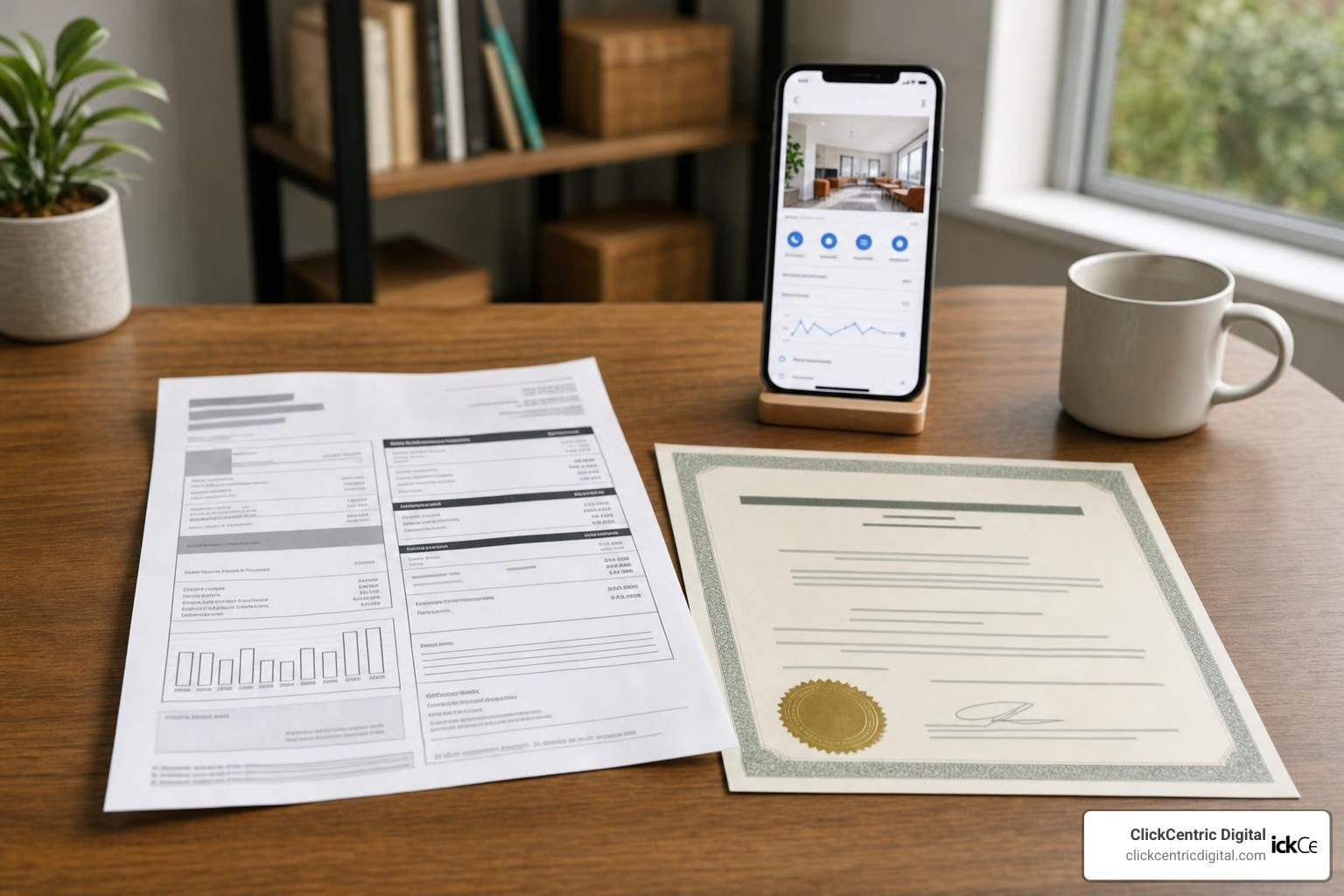
Collect the following documents before you start the appeal process:
- A utility bill (electricity, water, internet, or phone) showing your exact business name and address.
- Your official business registration or LLC filing documents.
- A local business license or tax certificate.
- A high-quality photo of your physical storefront showing permanent signage, your street address, and your entrance.
Step 3: Submit the Appeal for Your Google Business Profile Suspended
Now that your profile is clean and your evidence is ready, it is time to submit your appeal.
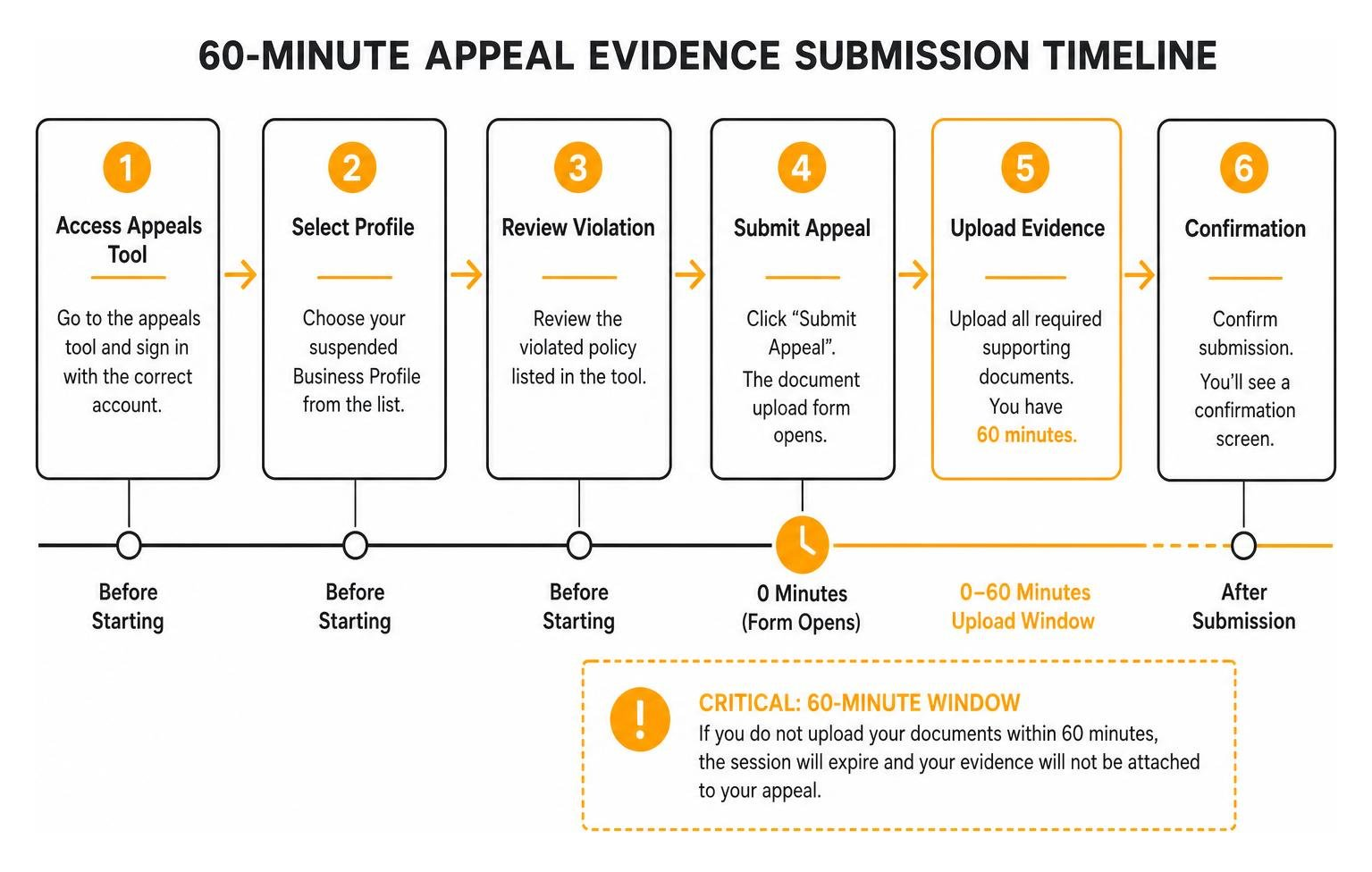
Go to the Google Business Profile appeals tool. Confirm you are logged into the correct Google account. Select the suspended profile and review the violated policy listed in the tool.
When you click “Submit Appeal,” Google will open a document upload form.
CRITICAL WARNING: You have a strict 60-minute window to upload your supporting evidence once this form is opened. If you do not upload your documents within 60 minutes, the session will expire, and your evidence will not be attached to your appeal, leading to an almost certain denial.
For official, step-by-step instructions on navigating this interface, refer to Appeal Business Profile content and profile restrictions – Google Business Profile Help.
How to Prevent Having Your Google Business Profile Suspended Again
Once you are back on the map, you want to make sure you stay there. Proactive profile governance is the best way to avoid future disruptions.
- Avoid Rapid Changes: If you need to update your phone number, address, or hours, make one change at a time. Wait at least 24 to 48 hours between major edits to avoid triggering automated spam filters.
- Keep Your Access Secure: Only grant manager access to trusted partners. Periodically audit your user list and remove anyone who no longer needs access.
- Use Domain-Based Emails: Ensure the primary owner of the profile uses an email address tied to your business website domain (e.g.,
owner@yourbusiness.com) rather than a generic@gmail.comaddress. This builds trust with Google’s automated systems.
If you are setting up a new location or want to ensure your setup is completely bulletproof from day one, read our guide on how to Claim Your Spot on the Map With a Free Google Business Page.
What to Do If Your Reinstatement Appeal Is Denied
If your first appeal is denied, do not panic, and do not immediately submit the exact same appeal again. Doing so will only clutter your support history and make recovery more difficult. A denial simply means the evidence you provided did not fully prove your eligibility or compliance to Google’s specialized review team.
Let’s look at how to escalate your case and get your local presence restored. Understanding the baseline rules of local search can help you diagnose why Google is pushing back; you can read about those in our breakdown of Google Maps Ranking Factors for 2025.
Requesting an Additional Review with Stronger Proof
If the appeals tool allows, you can request an additional review. This is your chance to submit stronger, undeniable proof.
One of the most powerful pieces of evidence you can provide is a video verification walkthrough. Record a continuous, unedited video that starts outside your building (showing your street name, nearby businesses, and permanent outdoor signage) and walks directly into your office or storefront. Show your workspace, your business equipment, and even open your laptop to show your business dashboard. This level of real-world proof is incredibly difficult for Google’s support team to reject.
Escalating Your Case to the Google Business Profile Help Community
If the appeals tool says “Can’t be appealed” or your additional reviews have run into a wall, your next best step is the Google Business Profile Help Community.
This forum is staffed by volunteer Google Product Experts—highly experienced local SEO specialists who have a direct line of communication with Google’s engineering and spam teams. Create a new thread, explain your situation clearly, share your Case ID, and present your clean documentation. If a Product Expert agrees that your business is legitimate and compliant, they can manually escalate your case for a specialized review.
Maintaining Visibility on Alternative Local Search Channels
While you are waiting for Google to resolve your case, you cannot afford to let your local leads dry up. Diversifying your local search footprint ensures your business keeps running even if one platform goes down.
Make sure you claim, verify, and optimize your business listings on these alternative local SEO platforms:
- Bing Places for Business: Bing powers search results for Yahoo, Amazon Alexa devices, and millions of Windows users.
- Apple Maps: Essential for capturing mobile search traffic from iPhone users.
- Yelp: A major source of local traffic, especially for restaurants, home services, and retail.
- Local Services Ads (LSAs): If you are a service-area business, running Google Local Services Ads can keep you visible at the very top of search results even while your organic map listing is suspended.
Frequently Asked Questions About Suspended Profiles
Should I create a new listing if my appeal is denied?
No! This is a critical mistake. Creating a duplicate listing while your original profile is suspended is a direct violation of Google’s terms of service. Google’s automated systems will easily detect the duplicate phone number, website, or physical location and suspend the new listing immediately.
Furthermore, creating a new listing means you lose your entire ranking history, your organic search authority, and—most importantly—all of your hard-earned customer reviews. It is always better to fix the original listing and fight for reinstatement.
How long does the reinstatement process typically take?
Reinstatement timelines vary depending on Google’s current backlog and the type of suspension you have.
- Soft Suspensions: Typically resolved within 3 to 10 business days once the correct documentation is submitted.
- Hard Suspensions: Usually take 14 to 30 days.
- Backlogs: During major algorithmic updates or technical bugs (like the major backlogs we saw in early 2025), wait times can stretch to 5 or 6 weeks.
Be patient and avoid submitting duplicate support tickets, as this can reset your place in the support queue.
Will a suspension permanently damage my local search rankings?
Generally, no. If your listing is reinstated reasonably quickly, it will typically return to its previous ranking positions within a few days to a week. Google restores your historical data, reviews, and search authority once the suspension is lifted. However, if your listing remains offline for several months, your local competitors may gain ground, requiring you to put extra effort into your local optimization to regain your top spots.
Conclusion
A google business profile suspended notice is a stressful event for any local business owner, but it is a hurdle you can clear with a systematic, calm approach. Remember: audit your profile first, gather matching, undeniable evidence, and respect the strict 60-minute upload window when submitting your appeal.
At ClickCentric Digital, we help local businesses across West Michigan—from Grand Rapids and Holland to Grand Haven, South Haven, and Kalamazoo—navigating the complexities of local search, review management, and paid traffic. If you want to make sure your profile is completely optimized and protected from future algorithmic sweeps, read our comprehensive guide on How to Make Google Fall in Love With Your Business Profile or reach out to us today to secure your local presence.
Sorry, the comment form is closed at this time.