


01 Jun Bespoke vs. Broke: How Custom Web Application Development Saves Your Business
Bespoke vs. Broke: How Custom Web Application Development Saves Your Business
Is Your Business Software Holding You Back?
Custom web application development is the process of building web-based software from scratch — designed around your specific business workflows, users, and goals — rather than forcing your team to adapt to generic, off-the-shelf tools.
Here’s a quick breakdown of what that means in practice:
| Question | Quick Answer |
|---|---|
| What is it? | Software built for your exact needs, accessed through a browser |
| Who is it for? | Businesses whose workflows don’t fit standard software |
| How is it different from a website? | It performs tasks, not just displays information |
| How is it different from SaaS? | You own the code; it’s built around your process, not a general one |
| What does it cost? | Roughly $10,000 for simple tools up to $500,000+ for enterprise systems |
| How long does it take? | As little as 4–8 weeks for simple apps; 6–12 months for complex platforms |
Think about the software your business runs on today. Chances are, you’re juggling several disconnected tools — a CRM here, a spreadsheet there, maybe a booking system that almost does what you need. It’s messy, slow, and expensive.
You’re not alone. Research shows that 68% of enterprise information is trapped in disconnected systems, and 95% of organizations struggle to integrate data across their tools.
Off-the-shelf software is built for the average business. But your business isn’t average.
The analogy that sticks: would you rather wear a suit pulled off a rack, or one tailored specifically for you? The difference isn’t just comfort — it’s performance.
Custom web apps let you build software that fits how you actually work, not the other way around. And with the global custom web application market projected to reach $898.9 billion by 2029, the shift toward tailored digital tools isn’t a trend — it’s a transformation already underway.
This guide breaks down everything you need to know: what custom web apps are, when you need one, how they’re built, and what they actually cost.
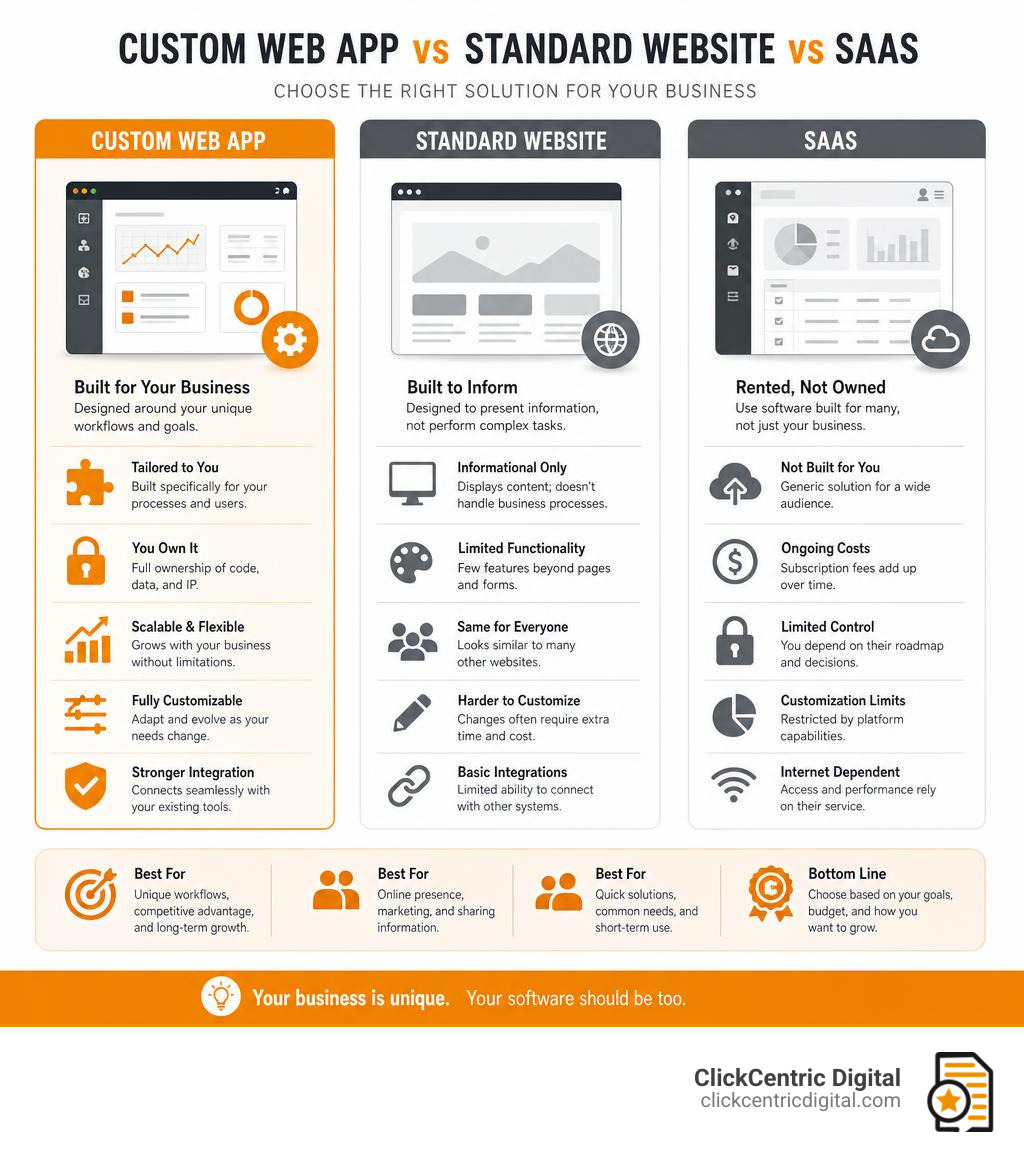
Simple guide to custom web application development:
Defining the Custom Web App vs. Standard Websites
A standard website is usually built to inform, persuade, and generate leads. Think service pages, blog posts, contact forms, location pages, menus, photo galleries, and calls to action.
A custom web application is built to do something. It lets users log in, manage data, complete tasks, trigger workflows, view personalized dashboards, make purchases, submit requests, generate reports, or collaborate with other users.
That difference matters because the planning, cost, technology, security, and maintenance requirements are not the same.
| Feature | Standard Website | Off-the-Shelf SaaS | Custom Web Application |
|---|---|---|---|
| Primary purpose | Inform and convert visitors | Solve a common business need | Solve your specific business need |
| User login | Sometimes | Usually | Usually |
| Database-driven | Sometimes | Yes | Yes |
| Workflow automation | Limited | Predefined | Built around your process |
| Ownership | You own your site content | Vendor owns platform | You can own the code and data |
| Custom integrations | Limited to plugins/API options | Limited by vendor | Designed into the architecture |
| Scalability | Depends on CMS/hosting | Depends on vendor plan | Planned around your growth |
| Best for | Marketing and lead generation | Common repeatable workflows | Unique operations, portals, dashboards, SaaS, automation |
If you are unsure whether your business needs a regular site, a more advanced website, or an actual application, start with the symptoms. Are people copying data between tools? Are customers calling because they cannot self-serve? Are employees relying on spreadsheets for mission-critical work? Those are strong signs you may need more than a brochure site. We covered more warning signs in 5 Ways to Know If You Need Website Development Services.
Core Types of Custom Web Applications
Custom web apps come in many forms, but most business use cases fall into a few major categories.
E-commerce platforms
These go beyond a basic online store. A custom e-commerce application might support complex pricing, product configurators, multi-location inventory, subscription billing, wholesale accounts, custom checkout flows, or integration with shipping and accounting tools.
For example, a West Michigan retailer might need an online ordering system that handles pickup in Holland, delivery near Grand Rapids, and special product rules that a standard template cannot support.
Customer portals
Customer portals give clients secure access to information, documents, messages, billing, appointments, support tickets, or project updates. These are common in healthcare, professional services, home services, education, finance, and B2B companies.
Content management systems
A custom CMS lets teams manage content when a standard CMS is too rigid. This can include approval workflows, permissions, custom content types, membership content, multilingual content, or structured data libraries.
Booking and scheduling systems
These applications handle appointments, resource availability, staff schedules, deposits, reminders, cancellations, and customer notifications. They are useful for service businesses, clinics, consultants, events, rentals, and training providers.
Business intelligence dashboards
Dashboards turn scattered data into usable insight. They may pull information from CRMs, ad platforms, spreadsheets, accounting software, inventory systems, or APIs. For businesses investing in local search and paid traffic, dashboards can make it easier to see which campaigns, locations, and services are actually driving revenue.
Internal workflow tools
Internal tools automate operations that are too specific for generic software. Examples include job costing systems, quote builders, approval workflows, field service tools, employee portals, order management systems, and custom CRMs.
Website vs. Web Application: The Interactive Divide
Here is the simplest test:
If the main value comes from reading, it is probably a website.
If the main value comes from doing, it is probably a web application.
A website may say, “Here are our services.”
A web app may say, “Log in, choose a service, upload documents, calculate pricing, schedule the job, notify the team, and update the dashboard.”
That interactive divide usually includes:
- User authentication
- Secure roles and permissions
- Database storage
- Personalized dashboards
- Task automation
- API integrations
- Payment processing
- Document handling
- Real-time status updates
- Reporting and analytics
- Workflow triggers
This is also why many web applications require stronger security and maintenance than traditional websites. Research suggests over 79% of web applications require login functionality, compared with less than 18% of traditional websites. Once users log in, you are responsible for protecting accounts, data, sessions, permissions, and transactions. Fun? Not always. Important? Absolutely.
The Strategic ROI of Custom Web Application Development

The ROI of custom web application development usually comes from one of four places:
- Saving time
- Reducing operating costs
- Increasing revenue
- Improving decision-making
Companies using scalable custom web apps have reported meaningful efficiency gains, and web-based software can reduce operating costs by helping teams automate repetitive tasks, eliminate duplicate data entry, and reduce dependency on disconnected tools.
But ROI is not only about cutting costs. A custom app can also create new revenue streams. An internal quoting tool can become a client-facing estimator. A proprietary workflow system can become a SaaS product. A customer portal can improve retention. A dashboard can reveal which services and locations are most profitable.
In other words, a good web app does not just make the business “more digital.” It makes the business easier to run.
When to Choose Custom Web Application Development vs. Low-Code
Low-code and no-code tools have improved dramatically. In 2026, they can be excellent for prototypes, internal tools, simple automations, landing-page-like experiences, and early MVPs.
But they are not always the right long-term choice.
Choose low-code or no-code when:
- You need a quick proof of concept
- The workflow is simple
- Security requirements are low to moderate
- You can live within platform limitations
- You do not need full code ownership
- The tool will not become mission-critical
- The data model is straightforward
Choose custom development when:
- Your workflow is unique or complex
- You need strict control over security and compliance
- You need deep integrations with CRMs, ERPs, payment systems, inventory tools, or legacy systems
- You need scalable architecture for many users or high traffic
- You want to own the code and data
- You need long-term flexibility
- Platform limits would create technical debt
- The application is central to operations or revenue
The middle ground is also worth considering. Some businesses can get 80% of the value with a well-built CMS, e-commerce platform, or plugin-based system before investing in a fully custom build. That can be smart, especially for smaller teams.
The danger is pretending a workaround is a strategy. If your staff is duct-taping five tools together and manually reconciling data every Friday afternoon, that is not “lean operations.” That is a cry for help wearing a spreadsheet costume.
The Business Benefits of Tailored Software
A custom web application can deliver several benefits that generic tools struggle to match.
Process automation
Manual tasks are expensive. Even small repetitive steps add up across weeks, months, and teams. Custom apps can automate approvals, notifications, data syncing, reporting, invoicing, scheduling, and customer communication.
System integration
Integration is one of the biggest reasons businesses go custom. When systems do not talk to each other, employees become the API. They copy, paste, check, re-check, and hope nobody breaks the spreadsheet.
Custom apps can connect your CRM, website forms, ad platforms, payment systems, inventory tools, analytics, and email systems into one cleaner workflow.
Data ownership
With off-the-shelf SaaS tools, your access to data depends on the vendor, pricing tier, API limits, and export options. With custom applications, businesses can design data ownership and portability into the system from the start.
Better reporting
A custom dashboard can show the numbers that matter to your business, not the default reports a vendor thinks everyone needs. For local businesses, that might include leads by service area, booking rates by location, campaign ROI, review trends, or customer lifetime value.
Customer retention
Portals, self-service tools, personalized dashboards, and faster communication can make customers happier. And happy customers tend to stick around, leave better reviews, and refer others.
Competitive advantage
Off-the-shelf software gives everyone the same tool. Custom software lets you build around the way you win.
That said, custom development is only valuable when the strategy is sound. The wrong partner can overbuild, under-document, ignore marketing, or create technical debt. If you are evaluating help, read Stop Hiring Bad Web Design Agencies before signing anything that requires both a deposit and blind faith.
Technical Architecture, Lifecycle, and Post-Development

A web application is not one thing. It is a system of choices: front end, back end, database, APIs, hosting, security, testing, deployment, analytics, and maintenance.
The goal is not to choose the trendiest stack. The goal is to choose the stack that fits the business, the users, the budget, and the long-term plan.
Front-End and Back-End Framework Selection
The front end is what users see and interact with. The back end is where the logic, data processing, authentication, APIs, and server-side operations happen.
Common front-end frameworks
React
React is widely used for interactive interfaces, dashboards, portals, and single-page applications. It has a large ecosystem, strong developer availability, and works well when user experience needs to feel fast and dynamic.
Vue.js
Vue is known for being approachable and flexible. It can be a good fit for applications that need interactivity without unnecessary complexity.
Angular
Angular is a full-featured framework often used for larger enterprise applications with structured development patterns. If your project needs a robust front-end architecture, Angular may be worth considering. We explain more in Angular for Web Development.
Common back-end frameworks
Django
Django is a Python framework often used for secure, data-heavy applications. It includes many built-in tools, which can speed up development for admin panels, authentication, and structured data workflows.
Laravel
Laravel is a PHP framework popular for business applications, portals, and dashboards. It has strong conventions, authentication tools, and a broad ecosystem.
Node.js
Node.js is common for real-time applications, API-driven platforms, and systems that need to handle many simultaneous connections. Express.js is especially popular in the Node ecosystem.
Ruby on Rails
Rails is known for rapid development and convention-based architecture. It can be effective for MVPs and business applications when speed to market matters.
Database selection
The database matters just as much as the code. Common choices include:
- PostgreSQL for structured relational data and complex querying
- MySQL for reliable general-purpose relational databases
- MongoDB for flexible document-based data
- Redis for caching and fast temporary data
- Cloud database services for managed scaling and backups
API-first development
An API-first approach means the application is designed so systems can communicate cleanly. This is helpful when you need a web app today, a mobile app later, and integrations with third-party tools tomorrow.
The Phases of Custom Web Application Development
Nearly 70% of project failures are linked to poor requirements practices, and large software projects are much more likely to fail than smaller, focused ones. Translation: planning is not red tape. Planning is how you avoid lighting your budget on fire.
A healthy lifecycle usually looks like this:
1. Discovery and strategy
This phase defines the problem. Who are the users? What are they trying to do? What business result should the app create? What tools must it integrate with? What does success look like?
2. Requirements gathering
Requirements turn ideas into a usable plan. This includes user roles, permissions, workflows, data fields, integrations, reporting needs, security requirements, and MVP priorities.
3. UX/UI design
Wireframes, mockups, and prototypes help teams test the experience before development gets expensive. This matters because a strong UI can improve conversion rates substantially, and better UX can produce even larger gains.
4. Architecture planning
This is where the technical foundation is selected: frameworks, database, hosting, APIs, security model, scalability plan, and deployment approach.
5. Agile development sprints
Most organizations now use agile methods. Agile breaks work into smaller iterations, often with demos every one or two weeks. This keeps feedback flowing and reduces the risk of discovering major problems too late.
6. QA testing
Testing should happen throughout development, not only at the end. QA may include:
- Functional testing
- Browser testing
- Mobile responsiveness testing
- Performance testing
- Security testing
- Accessibility checks
- Integration testing
- Regression testing
7. User acceptance testing
Actual users test real workflows. This is where you find out whether the app makes sense to the people who will use it every day.
8. Deployment
Deployment includes production hosting, DNS, SSL, environment setup, database migration, monitoring, backup configuration, and launch support.
9. Maintenance and iteration
Launch is not the finish line. It is the beginning of the useful part.
Cloud Hosting and Infrastructure Decisions
Most modern custom web applications run in the cloud. Public cloud services are now common across enterprises because they offer scalability, reliability, and managed infrastructure options.
Common hosting choices include:
AWS
AWS is highly flexible and powerful. It can support simple apps, enterprise systems, serverless tools, managed databases, storage, and global infrastructure. It is often a strong fit for applications that need serious scalability.
Google Cloud
Google Cloud is strong for data, analytics, machine learning, containerized applications, and scalable infrastructure.
Azure
Azure is common for organizations already using Microsoft tools, enterprise identity systems, and Microsoft-based infrastructure.
Heroku
Heroku is developer-friendly and can be a good fit for MVPs, prototypes, and smaller applications that need faster deployment with less infrastructure complexity.
Serverless platforms
Serverless hosting can reduce infrastructure management by running code only when needed. It may work well for event-based workloads, APIs, automations, and scalable back-end functions.
When choosing hosting, consider:
- Expected traffic
- Number of users
- Data sensitivity
- Compliance needs
- Uptime requirements
- Backup and disaster recovery
- Database size
- Performance needs
- DevOps complexity
- Budget
- Internal technical skill
Do not choose hosting based only on the logo. Choose it based on the workload.
Version Control, Bug Tracking, and Maintenance
Post-development care is where many projects either become long-term assets or slowly turn into haunted houses with login screens.
Important practices include:
Version control
Git is used by over 90% of developers for a reason. It tracks code changes, supports collaboration, enables rollbacks, and makes releases safer.
Bug tracking
Bug tracking tools help teams document issues, prioritize fixes, assign responsibility, and verify resolution. A simple defect process includes:
- Discover the issue
- Categorize severity
- Assign the fix
- Test the fix
- Verify in production or staging
- Document what changed
Security maintenance
Web applications are frequent targets. Research indicates that a large share of data breaches involve web app vulnerabilities. Security should include:
- Multi-factor authentication
- Role-based access control
- Input validation
- Secure session management
- Encryption in transit and at rest
- Dependency updates
- Security patches
- Logging and monitoring
- Regular backups
- Vulnerability testing
MFA is especially important because it can block the overwhelming majority of account compromise attacks.
Performance monitoring
Slow apps frustrate users and reduce conversions. Ongoing monitoring should track uptime, page speed, database performance, server load, errors, and user behavior.
Feature enhancements
Your business will change. Your software should be able to change with it. Plan for future improvements, not just the first launch.
Maintenance can account for 50% to 80% of a software product’s lifetime cost, so budget for it honestly. Ignoring maintenance to save money is like skipping oil changes because the car still technically moves.
Frequently Asked Questions
What is the average cost of a custom web application?
Custom web application costs vary widely based on complexity, features, integrations, design requirements, security needs, and scalability.
As a practical 2026 planning range:
| Project type | Typical cost range |
|---|---|
| Simple internal tool or MVP | $10,000-$25,000+ |
| Small to mid-level business app | $25,000-$75,000+ |
| Customer portal or workflow platform | $50,000-$150,000+ |
| Complex enterprise system or SaaS platform | $150,000-$500,000+ |
Major cost drivers include:
- Number of user roles
- Login and permissions
- Custom dashboards
- Payment processing
- Third-party integrations
- Data migration
- Mobile responsiveness
- Offline capability
- Security requirements
- Admin tools
- Reporting
- API development
- Hosting and DevOps
- Testing and QA
- Ongoing maintenance
The best way to control cost is to start with an MVP. Build the smallest useful version, launch it, learn from real users, and improve from there.
How long does it take to build a custom web app?
Timeline depends on scope.
General planning ranges:
| Project type | Typical timeline |
|---|---|
| Simple MVP | 4-8 weeks |
| Focused business application | 10-16 weeks |
| Mid-complexity app | 3-6 months |
| Complex enterprise or SaaS platform | 6-12+ months |
The timeline is affected by:
- Requirements clarity
- Stakeholder availability
- Number of integrations
- Design complexity
- Data migration
- Testing needs
- Security review
- Feedback cycles
- Approval delays
If someone promises a complex app in two weeks, either they know something magical or they have not understood the project yet. We would bet on the second one.
Can a custom web application run offline?
Yes, some custom web applications can run offline if they are built as Progressive Web Apps, or PWAs. For technical background, MDN’s Progressive Web Apps guide explains how modern web apps can use browser capabilities to provide app-like experiences.
A PWA uses modern browser technology to provide app-like features such as:
- Offline caching
- Home screen installation
- Push notifications
- Local data storage
- Background sync
- Faster mobile experiences
Offline capability is useful for field teams, service technicians, delivery drivers, event staff, inspectors, and users who may work in areas with weak internet.
However, offline functionality must be planned from the beginning. Developers need to decide what data is stored locally, how conflicts are handled, and how changes sync once the connection returns.
Conclusion
Custom web application development is not about building fancy software for the sake of it. It is about building a better operating system for your business.
A custom web app can help you:
- Replace disconnected tools
- Automate repetitive work
- Improve customer experience
- Centralize data
- Create better reporting
- Support growth
- Build a competitive advantage
But custom is not always the right first step. Sometimes a stronger website, smarter CMS, e-commerce platform, or low-code MVP is the better move. The right answer depends on your goals, workflows, budget, and growth plans.
At ClickCentric Digital, we think about digital systems through the lens of customer acquisition and business growth. Whether you serve Grand Rapids, Holland, Grand Haven, South Haven, Kalamazoo, or the broader West Michigan area, your website and web tools should not just look good. They should help people find you, trust you, contact you, buy from you, and come back again.
If your current site or software stack is starting to feel more “broke” than bespoke, it may be time to rethink the system behind your growth.
Start with a smarter foundation here: Website Design Development.
Sorry, the comment form is closed at this time.