

22 Jun How Do You Get Rid of Bad Google Reviews? A Step-by-Step Guide
How Do You Get Rid of Bad Google Reviews? A Step-by-Step Guide
What to Do When a Bad Google Review Is Hurting Your Business

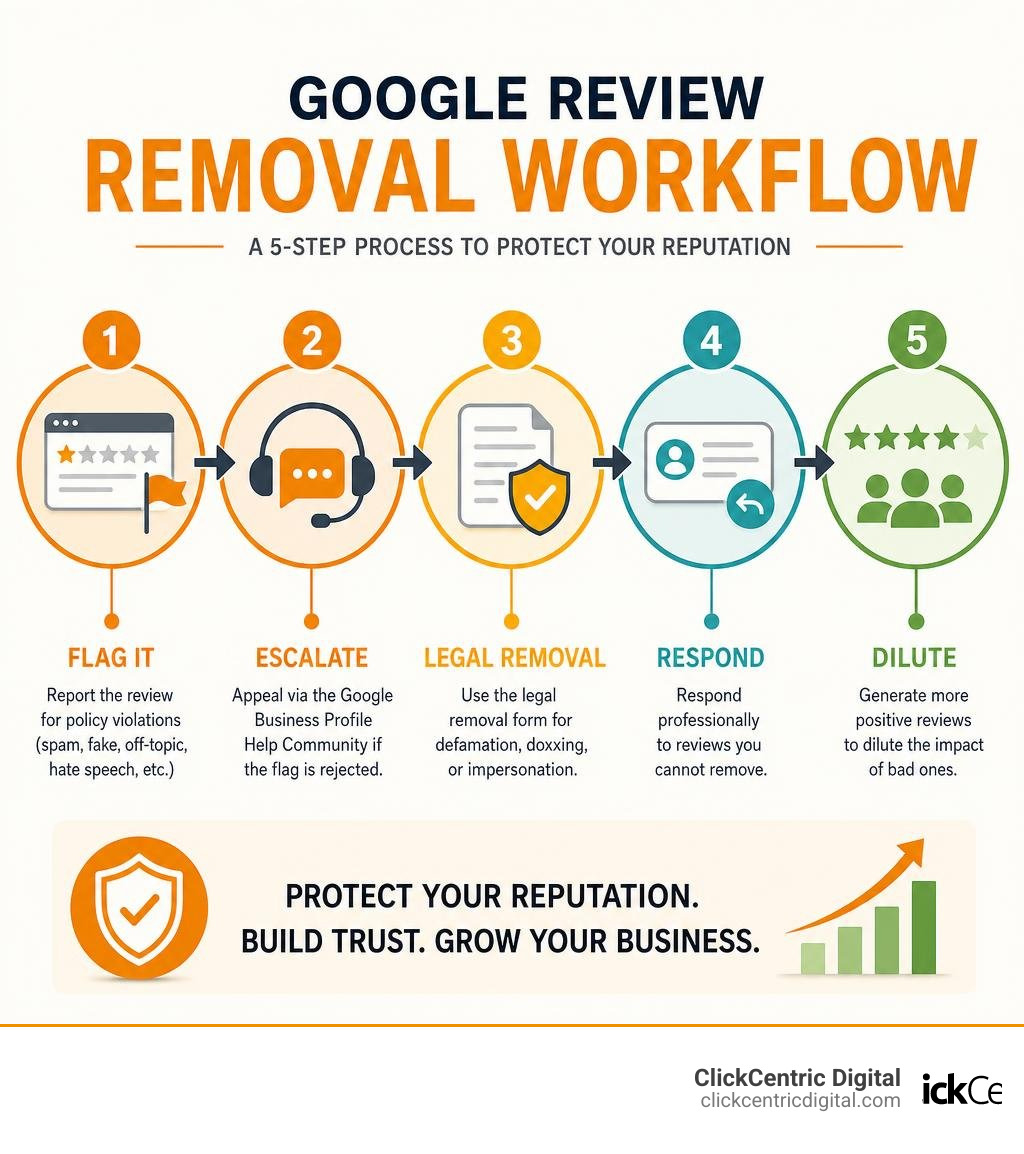
If you’re wondering how do you get rid of bad Google reviews, here’s the short answer:
- Flag it for removal if it violates one of Google’s content policies (fake, spam, off-topic, hate speech, etc.)
- Escalate via the Google Business Profile Help Community if the flag is rejected
- Use the legal removal form for defamation, doxxing, or impersonation
- Respond professionally to reviews you cannot remove
- Generate more positive reviews to dilute the impact of bad ones
You cannot delete a Google review yourself. Only Google — or the reviewer — can remove it. And Google will only act if the review breaks a specific policy.
That’s the reality most guides skip over.
Here’s why this matters for your business. 94% of searchers avoid businesses with negative reviews. A single bad review sitting at the top of your Google Business Profile can quietly cost you customers every single day — even if it’s completely fake or posted by a competitor.
The good news? You have more options than most business owners realise. Some reviews can be removed. The ones that can’t can still be managed. And a smart review strategy can rebuild your rating faster than you think.
This guide walks you through every legitimate step — no shady tactics, no empty promises.
Know your how do you get rid of bad google reviews terms:
Immediate Steps: What to Do Right After Receiving a Bad Review
When that dreaded notification pops up on your phone, your heart sinks. Whether you are running a family-owned restaurant in downtown Holland, a plumbing service in Kalamazoo, or a retail store in Grand Rapids, a 1-star review feels like a personal attack.
Before you fire off an angry response or panic, take a deep breath. Your immediate actions in the first 24 hours are critical to minimizing the damage.
First, you must determine what kind of negative feedback you are dealing with. We categorize bad reviews into two main buckets: legitimate customer complaints and completely fake or malicious reviews.
| Review Type | Key Characteristics | Best Immediate Action |
|---|---|---|
| Legitimate Complaint | Mentions specific details, names staff, describes a real transaction, or highlights a genuine service failure. | Document the issue, investigate internally, and respond professionally within 24 to 48 hours. |
| Fake or Malicious Review | Vague descriptions, generic complaints, no matching record in your customer database, or suspicious reviewer account history. | Take screenshots immediately, audit the reviewer’s profile, and prepare to flag the review. |
Your very first step is to screenshot the evidence. Do this before doing anything else. Reviewers can edit their text, change their usernames, or delete their accounts. Capture the review, the reviewer’s profile name, their profile URL, and their public review history. If this turns into a coordinated attack on your West Michigan business, having a clean paper trail is vital.
Next, conduct a quick internal audit. Look up the reviewer’s name in your point-of-sale system, customer relationship management (CRM) software, or appointment books. Check if any transactions match the date of the review or the complaints mentioned.
To help you decide if a review is worth fighting or if you are stuck with it, read our guide on Can You Get a Bad Review Removed From Google or Are You Stuck With It?
How Do You Get Rid of Bad Google Reviews That Are Fake?
Fake reviews are a massive headache for local businesses. In fact, Google’s automated systems are constantly fighting this battle, having blocked or removed over 292 million policy-violating reviews in 2025 alone. However, plenty of fake reviews still slip through the cracks.
Fake reviews often stem from competitor attacks, disgruntled former employees, or random spam bots. They are characterized by:
- Accounts that review multiple businesses across completely different geographic regions in a very short timeframe.
- Completely generic text like “Terrible service, avoid!” with absolutely no details about what was purchased or who they interacted with.
- Coordinated bursts of multiple 1-star reviews overnight.
If you suspect a competitor in Grand Haven or South Haven is targeting you with malicious feedback, you are not helpless. The Federal Trade Commission (FTC) has strict rules against fake reviews, with penalties reaching up to $53,088 per fake review.
When dealing with fake reviews, do not engage in a public shouting match. Instead, document the suspicious patterns and prepare to use Google’s official channels. For a deep dive into handling these malicious attacks, check out the comprehensive strategy guide on How to Handle a Bad Google Review (And What to Do About Fake Ones in 2026).
How Do You Get Rid of Bad Google Reviews Legally and Ethically?
When business owners ask us how do you get rid of bad Google reviews, they are often looking for a quick “delete” button. Because that button doesn’t exist, you must work within Google’s strict policy-based framework. Google will not remove a review simply because it is harsh, unfair, or factually incorrect. It will only remove a review if it violates one of its official content policies.
Google’s prohibited and restricted content policies cover several major categories:
- Spam and fake engagement: Content that does not represent a genuine experience.
- Off-topic content: Rants about social issues, politics, or unrelated personal grievances.
- Conflict of interest: Reviews left by competitors, former employees, or the business owner themselves.
- Harassment and hate speech: Personal attacks, slurs, or threats against staff members.
- Personal information: Reviews that doxx individuals by posting phone numbers, home addresses, or private details.
To successfully remove a review, you must map the offending content to one of these specific policy violations. Trying to argue that the customer is lying won’t work with Google’s automated systems or human moderators. You must prove they broke the rules.
For a detailed look at the legitimate methods to clean up your profile, you can read How to Remove Negative Reviews: 5 Guaranteed Methods or explore additional insights on How to Remove Negative Google Reviews – Alchemer.
Step 1: Flag the Review via Your Business Profile Dashboard
The fastest and most common way to request a removal is by flagging the review directly. While you can flag a review from the public Google Maps page, doing so through your official Google Business Profile dashboard is highly recommended because it routes the request with higher priority.
Here is how to do it step-by-step:
- Log into your Google Business Profile dashboard.
- Select the specific business location (e.g., your storefront in Grand Rapids or Holland).
- Navigate to the Reviews section.
- Find the offending review, click the three vertical dots, and select Report review.
- Choose the exact policy category that the review violates. Be precise. If a competitor left it, choose “Conflict of interest.” If it has nothing to do with your business, choose “Off-topic.”
Once submitted, Google typically takes between 2 to 14 days to review the flag. Clear-cut spam or obvious policy violations are often cleared within 48 hours. If you want to check the status of your request, you can use Google’s dedicated Reviews Management Tool, which provides a transparent look at your pending flags. For official documentation on this process, refer to the Report inappropriate reviews on your Business Profile – Google Help page.
Step 2: Escalate Through the Google Business Help Community
What happens if Google rejects your initial flag? This is incredibly common. Most first-pass flags are evaluated by automated AI systems that often miss the nuance of a fake review. If you receive an email stating “No policy violation found,” do not despair. You have a second-look opportunity.
You can escalate the issue through the Google Business Profile Help Community. This is a public forum staffed by Google Product Experts — real humans who have a direct line of communication to Google’s engineering and moderation teams.
When posting in the help community, treat your post like a formal legal brief:
- Provide your business name, location, and Google Maps URL.
- Link directly to the offending review.
- Clearly state which policy was violated.
- Present your evidence objectively (e.g., “This reviewer account was created yesterday and left identical 1-star reviews for five different local competitors in Kalamazoo within one hour”).
Escalations through the help community have a surprisingly high success rate (often around 60%) compared to the automated first-pass flag. To understand the realities and limitations of this escalation path, read our Review Removal Reality Check: Can You Really Delete Google Feedback?
Step 3: Use the Legal Removal Form for Defamation
If the review contains demonstrably false statements of fact that cause measurable financial harm to your business, it crosses the line from a bad opinion into legal defamation. Google takes legal violations seriously and provides a dedicated legal removal form for these extreme cases.
This route is particularly useful if a review doxxes an employee, uses copyrighted material, or makes false claims of illegal activity (such as accusing your West Michigan business of fraud or health code violations without proof).
To file a legal request:
- Access Google’s Legal Help page.
- Select “Google Business Profile” and choose the legal reason for your request (e.g., defamation or privacy violations).
- Provide clear, factual evidence proving the statements are false and harmful.
That filing a false legal request can carry serious penalties, so you should only use this option for genuine legal violations. A cease-and-desist letter sent to the reviewer (if you can identify them) can also resolve about 40% of clearly defamatory reviews without ever going to court. For a visual walkthrough of navigating these complex legal requests, you can watch this helpful guide: How to Delete Negative Google Reviews – It’s Easier … – YouTube.
The Art of Responding to Negative Reviews You Cannot Remove
Let’s face it: the vast majority of negative reviews do not violate Google’s policies. If a real customer leaves a harsh, 1-star review because they felt your customer service in Kalamazoo was slow or your prices in Holland were too high, Google will not remove it.
But you are far from powerless.
An outstanding response to a negative review is one of the most powerful marketing tools you have. In fact, research shows that 88% of consumers are willing to look past a bad review if they see the business responded well. Furthermore, businesses that actively respond to reviews see a 30% improvement in how they are perceived by potential customers.
When you reply to a bad review, remember that you are writing for the next 1,000 people who visit your profile, not the angry person who wrote the review. Your response demonstrates your professionalism, your commitment to customer service, and your brand’s character.
To master this balance, explore our guide on how to Manage Your Google Review Responses Like a Pro. For additional strategies on turning public complaints into brand wins, check out How to Handle Negative Google Reviews: 7 Steps That Actually Work.
Crafting a Professional Response to Turn a Negative Into a Positive
When replying to a genuine negative review, we recommend following a simple four-step formula: Thank, Acknowledge, Apologize, and Offer a Private Resolution.
Keep your response short, calm, and objective. Never argue, never get defensive, and never admit legal fault.
Here is a template you can adapt for your business:
“Hello [Name], thank you for sharing your feedback with us. We hold ourselves to high standards, and we are sorry to hear that your recent experience did not meet your expectations. We would love the opportunity to look into this and make things right. Please contact our manager directly at [Phone Number] or [Email Address] so we can discuss this privately. Thank you, [Business Name] team.”
By moving the conversation to a private channel (phone or email), you prevent a public back-and-forth while showing future searchers that you genuinely care about resolving issues. To weigh the benefits of automating these replies versus writing them manually, read our analysis on Automated Review Response System Pros and Cons.
How to Offset Bad Google Reviews with Positive Feedback
If you cannot remove a bad review, the single best strategy is to drown it out.
The math of Google reviews is simple. If you have only 5 reviews, a single 1-star review will drag your aggregate rating down to a painful 4.2. But if you have 150 reviews, a single 1-star review barely makes a dent, leaving your average at a stellar 4.9.
Only 1 in 20 dissatisfied customers will naturally leave a review, while 80% will share their negative experiences with friends. This means you must be proactive. You need to build a system that consistently encourages your happiest customers to share their experiences.
To start boosting your ratings immediately, read our guide on how to Stop Settling for Four Stars and Generate More 5-Star Reviews Today. To automate this process and make review collection effortless, explore our recommended tools in Stop Begging for Feedback With This Review Request Software.
How Do You Get Rid of Bad Google Reviews by Diluting Them?
To successfully dilute negative feedback, you need a steady “review velocity” — a consistent stream of new, positive reviews over time. Google’s algorithms love fresh reviews, and so do consumers. A 5-star review from last week carries far more weight than a 1-star review from two years ago.

Here are three highly effective, ethical ways to build your review volume in West Michigan:
- Send automated SMS or email requests: Send a friendly follow-up text or email immediately after a successful service call in Grand Haven or a purchase in South Haven.
- Use QR codes at checkout: Place a clean, professional sign at your front desk or checkout counter that links directly to your Google review form.
- Train your staff to ask: Teach your team to say, “If you loved your service today, would you mind leaving us a quick review on Google? It really helps our local business!”
By turning review generation into a daily operational habit, you build a powerful “reputation shield” that protects your business from the occasional bad review. To learn how to dominate your local market through review generation, check out our resource on Mastering Local Reviews to Win More Customers.
Frequently Asked Questions about Google Review Removal
How long does it take to get a bad Google review removed?
The timeline for removing a Google review depends entirely on the method used and the complexity of the case. Clear-cut spam, bot reviews, or obvious policy violations flagged through your dashboard are often removed automatically within 48 hours.
If your request requires a human moderator to review evidence (such as conflict-of-interest cases or off-topic rants), expect it to take between 7 to 14 days. If the initial flag is rejected and you must escalate the issue through the Google Business Profile Help Community or file a legal defamation form, the process can take an additional 14 to 30 days. For more details on what to expect, read How to Remove Bad Reviews From Google My Business (2026).
What common mistakes should businesses avoid when trying to remove reviews?
The biggest mistake business owners make is panicking and hiring shady “guaranteed review removal” services. Many of these companies use unethical tactics, such as automated bot reporting or filing false DMCA copyright claims. If Google detects these manipulative practices, it can result in your entire Google Business Profile being permanently suspended.
Another common mistake is trying to buy fake positive reviews to quickly cover up a bad one. This violates Google’s terms of service and FTC guidelines, and can lead to severe legal penalties and public warnings placed on your profile. Finally, never engage in a public argument with a reviewer. It only draws more attention to the negative feedback and makes your business look unprofessional.
Can customer service improvements prevent future negative reviews?
Absolutely. The absolute best way to manage your online reputation is to prevent negative reviews from happening in the first place. This starts with creating clear internal feedback loops.
If you notice a pattern in your negative reviews — such as complaints about long wait times at your Grand Rapids location or communication issues in Kalamazoo — use that feedback to train your staff and adjust your operations. By addressing customer complaints privately before they leave your business, you can turn a potentially negative online review into a loyal, lifelong customer.
Conclusion
At the end of the day, learning how do you get rid of bad Google reviews is about taking control of your business’s online narrative. While you cannot directly delete a review with the click of a button, you have a powerful playbook at your disposal: flag the obvious policy violations, escalate when necessary, respond with grace to the ones you cannot remove, and build a steady stream of 5-star reviews to dilute the impact of negative feedback.
Managing your online reputation takes time, consistency, and local expertise. Whether you’re trying to stand out in the competitive Grand Rapids market, attract tourists in Grand Haven and South Haven, or build trust in Holland and Kalamazoo, we are here to help.
At ClickCentric Digital, we specialize in helping West Michigan businesses dominate local search, manage their online reviews like pros, and leverage targeted digital marketing strategies to acquire more customers.
Ready to clean up your profile, boost your ratings, and win more local business? Discover how our team can help you build an unstoppable online reputation by exploring our Reputation Management services today.
Sorry, the comment form is closed at this time.