

08 Jun Can You Get a Bad Review Removed from Google or Are You Stuck with It?
Can You Get a Bad Review Removed from Google or Are You Stuck with It?
The Honest Answer to “Can You Get a Bad Review Removed from Google?”
Can you get a bad review removed from Google? Yes — but only under specific conditions, and it’s not as simple as clicking a button.
Here’s the quick answer:
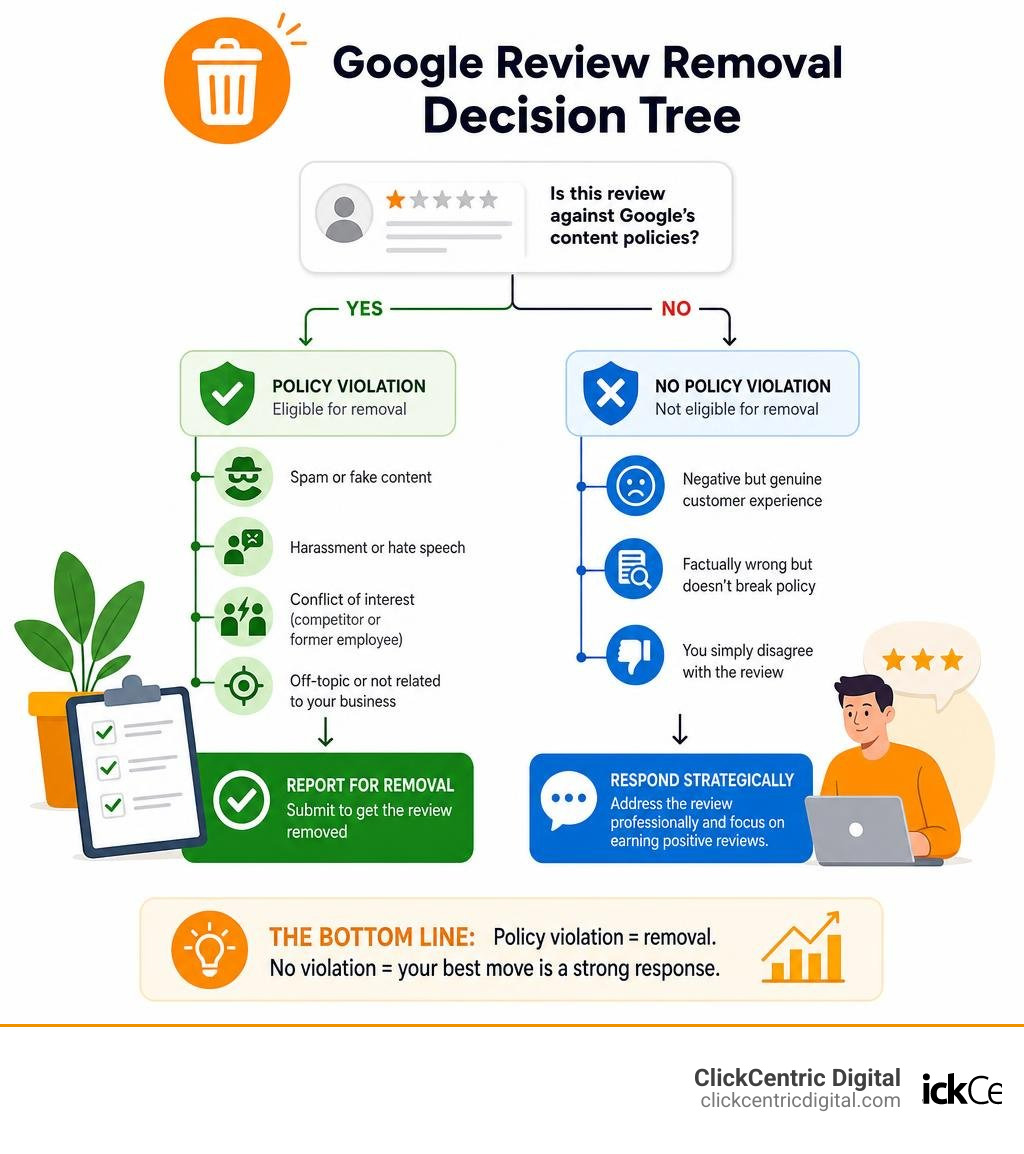
| Situation | Can It Be Removed? |
|---|---|
| Review violates Google’s content policies (spam, fake, harassment, etc.) | Yes — report it for removal |
| Review is from a competitor or former employee | Yes — qualifies as conflict of interest |
| Review is off-topic or has nothing to do with your business | Yes — eligible to flag |
| Review is negative but genuine and from a real customer | No — Google won’t remove it |
| Review is factually wrong but doesn’t break policy | No — Google doesn’t mediate disputes |
| You simply disagree with the review | No — not a valid reason for removal |
The bottom line: Google only removes reviews that violate its content policies — not reviews you simply don’t like.
That’s a hard pill to swallow when a single 1-star review is sitting on your profile. And the stakes are real. Research suggests that a bad review can cost a local business anywhere from 5% to 20% of its revenue. Some estimates put the share of bogus online reviews at around 11% — and in 2025 alone, Google blocked or removed 292 million policy-violating reviews.
So the system does work — but you have to know how to use it correctly.
This guide walks you through exactly what Google will and won’t remove, how to report reviews the right way, what to do when your request gets rejected, and how to protect your reputation when removal simply isn’t an option.
Basic can you get a bad review removed from google glossary:
Can You Get a Bad Review Removed from Google? The Rules of Engagement
When you see a biting 1-star review on your Google Business Profile, your first instinct is probably a mix of panic and frustration. If you run a family-owned restaurant in Holland, MI, or a boutique service business in Grand Rapids, every single star counts toward your local SEO visibility. But before you rush to click every “report” button in sight, you need to understand how Google’s moderation playground actually works.
Google operates on a strict set of rules collectively known as the Maps User Contributed Content Policy. This framework is designed to keep Google Maps and Search helpful, authentic, and safe for consumers.
[User Submits Review] ---> [Google AI Spam Filter] ---> [Approved & Published]
 |
 [Merchant Flags Review]
 |
 [Human or AI Policy Check]
 / \
 [Policy Violated] [No Violation Found]
 / \
 [Review Removed] [Review Stays Live]
 |
 [Merchant Appeals]
To keep this system clean, Google employs sophisticated automated spam detection algorithms. These algorithms work 24/7 to scan reviews for patterns of fake engagement, repetitive text, and suspicious user behavior. Sometimes, these automated systems work so fast that they block or remove policy-violating reviews before you even see them. However, they aren’t perfect. Nuanced violations—like a competitor trying to sabotage your business or a disgruntled former employee leaving a retaliatory rating—frequently slip past the automated filters.
This is where the manual flagging process comes in. But here is the critical reality check: you cannot treat Google’s reporting tool as a personal delete button. For a detailed breakdown of what you can realistically expect from this system, check out our Review Removal Reality Check: Can You Really Delete Google Feedback?.
When Can You Get a Bad Review Removed from Google?
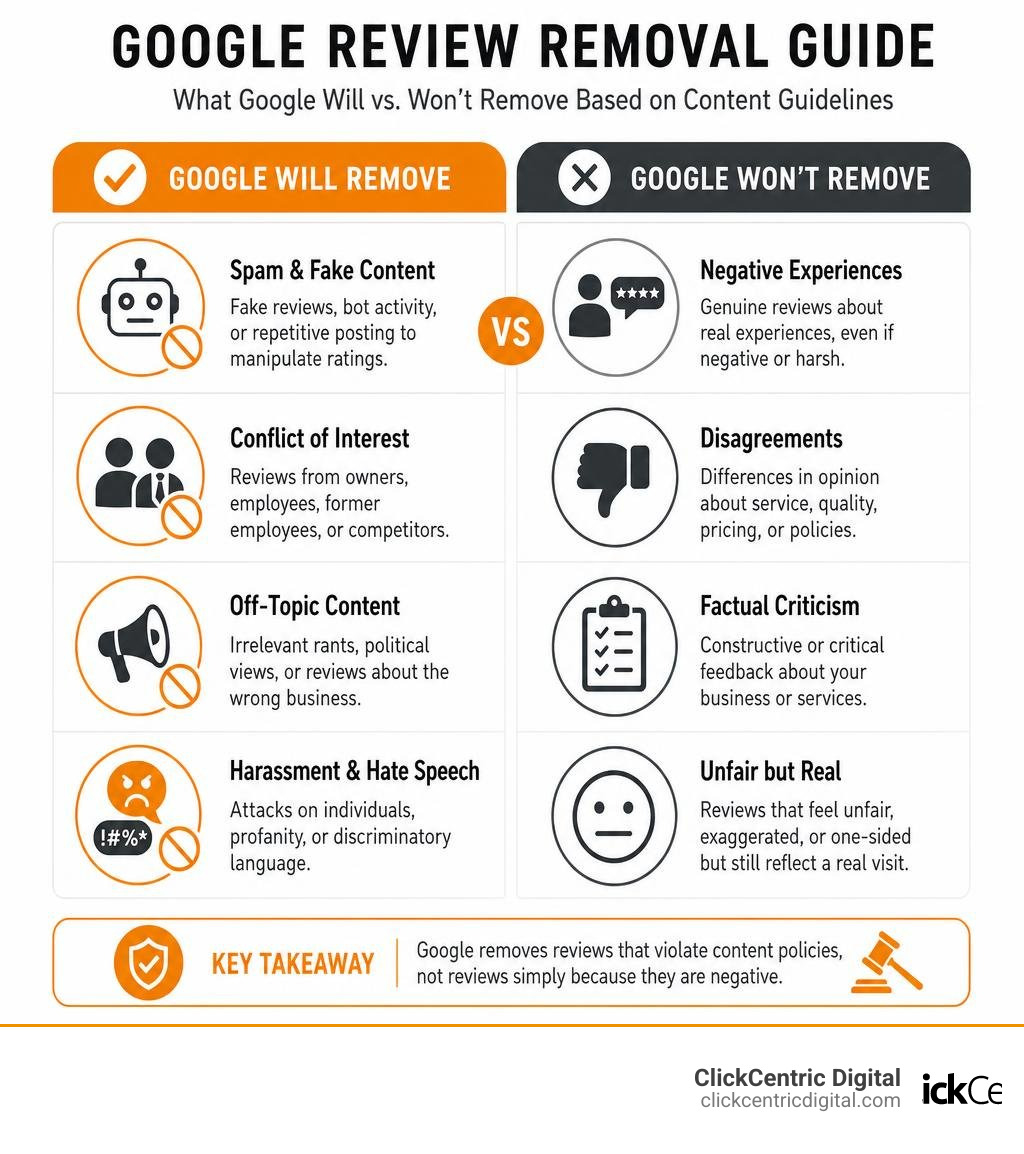
Google will step in and delete a review if—and only if—it violates one of their specific content policies. The most common valid reasons for removal include:
- Fake Engagement: Content that is not based on a real experience, or is posted repeatedly to manipulate a business’s rating.
- Conflict of Interest: Reviews left by the business owner, current employees, former employees, or direct competitors.
- Off-Topic Content: Reviews that discuss social or political views, rant about unrelated topics, or mistake your West Michigan business for an entirely different company.
- Harassment and Hate Speech: Reviews that attack specific employees, use profanity, or contain discriminatory language.
Why You Can’t Get a Bad Review Removed from Google Just Because It’s Negative
It is incredibly frustrating to receive a negative review that you believe is unfair, exaggerated, or factually incorrect. However, Google is not a court of law. They do not have the resources to investigate whether a customer’s steak was actually cold, or if your Grand Haven plumbing team arrived at 9:05 AM instead of 9:00 AM.
If a real customer had a genuine, albeit highly negative, experience at your business, Google will not remove their feedback. They do not mediate factual disputes between merchants and customers. A negative review is considered protected consumer feedback unless it crosses the line into a clear policy violation.
Identifying Policy Violations: What Google Will Actually Remove
To successfully get a bad review removed, you must build a case based on Google’s exact rulebook. If you flag a review under the wrong category, your request will almost certainly be rejected by Google’s automated system.
Here is a breakdown of the specific policy categories Google enforces, along with real-world examples:
1. Spam and Fake Content
This includes reviews from accounts that have never actually visited your business, or coordinated bot attacks. If you receive a flurry of 1-star reviews in Kalamazoo, MI, from brand-new profiles with no other review history, these are highly likely to be flagged as spam.
- Example: “This place is terrible!” left by an account named “User98723” that has posted the exact same review on 50 other businesses across the country in the last 24 hours.
2. Conflict of Interest
Google prohibits anyone with a financial or personal connection to the business from leaving reviews. This includes you, your staff, and your competitors.
- Example: A recently terminated employee posts: “The management here is awful and they don’t treat staff right.” If you have HR records proving this person was let go the day before, this is a clear-cut conflict of interest.
3. Off-Topic Content
Reviews must be based on a legitimate customer experience at your physical location.
- Example: A user leaves a 1-star review on your South Haven dental practice complaining about a political rally that took place down the street. Because it has nothing to do with your dental services, it is highly eligible for removal.
4. Harassment, Profanity, and Illegal Content
Google has zero tolerance for reviews that threaten employees, use explicit language, or promote illegal activities.
- Example: A review that names your front-desk manager in Grand Rapids and uses slurs or aggressive threats.
5. Rating Manipulation (Incentivized Reviews)
Google’s 2026 updates heavily restrict businesses from offering discounts, free products, or financial incentives in exchange for positive reviews. If a competitor is caught buying fake 5-star reviews to boost their own ranking, or if a negative reviewer demands payment to take down their post (extortion), Google will intervene.
For a deeper dive into these removal categories, check out our guide on How to Remove Negative Reviews: 5 Guaranteed Methods or refer directly to Google’s official documentation on how to Remove reviews from your Business Profile on Google.
| Review Content | Policy Violated? | Eligible for Removal? |
|---|---|---|
| “The food was cold and the server was rude.” | No (Genuine negative feedback) | No |
| “Don’t work here! The boss is a crook.” | Yes (Conflict of Interest / Harassment) | Yes |
| “I hate the mayor of this town, don’t visit Grand Rapids.” | Yes (Off-Topic Content) | Yes |
| “Worst experience ever!” (Left by a competitor’s IP address) | Yes (Conflict of Interest / Fake Engagement) | Yes |
Step-by-Step: How to Flag and Report a Google Review
If you have identified a review that clearly violates Google’s terms, you need to report it. There are three main interfaces you can use to flag a review: Google Maps, Google Search, and the Google Reviews Management Tool.
For the best tracking and success rates, we highly recommend using the Reviews Management Tool.

Method 1: Flagging via Google Maps or Google Search
This is the quickest method, but it offers the least visibility into the status of your request.
- Open Google Maps or search for your business on Google.
- Navigate to your Google Business Profile and click on your reviews.
- Find the offending review, click the three-dot menu in the top right corner, and select Report review (or Flag as inappropriate).
- Choose the specific policy violation that applies (e.g., Spam, Conflict of Interest, or Off-Topic).
- Submit the report.
Method 2: The Google Reviews Management Tool (Recommended)
This dedicated portal allows you to track the exact progress of your removal requests and submit appeals if your first attempt is rejected.
- Go to the official Report inappropriate reviews on your Business Profile page.
- Log into the Google account associated with your Google Business Profile.
- Select your business listing.
- Click Check the status of a review I reported previously or Report a new review for removal.
- Select the review you want to flag, choose the violation category, and submit.
Once submitted, Google typically takes 3 to 7 business days to process the initial request. During this time, the status in your dashboard will show as “Under Review.”
The Appeal Process: What to Do When Your Initial Request Is Denied
It is incredibly common for your initial flag to be rejected. Why? Because the first line of defense is almost entirely automated. Google’s AI looks for obvious triggers (like profanity or known spam accounts). If the violation is nuanced—such as a competitor using a fake name to leave a 1-star review—the AI will likely return an email saying: “We’ve reviewed the report and found no policy violation.”
Do not panic. This is where the real work begins.
Step 1: Submit a One-Time Appeal
When your initial report is rejected, the status in your Reviews Management Tool will change to “Report reviewed – no policy violation.” At this point, you are eligible to submit a one-time appeal.
Unlike the initial flag, appeals are reviewed by human moderators. This is your chance to present a clear, emotion-free, legal-style case.
[Initial Flag Rejected]
 |
[Gather Evidence] (Screenshots, employee records, timelines)
 |
[Submit One-Time Appeal] (Explain the exact policy violated)
 |
[Human Moderator Review] ---> [Approved: Review Deleted]
 ---> [Denied: Final Decision]
When writing your appeal, follow these best practices:
- Be Specific: Cite the exact policy from the Maps User Contributed Content Policy.
- Keep it Factual: Do not use emotional language or complain about how unfair the review is. Stick to verifiable facts.
- Provide Context: If the reviewer is a former employee, state their termination date and explain that the review constitutes a clear conflict of interest. If the reviewer is an opposing party in a lawsuit (common for law firms in West Michigan), provide public case numbers to prove the conflict.
- Define Ambiguity: If the reviewer used regional slang or subtle insults that a non-native English-speaking moderator might not understand, explain the terms clearly.
Step 2: Escalate to the Google Business Profile Help Community
If your one-time appeal is denied, your options within the standard dashboard are exhausted. However, you have one final escalation path: the Google Business Profile Help Community.
This is a public forum staffed by Google Product Experts (high-level volunteers who have a direct line of communication with Google’s engineering and moderation teams).
- Visit the Google Business Profile Help Community.
- Create a new post detailing your situation.
- Provide your business name, the link to your profile, the text of the review, and the case ID from your denied appeal.
- Explain clearly why the review violates Google’s guidelines, backed by the evidence you gathered.
If a Product Expert agrees that Google’s moderation team made an error, they can manually escalate the case for a secondary internal review. This escalation path boasts a 40-60% success rate when clear, policy-based evidence is provided, compared to just a 15-25% success rate for the initial automated flag.
The Dark Side of Review Removal: Paid Services and Shady Tactics
Because negative reviews can devastate a local business’s bottom line, a massive industry of “review removal services” has emerged. Some of these agencies charge anywhere from $125 to $500 per removed review, promising “guaranteed results.”
While some consultants are legitimate policy experts who charge hourly to navigate the official appeal channels on your behalf, many operate in a highly unethical “dark side.”
The Fake DMCA Takedown Scam
One of the most dangerous tactics used by shady reputation companies is abusing the Digital Millennium Copyright Act (DMCA). These companies will take the text of your negative Google review, publish it on a dummy blog post with a backdated timestamp, and then file a formal DMCA copyright infringement notice with Google claiming the reviewer stole their copyrighted content.
Because Google processes DMCA notices through automated systems to comply with federal law, the review is often removed automatically. However, this is perjury and fraud. Google has cracked down heavily on these false legal claims, and businesses caught using these services risk severe legal consequences and permanent suspension from Google Search and Maps.
Coordinated Mass Reporting and Automated Bots
Other shady agencies use browser automation and networks of fake accounts to mass-report a single review, hoping to trigger an automated deletion.
In April 2026, Google rolled out a massive AI-driven enforcement wave specifically targeting profiles that engaged in suspicious reporting patterns. Thousands of innocent local businesses across the country—including several in West Michigan—woke up to find their entire Google Business Profiles suspended because they hired “guaranteed” removal services that used automated bots.
Furthermore, the Federal Trade Commission (FTC) final rule banning fake testimonials and reviews makes it illegal to engage in deceptive review manipulation. The risks far outweigh the rewards. If a service promises a “100% guaranteed” removal and refuses to explain their process, run the other way.
What to Do When a Negative Review Cannot Be Removed
If you have gone through the flagging process, submitted an appeal, escalated to the community forum, and the review still remains, you must accept a hard truth: the review is here to stay.
But a permanent 1-star review is not a death sentence for your business. In fact, studies show that consumers are highly suspicious of businesses with a perfect 5.0 rating. A healthy mix of reviews (around 4.2 to 4.9 stars) actually achieves the highest conversion rates because it looks authentic and trustworthy.
Here is your game plan for managing permanent negative feedback:
Strategy 1: Write a Professional, Strategic Response
Your response to a negative review is not for the reviewer—it is for the next 500 potential customers who read it. A polite, professional response can completely neutralize the damage of a bad review.
When responding, keep these principles in mind:
- Stay Calm and Polite: Never argue, get defensive, or attack the reviewer.
- Keep it Short: State your commitment to customer service and offer to resolve the issue offline.
- Take it Offline: Provide a direct phone number or email address so the reader sees you are proactive.
- Reframe the Narrative: If you don’t recognize the reviewer as a customer, say so politely.
Example Response:
“Hello [Name]. We take customer satisfaction very seriously, but we cannot find any record of a customer under your name or matching this description in our database. We would love to learn more and make things right. Please contact our manager directly at [Phone Number] or [Email] so we can assist you.”
For a complete guide on how to structure these replies, check out our resource on how to Manage Your Google Review Responses Like a Pro.
Strategy 2: Dilute the Damage with Review Velocity
The absolute best defense against a bad review is a steady stream of fresh, positive reviews. This is known as Review Velocity.
If you have 10 reviews and receive a 1-star rating, your aggregate score drops significantly. But if you have 150 reviews and receive a 1-star rating, your aggregate score barely budges.
We help businesses in Grand Rapids, Holland, and across West Michigan set up automated review generation systems that ask happy customers for feedback immediately after a transaction. By consistently generating authentic 5-star reviews, you naturally push the negative feedback down the page where few searchers will ever see it.
To start building your defense, read our guides on how to Stop Settling for Four Stars and Generate More 5-Star Reviews Today and how to go about Mastering Local Reviews to Win More Customers.
Frequently Asked Questions about Google Review Removal
How long does Google take to remove a flagged review?
For standard flags submitted through Google Maps or your Business Profile, the initial automated review process typically takes 3 to 7 business days. If the review is an obvious, egregious violation (such as containing extreme profanity or direct threats), it may be removed by automated filters within 24 hours. If your request is rejected and you submit a manual appeal with evidence, human moderation can take an additional 7 to 21 business days to reach a final decision.
Can I delete a Google review I wrote as a customer?
Yes. If you wrote a review as a customer and want to delete or edit it, the process is simple:
- Open Google Maps on your phone or computer.
- Tap your profile picture or initials in the top right corner and select Your contributions.
- Click on the Reviews tab.
- Locate the review you wrote, click the three-dot menu, and select Delete review (or Edit review if you simply want to update your feedback).
Will deleting my Google Business Profile wipe out bad reviews?
No, and we strongly advise against attempting this. Deleting your Google Business Profile does not delete the physical location from Google Maps; it simply marks it as “unclaimed.” The listing—and all of its reviews—will remain visible to the public. If you attempt to delete your profile and create a brand-new one at the same address, Google’s algorithms will detect the duplicate location and merge the profiles, bringing all of your old negative reviews right back with it. Doing this also wipes out all of your hard-earned positive reviews and severely damages your local search rankings.
Conclusion
When a negative review strikes, you are not entirely powerless. By understanding Google’s content policies, using the official Reviews Management Tool, and structuring clear, evidence-based appeals, you can successfully remove illegitimate feedback.
But for the reviews that stick around, the key is proactive management. Don’t let a single bad day define your business online. At ClickCentric Digital, we help local businesses across West Michigan—from Grand Rapids and Holland to Grand Haven, South Haven, and Kalamazoo—take control of their online presence.
Whether you need to fight a coordinated fake review attack or build an automated system to consistently generate positive feedback, we can help. Protect your hard-earned reputation and boost your local search rankings today by exploring our professional Reputation Management services.
Sorry, the comment form is closed at this time.