

09 Apr The Ultimate Guide to GMB Posting Without Being Boring
The Ultimate Guide to GMB Posting Without Being Boring
Why Most Google Business Profile Posts Get Ignored (And How to Fix That)
GMB posts best practices can be the difference between a profile that quietly generates leads and one that nobody notices.
Here’s a quick overview of what actually works:
Top GMB Post Best Practices at a Glance:
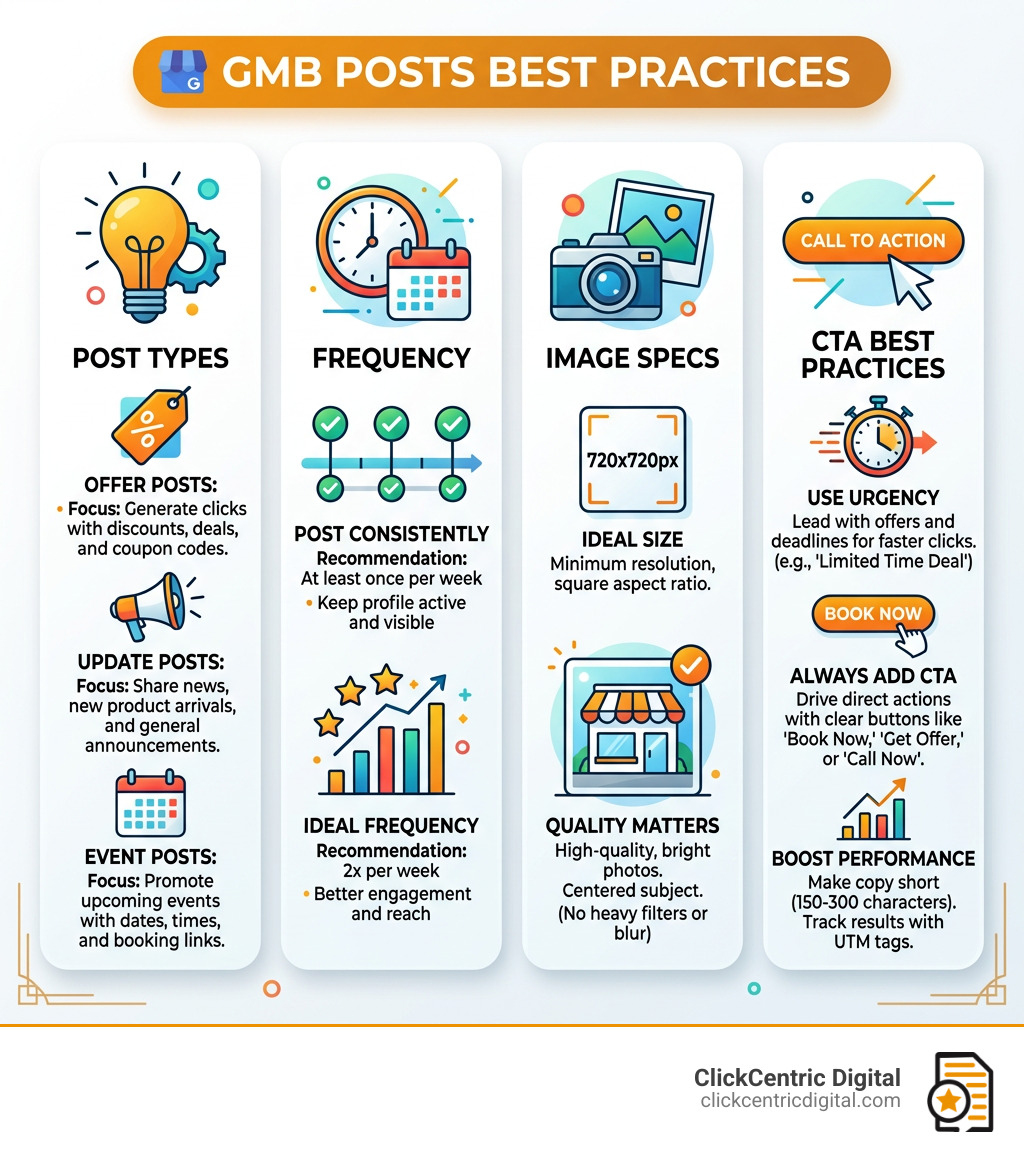
- Post consistently – Aim for at least once per week, ideally 2x per week
- Use high-quality images – Minimum 720x720px, centered subject, no heavy filters
- Lead with urgency – Offer Posts with discounts or deadlines get the most clicks
- Keep copy short – 150-300 characters is the sweet spot for mobile readers
- Always include a CTA – “Book Now,” “Get Offer,” or “Call Now” drive action
- Use Offer Posts first – Data from 1,000+ posts shows Offer Posts outperform Event and Update Posts for clicks
- Add UTM tags – Track exactly which posts drive traffic and conversions
Think about this for a second. Over 90% of web searches happen on Google. When someone searches for a business like yours, your Google Business Profile is often the first thing they see — before your website, before your social media, before anything else.
And yet most businesses treat their GBP posts like an afterthought. They post once in a blue moon, slap up a blurry photo, write two vague sentences, and wonder why nobody clicks.
Here’s what the data actually shows: posts with a sense of urgency and special offers consistently outperform generic updates. Videos get twice the engagement of photos. And images with text overlaid perform better than those without.
The businesses winning local search right now aren’t just claiming their profile and walking away. They’re treating GBP posts like a free advertising channel — because that’s exactly what it is.
This guide will show you how to use it properly.
Understanding Google Business Profile Post Types and Visibility
Before we dive into the “how-to,” we need to understand the “what.” Google Business Profile (formerly Google My Business) rolled out posts back in 2017. Since then, they have become a cornerstone of local engagement. But not all posts are created equal.
Update Posts
Think of these as your “What’s New” section. We use these for general announcements, sharing a new blog post, or highlighting a new service in Grand Rapids or Kalamazoo. While you can write up to 1,500 characters, the “sweet spot” for engagement is actually much shorter—around 150 to 300 characters.
Offer Posts
If you want clicks, this is your gold mine. Joy Hawkins’ analysis of 1,000 Google Posts found that Offer Posts get more clicks than any other type. These allow you to include a coupon code, a link to a specific landing page, and terms and conditions. They are perfect for “15% off your first service” or “Free consultation this month.”
Event Posts
Planning a grand opening in Holland or a workshop in Grand Haven? Event posts require a start and end date. A pro tip we’ve learned: Google’s system is quite smart at parsing temporal details. If you specify “Every Monday through Thursday” in the description, Google is more likely to display that event to users searching during those specific times.
Where Do These Posts Actually Live?
Your posts appear in several high-traffic areas:
- The Knowledge Panel: On desktop, this is the big box on the right side of the search results.
- Google Maps: Both on desktop and the mobile app, posts appear when a user clicks on your business pin.
- The Updates Tab: On mobile devices, Google often places your latest post directly under your business name, which can actually push reviews further down the screen.
Posts are shown in reverse-chronological order, meaning your freshest content always takes center stage. While posts technically stay “active” and visible for six months, they have the most impact in the first few days after publishing. For a deeper dive into the technical rules, you can check out Google’s official post guidelines.

GMB Posts Best Practices for Visuals and Copy
We live in a visual world. If your image is blurry or irrelevant, people will scroll right past your profile. To master gmb posts best practices, you need to treat your GBP like a high-end Instagram feed, not a junk drawer.
Visual Specifications
- Resolution: Google recommends 720×720 pixels. The minimum is 250×250, but we suggest aiming higher for clarity.
- Video: Videos get 2x more engagement than photos. Keep them under 30 seconds, 75MB in size, and at least 720p resolution.
- Framing: Always center your subject. Google crops images differently across desktop and mobile, so if your text or face is on the edge, it might get cut off.
- AI Tools: Don’t be afraid to use an AI photo editor to brighten up your shots or an AI clip generator to turn static photos into engaging video snippets.
Writing Engaging Copy for GMB Posts Best Practices
You have about 80 characters before Google cuts off your text with a “Read More” link. That means your “hook” has to be in the first sentence.
- Front-load Keywords: Put your most important words (like “Plumbing Repair” or “Web Design”) at the very beginning.
- Use CTA Buttons: Never leave a post without a Call to Action. Options include “Book,” “Order Online,” “Buy,” “Learn More,” “Sign Up,” and “Call Now.”
- Urgency and Value: Use phrases like “Limited time only” or “Only 5 spots left.”
- Emojis: Use them strategically to break up text, but don’t turn your post into a puzzle.
For businesses in West Michigan looking to dominate the map, engagement on these posts sends positive signals to Google. You can learn more info about Google Maps ranking to see how posts fit into the bigger SEO picture.
Optimizing Event and Offer Posts for GMB Posts Best Practices
When creating an Event post, don’t just say “Happy Hour.” Say “Happy Hour every Tuesday through Friday from 4 PM to 6 PM.” This specific event schema helps Google understand exactly when to show your post to local searchers.
For Offer posts, try creating “evergreen” offers. These are deals that stay valid for a long time—up to 12 months. This ensures that even if you forget to post for a week, a potential customer in South Haven or Holland still sees a reason to click “Call Now.”
Strategic Posting Frequency and Local SEO Impact
How often should we post? It’s the question we get asked most. While Google doesn’t have a strict “rule,” the consensus among local SEO experts is that consistency beats frequency.
Posting 10 times in one day and then disappearing for a month is a recipe for failure. Instead, aim for a steady cadence.
The Ideal Window
Data suggests that posting between Tuesday and Thursday during business hours often yields the highest engagement. Why? Because that’s when people are actively planning their weekends or looking for mid-week services.
Freshness and Clicks
Google loves “freshness.” An active profile tells Google (and customers) that you are open for business and attentive to your audience. Every time someone clicks your post, it improves your Click-Through Rate (CTR). High CTR is a powerful indirect ranking signal. If people keep clicking on your business in Holland MI, Google realizes you are a relevant result and may boost your visibility in the local pack.
Technical Optimization: Tracking and Troubleshooting
If you aren’t tracking your posts, you’re just guessing. To truly master gmb posts best practices, you need to know which posts actually put money in the bank.
UTM Tagging
Google Business Profile Insights will tell you how many people “viewed” your post, but “views” don’t pay the bills—conversions do. By adding UTM tags to your CTA links, you can see exactly which posts led to website sales or contact form submissions in Google Analytics.
Use Google’s Campaign URL Builder to create a link like this:
yourwebsite.com/?utm_source=google&utm_medium=gbp_post&utm_campaign=summer_sale
Handling Rejections
It happens to the best of us. A post gets rejected, and you have no idea why. Common culprits include:
- Phone numbers in the text: Google wants you to use the “Call Now” button instead.
- Overly promotional language: Avoid ALL CAPS or excessive exclamation points.
- SafeSearch issues: Sometimes Google’s AI (Google Vision API) misinterprets an image. If your photo of a “hot” pepperoni pizza is flagged as “adult content,” try a different angle or less steam!
For multi-location businesses in Grand Rapids and beyond, manual posting is a nightmare. We recommend using third-party scheduling tools or the Google Business Profile API to manage posts across all your locations simultaneously.
Frequently Asked Questions about GMB Posts
How long do Google Business Profile posts stay live?
Currently, posts remain visible on your profile for up to six months. However, they are shown in reverse-chronological order, so after you’ve made a few new posts, the older ones will be tucked away under a “View all” link. Offer and Event posts will stay live until the end date you specify.
Do hashtags help GMB posts rank higher?
The short answer is: No. Unlike Instagram or Twitter, Google Business Profile doesn’t use hashtags to categorize content or boost reach. Including them won’t hurt you, but they take up valuable character space that could be used for keywords or a better hook. Focus on clear, descriptive language instead.
Why was my Google Business Profile post rejected?
Rejections usually stem from content policy violations. This includes using “spammy” links, including a phone number in the post body (use the button instead!), or using images that fail Google’s “SafeSearch” filters. If you’re stuck, try removing all links and special characters to see if it passes, then add them back one by one.
Conclusion
Mastering gmb posts best practices isn’t about being a professional writer; it’s about being consistent, clear, and customer-focused. By treating your Google Business Profile as a living, breathing extension of your brand, you can turn casual searchers into loyal customers.
At ClickCentric Digital, we specialize in helping businesses across West Michigan—from Grand Rapids to Kalamazoo—dominate their local markets. Whether it’s managing your reviews or fine-tuning your local search strategy, we’re here to help you grow.
Ready to stop being boring and start getting leads? Maximize your local reach with Google Maps ranking and let’s get your business the visibility it deserves.
Sorry, the comment form is closed at this time.