

19 May Route Planning Made Easy with Google Map Optimizer
Route Planning Made Easy with Google Map Optimizer
Why Every Multi-Stop Business Needs a Google Map Optimizer
Quick Answer: Best Google Map Optimizer Tools
| Tool | Best For | Free Option? |
|---|---|---|
| Google Maps (built-in) | Simple routes, up to 10 stops | Yes |
| OptiMap | Free web-based multi-stop planning | Yes (up to 50 locations) |
| Google Maps Route Optimizer (Chrome extension) | Time-based optimization in-browser | Yes |
| MyRouteOnline | Bulk address import, driver workflows | Freemium |
| Google Route Optimization API | Developers, fleets, complex logistics | Pay-per-use |
A google map optimizer is any tool, extension, or API that helps you automatically reorder and plan multi-stop routes more efficiently than standard Google Maps allows.
If you’ve ever spent a Monday morning manually dragging pins around a map trying to figure out the fastest delivery route, you already know the problem. Google Maps is powerful — but it wasn’t built for serious multi-stop logistics.
The 10-stop free limit, no automated reordering, no time windows, no vehicle capacity — these gaps add up fast. And the cost is real: inefficient routes can waste up to 20% more fuel than an optimized alternative.
The good news? There are several solid tools — from free Chrome extensions to enterprise-grade APIs — that plug directly into Google Maps and fix these gaps without requiring you to abandon the platform you already know.
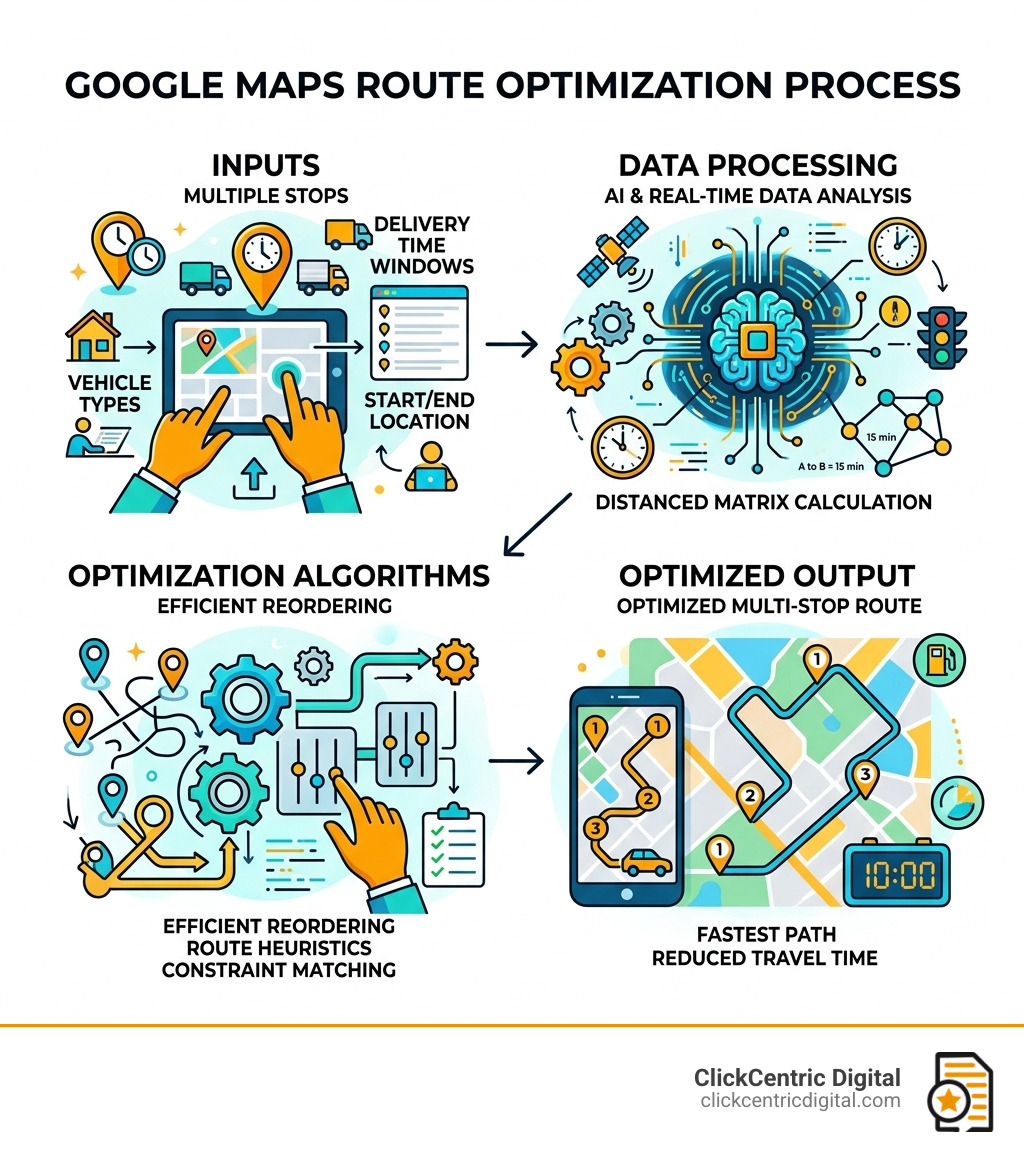
Here’s a quick look at how the route optimization process works before we dive into each option:
How Google Maps Route Optimization Works in 2026
By April 2026, the technology behind a google map optimizer has evolved into a sophisticated blend of AI and real-time data processing. At its core, route optimization isn’t just about finding the “shortest” path—it’s about finding the “best” path based on a variety of shifting variables.
When you use a google map optimizer, the software communicates with the Google Maps Distance Matrix. It looks at your starting point and all your waypoints (stops), then calculates the travel time and distance between every possible combination of those stops.
The algorithm then solves what mathematicians call the “Vehicle Routing Problem.” It considers:
- Real-time traffic: Current congestion levels in West Michigan, from the busy streets of Grand Rapids to the seasonal traffic in South Haven.
- ETA Accuracy: Predicted arrival times based on historical data and current road conditions.
- Travel Mode: Whether you are driving a truck, a car, or even a motorized two-wheeler.
Interestingly, these same data points often overlap with Google Maps Ranking Factors for 2025. Just as Google prioritizes the most “relevant” and “proximate” business for a searcher, a route optimizer prioritizes the most logical sequence of stops to minimize wasted time.
Limitations of Standard Google Maps for Multi-Stop Planning
While we love Google Maps for getting us to a new restaurant in Kalamazoo, using it for business logistics reveals some frustrating roadblocks. If you are trying to manage a fleet or a busy service schedule, you’ve likely hit these walls:
- The 10-Stop Ceiling: For free users, Google Maps limits you to just 10 waypoints (your starting point plus 9 stops). If you have 20 deliveries to make, you’re forced to split them into two separate maps, which completely destroys any chance of true optimization.
- Manual Reordering: This is the biggest headache. Google Maps does not automatically put your stops in the right order. If you enter Stop A, then B, then C, it will guide you in that exact order—even if Stop C is right next to Stop A. You have to manually drag and drop waypoints to “guess” the best route.
- Human Error and Backtracking: Without a google map optimizer, drivers often end up “zigzagging” across town. This leads to backtracking, missed time windows, and increased vehicle wear and tear.
- Lack of Constraints: Standard maps don’t know that your 3:00 PM stop in Holland MI must happen before the customer leaves at 4:00 PM. It doesn’t account for loading times or vehicle capacity.

To truly succeed in the local market, you need to think beyond just the map. Learning How to Win the Local Pack in 2026 and Beyond is about visibility, but route optimization is about the operational efficiency that keeps your business profitable once those customers find you.
Choosing the Right Google Map Optimizer for Your Business
Selecting the right tool depends entirely on the scale of your operations. A solo florist in Grand Haven has different needs than a large HVAC company serving all of West Michigan.
| Feature | Browser Extensions | Web-Based Tools (e.g., OptiMap) | Professional API / Enterprise |
|---|---|---|---|
| Stop Limit | Usually 25+ | Up to 50 | 625+ |
| Setup Ease | Instant | Low | High (Requires Dev) |
| Best For | Daily individual use | Small delivery batches | Large fleets / Apps |
| Cost | Free / Low Cost | Free / Freemium | Usage-based pricing |
For many of our clients, starting with a free tool like OptiMap | Route Planner for Google Maps is a great first step. It allows for up to 50 locations and provides a “Fastest Roundtrip” solver that takes the guesswork out of your sequence.
Top Chrome Extensions for Google Map Optimizer Functionality
If you spend your day on a desktop planning routes, a Chrome extension is often the most seamless google map optimizer. These tools “inject” a button directly into the Google Maps interface.
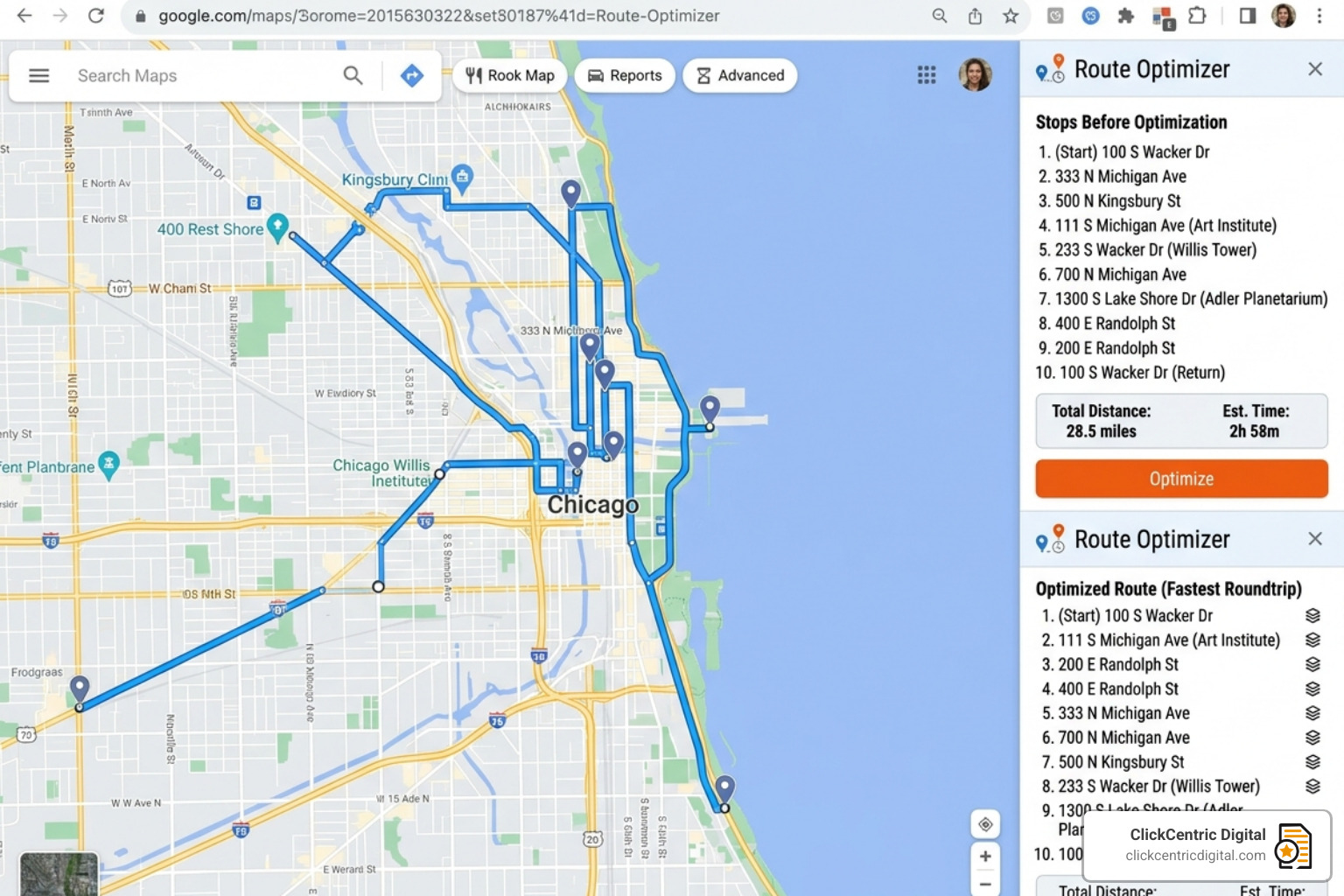
One popular option is the Google Maps Route Optimizer extension. Once installed, it adds a “Route Optimizer” button near the search bar. You simply add your destinations, click the button, and the extension reorders the stops based on the quickest travel time rather than just the shortest distance.
Installation is simple:
- Visit the Chrome Web Store.
- Search for a route optimizer and click “Add to Chrome.”
- Open Google Maps and enter your stops.
- Click the “Optimize” button to watch your route rearrange itself for maximum efficiency.
When to Upgrade to a Professional Google Map Optimizer
There comes a point where free tools aren’t enough. You’ll know it’s time to upgrade to professional software or the Google Maps API when you need to:
- Manage Multiple Drivers: If you have three vans leaving from a warehouse in Grand Rapids, you need to split 60 stops between them efficiently.
- Handle Time Windows: Ensuring a delivery arrives between 1:00 PM and 2:00 PM.
- Account for Load Costs: Planning routes based on how much weight or volume a vehicle can carry.
- Automate Dispatch: Sending the closest driver to a new service call in real-time.
When you reach this level of sophistication, you aren’t just saving time; you are dominating your service area. We often tell businesses to Optimize for Local Search and Dominate Your Neighborhood, but that dominance is only sustainable if your logistics are as sharp as your marketing.
Leveraging the Google Maps Route Optimization API
For businesses building their own apps or managing massive logistics, the Google Maps Platform Route Optimization API is the gold standard. This isn’t a consumer app; it’s a developer tool that allows for incredible customization.
The API can calculate up to 625 routes and find the optimized path for up to 25 waypoints per request (with higher limits for enterprise users). It also includes “Experimental Features” that are changing the game in 2026:
- U-Turn Avoidance: Essential for large trucks or trailers that can’t easily turn around in tight West Michigan neighborhoods.
- Eco-friendlier Routing: Optimizing for fuel efficiency based on your specific engine type (Electric, Diesel, etc.).
- Load Constraints: Factoring in the physical limits of your vehicles.
Using the API allows you to Get Your Business on the Map and Stay There by providing a level of service reliability that manual planning simply can’t match.
Maximizing Business Efficiency with Optimized Routes
Why go through all this trouble? Because the numbers don’t lie. Proper route optimization is one of the fastest ways to increase your bottom line without raising your prices.
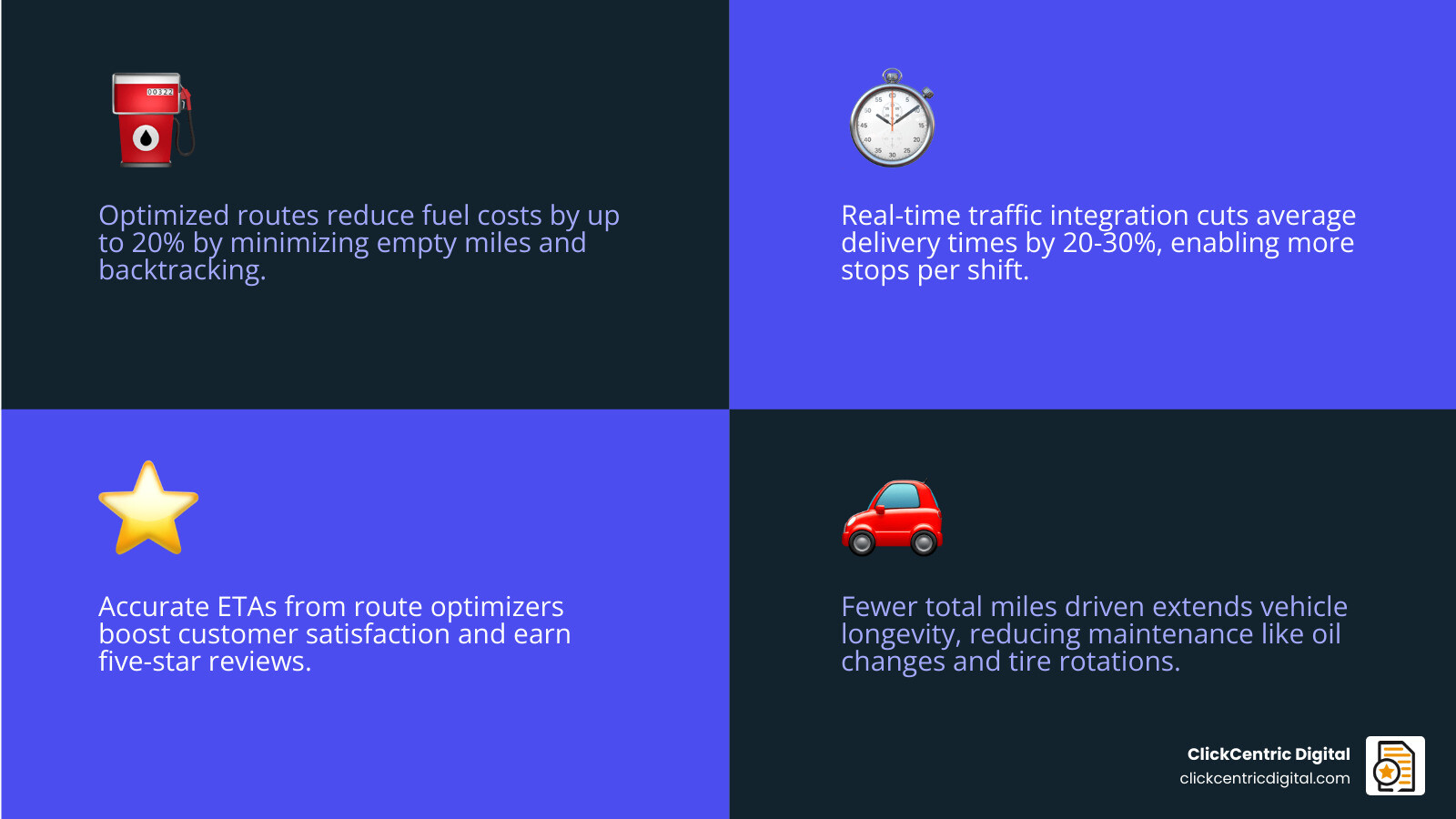
- Fuel Savings: Studies show that optimized routing can reduce fuel costs by up to 20%. In an era of fluctuating gas prices, this is pure profit back in your pocket.
- Time is Money: Incorporating real-time traffic data can reduce average delivery times by 20-30%. This means your drivers can complete more stops per shift, or get home earlier, reducing overtime costs.
- Customer Satisfaction: When you give a customer in Kalamazoo a 2:00 PM arrival time and you actually show up at 2:00 PM, you earn a five-star review.
- Vehicle Longevity: Fewer miles driven means fewer oil changes, tire rotations, and repairs.
By using a google map optimizer, you’re leveraging the Route Optimization & Real-Time Traffic data that Google has spent billions of dollars collecting. You’re making your business “smarter” with every mile.
Frequently Asked Questions about Google Map Optimizer
How many stops can I optimize for free in Google Maps?
In the standard, free version of Google Maps, you can add up to 10 waypoints (your start point and 9 destinations). However, Google will not automatically optimize the order of these stops. You must manually reorder them yourself. To get more stops or automated reordering, you need a third-party google map optimizer or a paid API plan.
Can Google Maps handle vehicle capacity and time windows?
No, the standard Google Maps app does not support vehicle capacity (how much fits in your truck) or specific time windows (delivery between 8 AM and 10 AM). For these complex constraints, you must use the Google Maps Route Optimization API or dedicated route planning software that builds upon Google’s data.
How much fuel can a route optimizer save my business?
On average, businesses see a fuel reduction of about 20% after implementing a google map optimizer. By eliminating backtracking and idling in traffic, you significantly reduce the “empty miles” your vehicles travel.
Conclusion
At ClickCentric Digital, we know that being “on the map” is only half the battle. Once the orders start rolling in from your improved Search Engine Optimization Google Maps Ranking, you need the tools to fulfill those promises efficiently.
Whether you are a local service provider in West Michigan or a delivery fleet covering the state, using a google map optimizer is no longer a luxury—it’s a necessity for staying competitive. From free Chrome extensions to the power of the Route Optimization API, there is a tool that fits your budget and your scale.
Ready to take your local presence to the next level? Master your local presence with ClickCentric Digital and let us help you dominate the local pack while you focus on running your most efficient business yet.
Sorry, the comment form is closed at this time.