

30 Mar Stop Settling for Four Stars and Generate More 5-Star Reviews Today
Stop Settling for Four Stars and Generate More 5-Star Reviews Today
Why You Must Generate More 5-Star Reviews for Local Growth
Generating more 5-star reviews is one of the highest-impact things a local business can do right now. Here’s the fastest way to do it:
- Optimize your Google Business Profile with accurate info, photos, and categories
- Ask every happy customer for a review at the peak of their satisfaction
- Send a direct review link via SMS or email within 1-2 hours of service
- Respond to every review — positive and negative — within 24 hours
- Automate requests using CRM triggers so the system runs without you
The numbers don’t lie. A staggering 98% of consumers read reviews before choosing a local business. And 93% say a star rating directly influences their purchase decision.
Yet most local business owners either wait for reviews to come in on their own — or ask once and forget about it. That’s leaving serious money on the table.
Consider this: a 0.5-star improvement in your rating can increase revenue by up to 20%. And 31% of consumers now refuse to even consider businesses rated below 4.5 stars — nearly double the number from just a year ago.
The businesses winning in local search aren’t just delivering great service. They have a system for turning happy customers into public advocates.
This guide walks you through exactly how to build that system — from your Google Business Profile foundation to automated review requests, response templates, and measuring ROI.
When we look at the local landscape in places like Grand Rapids, Kalamazoo, and throughout West Michigan, the competition is fierce. It isn’t enough to just be “good.” You need to look the best on the screen before a customer even picks up the phone. 98% of consumers read reviews to decide who to trust. If your competitor has a 4.8-star rating and you’re sitting at a 4.1, you are essentially invisible to a third of your potential market.
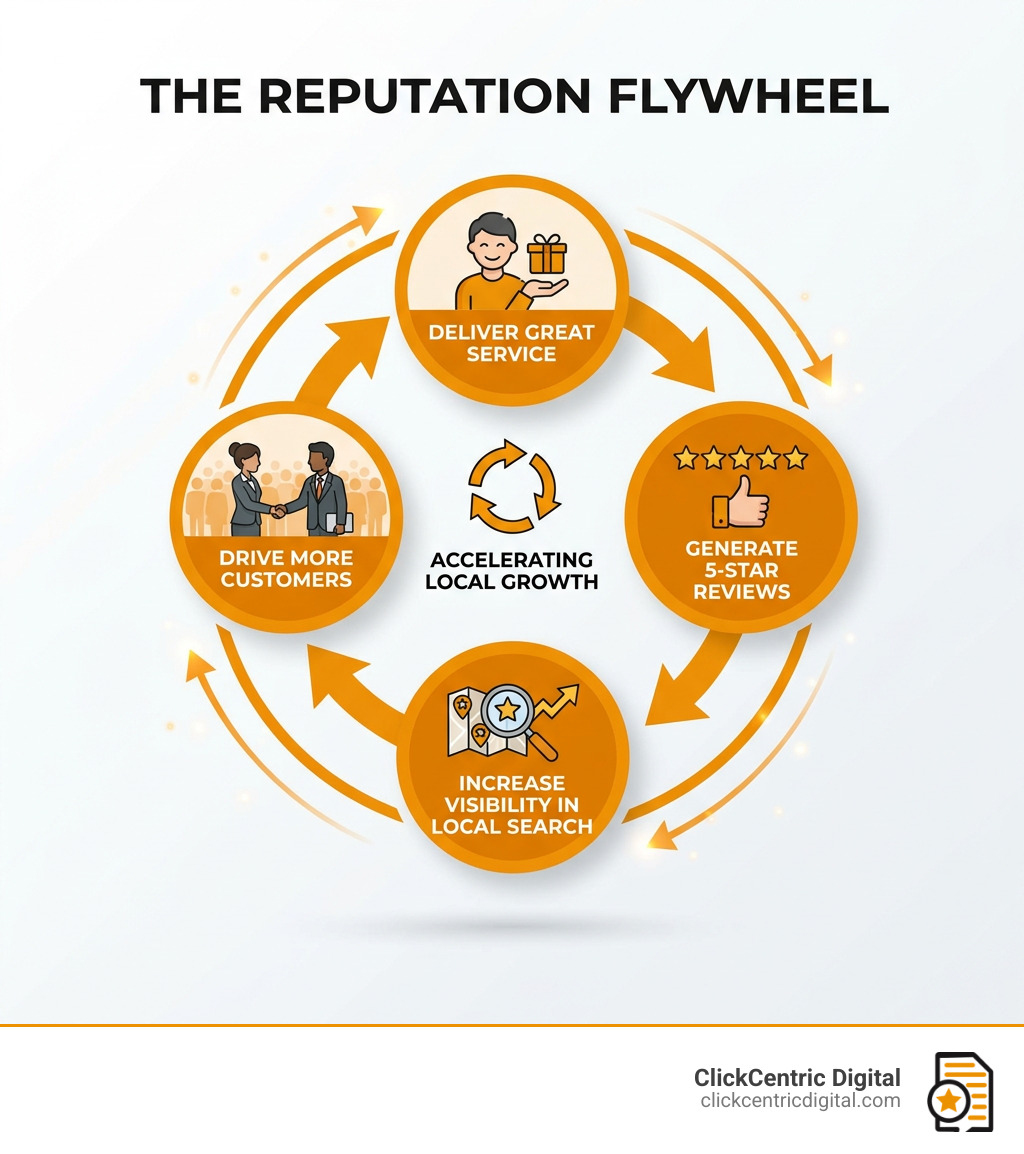
The “Reputation Flywheel” is a simple concept: Excellent service creates happy customers. Happy customers leave 5-star reviews. Those reviews improve your local search rankings, which brings in more customers. Then the cycle repeats. If you aren’t actively fueling this flywheel, your growth will eventually stall.
| Metric | 4.0 Star Business | 4.5+ Star Business |
|---|---|---|
| Consumer Trust | 68% will consider using | 93% will consider using |
| Search Visibility | Standard | High (Maps 3-Pack Priority) |
| Willingness to Pay | Market Average | 22% Premium |
| Conversion Rate | Baseline | 0.5 star boost = ~20% revenue increase |
Even AI is getting in on the action. Tools like ChatGPT and Google Gemini now use review data to recommend businesses to users. If you want to be the business the AI suggests when someone asks for the “best plumber in Holland MI,” you need a high volume of recent, positive feedback.
Building a Foundation with Google Business Profile Optimization
Before we can generate more 5-star reviews, we have to make sure your landing pad is ready. Your Google Business Profile (GBP) is often the first thing a customer sees. If your profile is messy, incomplete, or has the wrong hours, you’re inviting a 1-star review before you’ve even made a sale.
First, let’s talk about NAP consistency—Name, Address, and Phone number. This information must be identical across the web. If you are “Main St. Auto” on Google but “Main Street Automotive” on Yelp, Google’s algorithm gets confused, and your ranking drops.
Next, you need to dive into Google Business Profile attributes. These are the small details that help customers choose you, like “Wheelchair accessible,” “Free Wi-Fi,” or “Veteran-led.” Choosing the right business categories is also vital. Don’t just pick “Restaurant”; pick “Italian Restaurant” or “Pizza Takeout” to ensure you show up for the most relevant searches.

High-quality photos are non-negotiable. Research shows that profiles with more than 15 photos get significantly more requests for driving directions and website clicks. We recommend uploading at least 10–20 high-resolution images of your storefront, your team, and your finished work.
Don’t ignore the Q&A section either. Proactively adding 5–7 frequently asked questions (and answering them yourself!) helps convert customers who are on the fence. 87% of consumers use Google to evaluate local businesses, and 60% still prefer to call a business directly from the profile. Make it easy for them.
Proven Strategies and Templates to Request Feedback
You can’t just wait for reviews to happen. Why? Because people are naturally more motivated to complain than to compliment. In fact, 95% of people will share a negative experience, while only 87% will share a positive one—and usually only when asked. To generate more 5-star reviews, you must be proactive.
The secret is identifying the “moment of maximum delight.” This is the exact point in the customer journey where the customer is happiest. For a HVAC tech in Grand Haven, it’s right when the AC kicks back on. For a restaurant in South Haven, it’s right after a fantastic dessert.
Use SMS and Email to Generate More 5-Star Reviews
Digital requests are the backbone of a modern review strategy. SMS is particularly powerful because it has a 98% open rate. Most people read a text within minutes, whereas an email might sit in an inbox for days.
When sending these requests, personalization is key. Don’t just send a generic “Give us a review.” Mention the specific service or the name of the team member who helped them.
SMS Template:
“Hi [Name], it was a pleasure helping you with your [Service] today! We’re a local business and your feedback means the world to us. Would you mind leaving us a quick 5-star review here? [Link]”
Email Template:
“Subject: How did we do, [Name]? Hi [Name], thank you for choosing [Business Name]. We hope you’re loving your new [Product/Service]. If you have 30 seconds, could you share your experience on Google? It helps neighbors in [City] find us! [Link]”
Timing Your Request for Maximum Impact
Timing isn’t just a suggestion; it’s a science. To generate more 5-star reviews, you should aim to send your request within 1 to 2 hours of the service completion. If you wait 24 hours, the excitement has faded. If you wait a week, it feels like homework.
Nearly three-quarters of consumers care about recent reviews, specifically those written in the last three months. In fact, 69% of consumers only trust reviews left within the last month. This is why “review velocity”—the steady flow of new reviews—is more important than having a large total volume from three years ago. If your last review was from 2022, customers (and Google) might wonder if you’re still in business or if your quality has slipped.
Scaling Success with Automation and Response Management
As your business grows, manually texting every customer becomes impossible. This is where automation saves the day. By integrating your review requests into your CRM or eSign workflow, you ensure that no customer is ever missed.
For example, if you use an eSign tool like Docusign or WeSignature, you can set the final “Thank You” page to automatically redirect the customer to your Google review link. This creates a seamless, one-click experience.
When those reviews start rolling in, your job isn’t done. You must respond. 80% of consumers are more likely to use a business that responds to every review, and 56% are specifically looking for businesses that engage.
Response Best Practices:
- Speed: Aim to respond within 24 hours. 81% of consumers expect it within a week at the absolute latest.
- Personalization: Use the customer’s name and mention a detail from their review.
- Professionalism: Even if the review is unfair, stay calm. Your response isn’t just for the reviewer; it’s for every future customer reading it.
- Keywords: Subtly include your service and city in the response (e.g., “We love being the top choice for roofing in Kalamazoo!”).
Leverage CRM Triggers to Generate More 5-Star Reviews
A sophisticated CRM setup allows you to map the customer journey and trigger requests based on specific actions. Did a support ticket just close with a “Satisfied” rating? Trigger a review request. Did a loyalty member just make their fifth purchase? Trigger a request.
This isn’t just about getting stars; it’s about business intelligence. By using sentiment analysis on your reviews, you can spot patterns. If three people mention that “the wait time in Holland was too long,” you have a clear operational issue to fix. This feedback loop is what separates growing businesses from those that stay stagnant. Companies embracing these tech trends see 76% more growth on average.
Frequently Asked Questions about 5-Star Reviews
Can I delete a negative Google review?
The short answer is: No, you cannot directly delete a review just because you don’t like it. However, you can “flag” a review for removal if it violates Google’s policies—such as if it contains hate speech, is clearly spam, or is a fake review from someone who was never a customer.
If a review is legitimate but negative, your best strategy is to respond professionally. Acknowledge the issue, apologize without making excuses, and offer to take the conversation offline. A well-handled negative review can actually build trust because it shows you are accountable and care about customer satisfaction.
Is it legal to incentivize customers for reviews?
This is a major “proceed with caution” area. Google’s official policy strictly prohibits offering incentives—like discounts, free items, or cash—in exchange for reviews. Doing so can get your entire profile suspended.
Furthermore, the FTC has strict guidelines against “review gating”—the practice of only asking happy customers for reviews while filtering out unhappy ones. To stay ethical and safe, focus on providing “after-service delight” (like a small unexpected gift or exceptional follow-up) that naturally motivates people to share their experience. You can reward your staff for getting reviews, but never pay the customer.
How many reviews do I need to see an ROI?
There isn’t a “magic number,” but there are thresholds of believability. Most consumers want to see at least 10–20 reviews before they trust the average rating. However, the real goal is to outpace your local competitors. If the top-rated competitor in Grand Rapids has 100 reviews, you should aim for 110.
A 4.6-star rating is often considered the “sweet spot.” A perfect 5.0 can sometimes look suspicious to savvy shoppers, while anything below a 4.4 starts to see a drop-off in conversion. Focus on consistency; getting 5 reviews a month, every month, is much better for your SEO than getting 50 reviews in one week and then nothing for a year.
Conclusion
Your reputation is your most valuable currency. Generating more 5-star reviews isn’t just a “nice-to-have” marketing task; it is the engine that drives local search visibility and consumer trust. By optimizing your Google Business Profile, mastering the timing of your requests, and leveraging automation, you can turn your satisfied customers into a 24/7 sales force.
Don’t let your hard work go unnoticed. If you’re ready to dominate the local search results in West Michigan, from Kalamazoo to Grand Haven, we can help you build a system that works while you sleep.
At ClickCentric Digital, we specialize in helping local businesses like yours master Reputation Management. Whether you need to fix a sagging star rating or you want to automate your feedback loops to scale faster, our targeted strategies are designed for one thing: local customer acquisition.
Stop settling for four stars. Start building a 5-star legacy today.
Sorry, the comment form is closed at this time.