


09 Jul Little-Known Ways to Target Local Customers with Google Ads
Little-Known Ways to Target Local Customers with Google Ads
The Fastest Way to Target Local Customers with Google Ads
If you want to target local customers effectively, here are the core methods that actually work in 2026:
- Fix your Google Ads location settings — switch from “presence or interest” to “presence only” to stop wasting 20-30% of your budget on people outside your area
- Add location assets — so your ads show your address, phone number, and directions directly in Google Search and Maps
- Use radius targeting — set a realistic service radius (typically 5-25 miles depending on your business type) instead of targeting an entire city
- Layer audience signals — combine location with demographics and behavioral data for up to 45% higher conversion rates
- Keep NAP consistent — your business name, address, and phone number must match across every directory and your Google Business Profile
Most local business owners set up Google Ads, pick their city from a dropdown, and assume they’re done. They’re not — and it’s costing them real money.
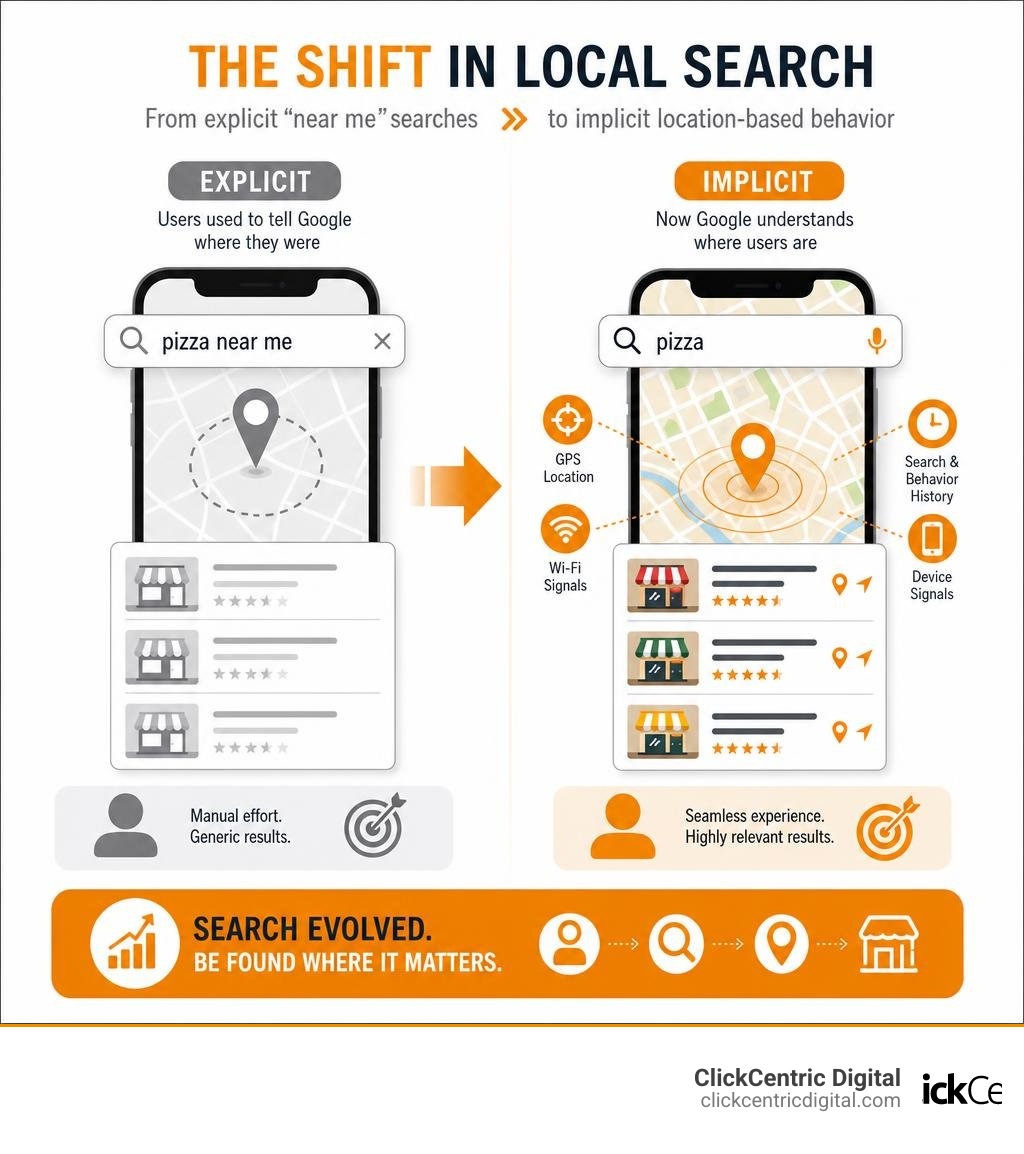
Here’s the thing: how people find local businesses has changed. Consumers used to type “pizza near me in Chicago.” Now they just type “pizza” and expect Google to figure out the rest. Their smartphone does the location work for them. That means 82% of smartphone users are already using search to find local businesses near them — they just may not be finding yours.
And before a single one of those people walks through your door, 76% will check your online presence first.
The gap between showing up and not showing up in local search isn’t about luck. It’s about knowing the right settings, the right targeting layers, and the right signals to send Google. That’s exactly what this guide covers.
Why You Must Target Local Customers to Survive in 2026
If you run a business in West Michigan—whether you are a home services contractor in Grand Rapids, a retail boutique in Grand Haven, or a family restaurant in Kalamazoo—your local market is your lifeblood. Broad brand awareness across the entire state of Michigan is a vanity metric; market penetration in your specific neighborhood is where the real revenue lives.
With 76% of consumers checking a business’s online presence before physically walking through the door, having a weak or inaccurate digital footprint is the equivalent of locking your front door during business hours. Furthermore, search engines have evolved. Because mobile devices provide precise GPS coordinates, search engines now rely heavily on implicit location detection. If someone in South Haven searches for “furnace repair,” they expect to see local providers immediately, without needing to type “South Haven MI” into the search bar.
Failing to optimize your digital marketing for these nearby buyers means you’re actively handing leads to your competitors. If you want to stop losing ground, you need to implement active, location-specific strategies. To get started on building a baseline of visibility, check out our guide on how to Stop Being Invisible with These Local SEO Strategies.
Step 1: Define Your Ideal Audience to Target Local Customers
Before spending a single dollar on Google Ads, you must pinpoint exactly who you are trying to reach. A common mistake local businesses make is trying to be everything to everyone. Instead, you need to build highly specific buyer personas rooted in local geographic reality.
To define your local target audience, consider these primary layers:
- Demographics: Age, household income, marital status, and homeownership. For example, a high-end kitchen remodeling business in Grand Rapids should focus on high-income zip codes and homeowners aged 35–65.
- Geographic Boundaries: Define your service area based on realistic travel times rather than simple radial distance. In West Michigan, a service provider in Holland might easily travel to Grand Haven, but crossing over to certain rural areas might not be cost-effective.
- Behavioral Patterns: What are their hobbies, buying habits, and preferred local spots?
If you are a B2B business, your targeting parameters will shift toward industry type, company size, and specific local business challenges. Grounding your customer profiles in local market conditions—rather than assuming your audience matches a national average—is critical. For an in-depth breakdown of how to build localized campaigns that align with physical storefront behaviors, explore the strategies outlined in Hyperlocal Marketing: How it Works, Strategies & Examples (2026) – Shopify.
Balancing New Acquisition with Customer Retention
While Google Ads is fantastic for capturing new leads, you shouldn’t neglect the customers you already have. In fact, 75% of loyal customers will recommend a brand to friends and family. Word-of-mouth in close-knit West Michigan communities like Holland and South Haven is incredibly powerful.
To maximize your marketing ROI, combine your acquisition campaigns with retention strategies:
- Loyalty Offers: Use email marketing and SMS promotions to send exclusive, neighborhood-specific deals to your existing customer base.
- Visit History Intelligence: Leverage tools that recognize returning website visitors to customize their experience. For example, you can display a personalized welcome-back offer or a discount code for their next service appointment.
- Smart Popups: Use lightweight, location-aware scripts like the SmartTarget | Local Business Targeting Platform to automatically distinguish between first-time web visitors and returning local customers, serving them distinct, highly relevant calls-to-action.
Advanced Google Ads Settings for Hyperlocal Precision
Now, let’s dive into the technical details of Google Ads. The absolute biggest money-waster in local PPC is Google’s default location setting.
When you set up a campaign, Google automatically selects “Presence or interest: People in, regularly in, or who’ve shown interest in your targeted locations.”
This is a massive trap. If you own a plumbing business in Kalamazoo, MI, this default setting means your ads could show to someone sitting in Chicago who is simply researching Kalamazoo real estate. You pay for the click, but they will never hire you. To save your budget, you must change this setting to “Presence: People in or regularly in your targeted locations.”
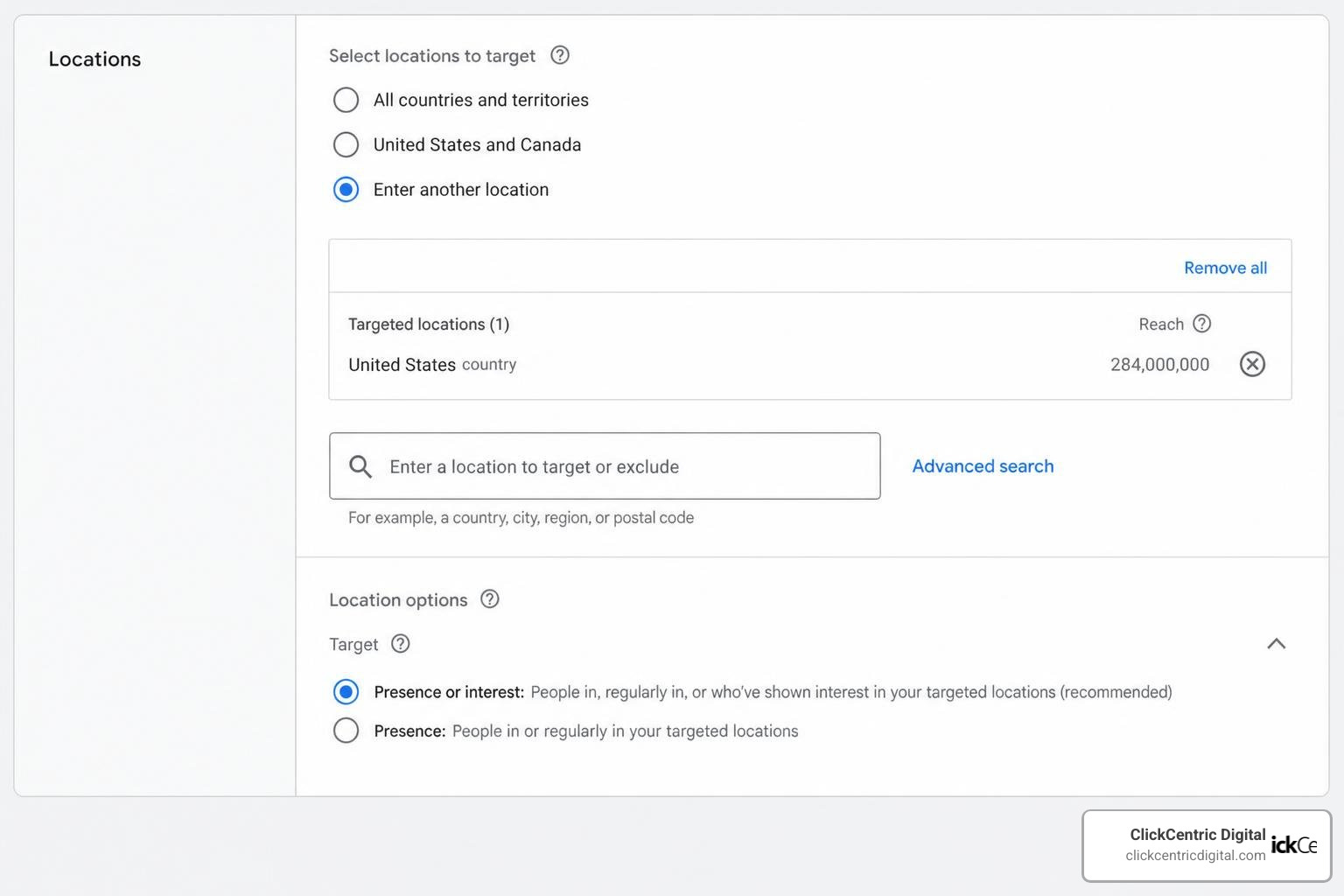
By switching to “Presence only” and setting up strategic location exclusions (such as blocking adjacent counties or states you don’t service), you can immediately eliminate up to 20-30% of wasted ad spend. For more tips on setting up campaigns that convert, read our complete guide on Local PPC Campaigns That Actually Bring People Through the Door.
Using Location Assets to Target Local Customers
To make your Google Ads highly visible to nearby searchers, you must enable location assets (formerly known as location extensions).
When you link your Google Business Profile to your Google Ads account, location assets allow your ads to display your physical address, phone number, a map marker, and your business hours directly within the search results.
On mobile devices, these ads feature a prominent “Get Directions” or “Call” button. This is incredibly powerful for capturing immediate, high-intent foot traffic. If someone in Holland searches for “oil change” on Google Maps, an ad featuring your location asset can appear right at the top of the map results.
Best of all, you only pay a standard cost-per-click (CPC) when someone clicks on your location details, asks for directions, or clicks to call you. Using location assets is far more effective than using basic call assets because it provides the full physical context of your business to the searcher.
Radius Targeting and Geofencing vs. Zip Codes
When setting up your geographic targeting in Google Ads, you have three primary options: radius, city/metro, and zip code targeting.
- Radius Targeting: This is highly effective for local service businesses. You can target a specific mile radius (e.g., 10 miles around your storefront in Grand Rapids).
- Zip Code Targeting: This allows for extreme demographic precision. If you want to target affluent neighborhoods in West Michigan, you can select specific zip codes in areas like East Grand Rapids or coastal Holland.
- Geofencing: This involves drawing a virtual boundary around a highly specific geographic location (like a competitor’s store or a local event venue) to serve ads to users within that boundary.
That mobile location targeting can be up to 85% more accurate than desktop targeting for local businesses. Mobile devices use precise GPS coordinates, whereas desktops rely on IP addresses, which can easily be off by 20 miles or more. If you want to learn more about the mathematics of optimizing your geographic boundaries to maximize ad efficiency, take a look at The Math Behind a Better Local Search Strategy.
Layering Audiences and AI-Powered Geo-Targeting
To truly dominate your local market in 2026, you shouldn’t rely on location targeting alone. The most successful campaigns use layered targeting strategies, which see 45% higher conversion rates compared to campaigns using single targeting criteria.
Layering means you take your geographic boundary and stack other targeting signals on top of it, such as demographic data, in-market behaviors, and search intent. For example, instead of targeting everyone within 10 miles of your Grand Rapids office, you target only homeowners within that 10-mile radius who are actively searching for “roof repair.”
In 2026, AI-powered geo-targeting takes this a step further by automating real-time optimizations based on external variables. Here is how traditional targeting compares to AI-driven local targeting:
| Feature | Traditional Geo-Targeting | AI-Powered Geo-Targeting (2026) |
|---|---|---|
| Precision | Static zip codes or broad mile radiuses. | Dynamic boundaries that adjust based on real-time traffic and drive times. |
| Bidding | Manual bid adjustments based on historical city data. | Micro-location bid optimization that adjusts in real-time by neighborhood and time of day. |
| External Triggers | Static ad scheduling (e.g., Monday–Friday, 9am–5pm). | Weather-triggered campaigns (e.g., promoting AC repair when a heatwave hits West Michigan). |
| Audience Creation | Basic demographic filters. | Geo-behavioral audience creation (e.g., targeting users who frequently visit home improvement stores). |
Integrating Paid Ads with Local SEO and Citations
Your paid search campaigns do not exist in a vacuum; they should work hand-in-hand with your organic local SEO efforts. One of the strongest trust signals you can send to both search engines and potential customers is consistency.
This starts with your NAP (Name, Address, Phone number) data. Your NAP must be identical across your website, Google Business Profile, and all local directories (such as Yelp or TripAdvisor). If Google’s algorithm detects conflicting information, it lowers its trust in your business location, which can hurt your organic rankings and increase your paid ad costs.
Furthermore, reviews are a massive part of the local decision-making process. 64% of people search for online reviews from a search engine, while only 37% find them by going directly to review sites. When searchers click your local ad and see a highly optimized Google Business Profile backed by hundreds of positive, authentic reviews, they are far more likely to convert.
If you are a local business, you can also look at how major brands handle local presence. For example, you can see how local retail citations are structured by checking out Target stores in Michigan, the specific Target Holland Store, or local user reviews on the Target Grand Rapids Yelp page, the Target Holland Yelp page, and the Target Kalamazoo Yelp page. Maintaining this level of directory consistency is key to local search success. To build a solid organic foundation that supports your paid ads, read our guide on how to Optimize for Local Search and Dominate Your Neighborhood.
Avoiding Intrusive Personalization and AI Pitfalls
While targeting data is highly sophisticated, there is a fine line between being helpful and being creepy. Ad personalization based on inferred data can actually decrease purchase interest by 17% if it feels too intrusive. If your ad copy says, “We saw you walking past our Grand Haven store 10 minutes ago—come back for 10% off!”, customers may feel uncomfortable rather than enticed. Keep your local references natural and welcoming.
Additionally, be extremely careful with AI automation when managing your local reputation. 60% of users distrust AI-generated responses to reviews.
When a customer takes the time to write a review of your business, they expect a human response. If they receive a generic, obviously AI-written reply, it signals that you do not truly care about their experience. Always use real, human responses to manage your local reviews and build genuine community trust.
Measuring Success and ROI of Local Campaigns
To ensure your campaigns are actually driving business, you must look past vanity metrics like impressions and clicks. Instead, focus on conversion actions that represent real foot traffic and revenue:
- Direction Requests: Tracking how many users clicked “Get Directions” on your local ads to visit your physical location.
- Phone Calls: Monitoring click-to-call conversions directly from your ads or website.
- Local Store Visits: Using Google’s store visit attribution models to link digital ad clicks to physical in-store visits.
- Search Term Reports: Regularly auditing your search terms to identify and add negative keywords (like “DIY” or “free”) so you don’t pay for non-transactional searches.
By focusing on these high-intent actions, you can accurately calculate your true cost-per-acquisition (CPA) and ensure your budget is being spent wisely. For a deeper look at tracking and optimizing your local marketing ROI, read our guide on avoiding the pitfalls of a poor local strategy in Don’t Get Lost in the Crowd with a Better Local Search Marketing Strategy.
Frequently Asked Questions about Local Targeting
What is the difference between “presence” and “presence or interest” in Google Ads?
The “presence” setting targets only people who are physically located in your target area. The default “presence or interest” setting targets both those physically in the area and anyone who has searched for or shown interest in that area, which frequently leads to wasted ad spend on out-of-market searchers.
How does geofencing differ from standard radius targeting?
Standard radius targeting draws a broad circle (such as a 5-mile radius) around your business location. Geofencing is a much tighter, highly customized virtual boundary drawn around a specific building, competitor’s location, or local landmark to trigger mobile ads only when someone enters that precise boundary.
Why is NAP consistency so important for local search rankings?
Consistency in your Name, Address, and Phone number (NAP) across your website, Google Business Profile, and local citations builds search engine trust. If search engines find conflicting contact info across the web, they are less likely to display your business in local search results.
Conclusion
Mastering local customer targeting with Google Ads is the fastest way to drive high-quality leads and physical foot traffic to your business. By moving away from default settings, utilizing location assets, layering your audiences, and ensuring your organic local presence is rock-solid, you can maximize your ROI and out-compete national brands.

At ClickCentric Digital, we specialize in helping West Michigan businesses dominate their local markets through custom search engine optimization and highly targeted local ad campaigns. Whether you are operating in Grand Rapids, Holland, Kalamazoo, or along the lakeshore, we can help you capture nearby buyers effectively.
Ready to rule the local search results? Discover how we can help you grow by visiting Rule the Mitten with Top SEO Services in Michigan.
Sorry, the comment form is closed at this time.