

24 Apr The Non-Profit Guide to Mastering Google Grant PPC Management
The Non-Profit Guide to Mastering Google Grant PPC Management
What Is Google Grant PPC Management (And Why It Matters for Nonprofits)
Google Grant PPC management is the process of applying for, setting up, and continuously optimizing a Google Ad Grants account to help nonprofits spend their free $10,000 monthly advertising budget effectively.
Here’s a quick overview of what it involves:
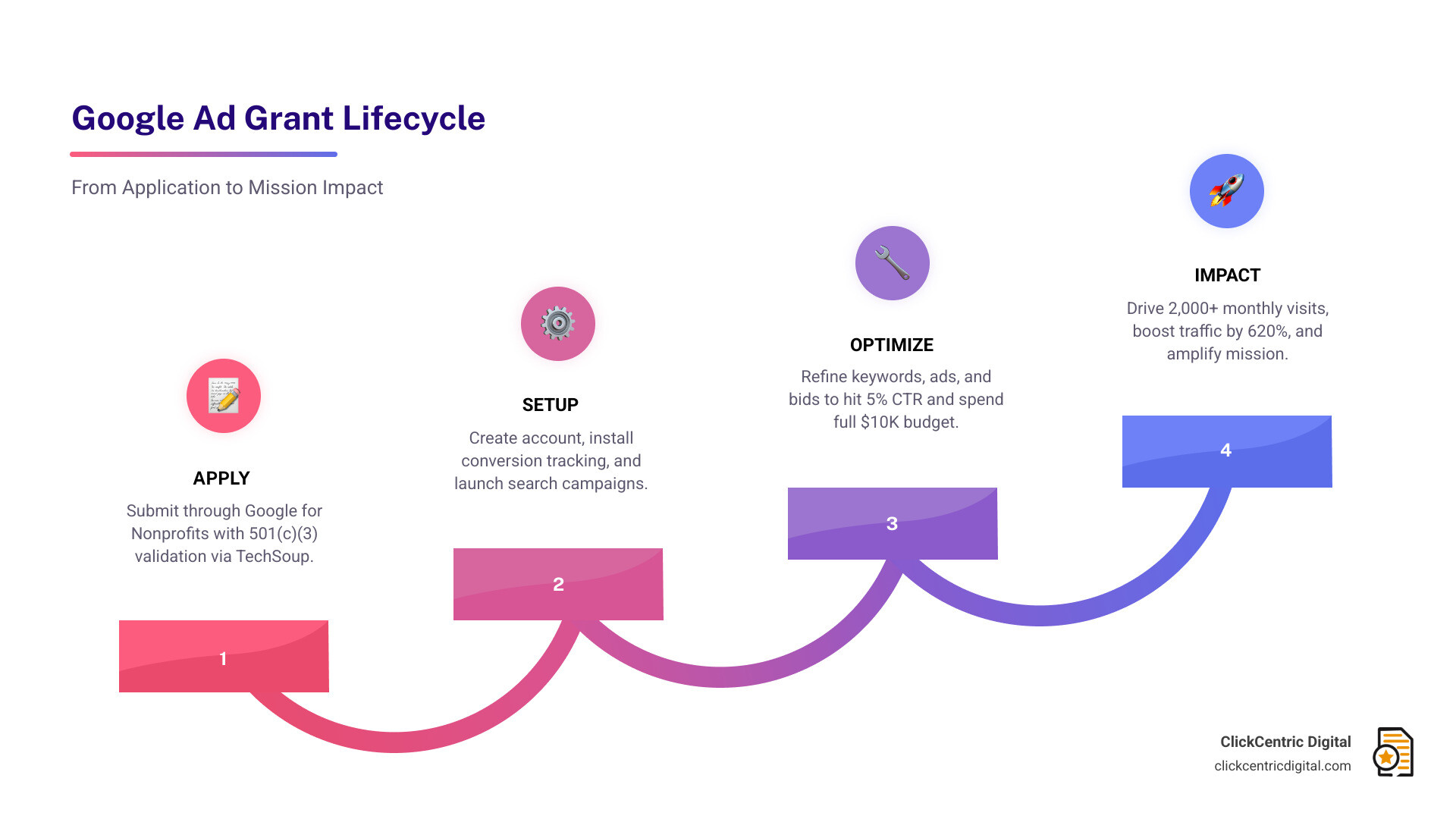
- Apply for Google Ad Grants through Google for Nonprofits
- Set up campaigns, ad groups, and conversion tracking
- Optimize keywords, ad copy, and landing pages regularly
- Maintain compliance with Google’s performance requirements (like a 5% minimum CTR)
- Report on traffic, impressions, and conversions to measure mission impact
Google offers eligible nonprofits up to $10,000 per month in free search advertising. That’s $120,000 per year in potential visibility — at zero cost.
But here’s the problem: most nonprofits never come close to using it.
Without active management, the average nonprofit spends less than $800 of that $10,000 monthly budget. The ads underperform, the account risks suspension, and a massive opportunity goes to waste.
The good news? With the right strategy, nonprofits have seen results like a 620% increase in website traffic in just a few months, and averages of 2,000+ new website visits per month driven entirely by grant-funded ads.
This guide walks you through exactly how to make that happen — from your first application to advanced 2025 optimization tactics.
Eligibility and Application: Getting Started with the Grant
Before we dive into the weeds of keywords and bidding, we have to make sure you can get through the front door. The Official Google Ad Grants Program is incredibly generous, but Google is protective of its search results. They want to ensure that the organizations receiving this $120,000 annual gift are legitimate, high-quality, and mission-driven.
To be eligible, your organization must hold valid charity status. In the United States, this means being a registered 501(c)(3) nonprofit. However, there are a few notable exceptions: governmental entities, hospitals or healthcare organizations (in most cases), and schools, academic institutions, or universities are generally not eligible. If you are a philanthropic arm of an educational institution, you might still have a shot, but standard K-12 schools and colleges usually have other Google programs available to them.
Beyond your legal paperwork, your website is the most critical piece of the puzzle. Google won’t approve a grant for a broken or thin website. You need high-quality content that clearly describes your mission and provides value to the visitor. This is where Search Engine Optimization Google Maps Ranking strategies cross over with PPC; if your site isn’t optimized for searchers to find what they need, Google won’t want to send them there via an ad.
Step-by-Step Google Grant PPC Management Setup
Once you’ve confirmed your eligibility, the setup process is a bit of a relay race. Here is the path we recommend for a smooth launch:
- Register with Google for Nonprofits: This is the umbrella account that gives you access to the Ad Grant, Workspace, and YouTube nonprofit features.
- Validate via TechSoup: Google uses TechSoup to verify the nonprofit status of organizations. If you aren’t already registered with TechSoup, do that first. It can take a few days to get your validation token.
- Submit the Ad Grant Pre-Qualification: You’ll fill out a short form and a survey about your organization’s goals.
- Account Creation: Once pre-qualified, you’ll create your Google Ads account. Crucial Tip: Do not enter any credit card information. If you do, you’ve created a standard paid account, and Google won’t apply the grant to it.
- Conversion Tracking Setup: This is non-negotiable. Google requires you to track “meaningful” conversions. This could be a donation, a newsletter sign-up, a volunteer form submission, or a click-to-call. Without this, you cannot use “Smart Bidding,” which is the only way to bypass the standard $2 bid limit.
Navigating Compliance for Google Grant PPC Management
Getting the grant is the easy part; keeping it is where the real work begins. Google has strict rules to ensure nonprofits don’t “junk up” the search results with irrelevant ads. If you fall out of compliance, your account can be suspended, and getting it back is a bureaucratic headache we wouldn’t wish on our worst enemies.
The most famous rule is the 5% CTR threshold. Your account-wide Click-Through Rate (CTR) must stay at 5% or higher each month. If you drop below this for two consecutive months, your account is liable for suspension. Considering the average CTR for search ads is often around 2-3%, maintaining an 8% average (which many well-managed grant accounts do) requires surgical precision in keyword selection.
Other compliance rules include:
- No single-word keywords: (Unless it’s your brand name or on a specific exception list).
- No “too generic” keywords: You can’t bid on “free videos” or “today’s news.”
- Keyword Quality Scores: Any keyword with a Quality Score of 1 or 2 must be paused or removed.
- Account Structure: You must have at least two ad groups per campaign and at least two sitelink ad extensions active.

The Benefits of Professional Google Grant PPC Management
Why do so many nonprofits hire an agency for google grant ppc management? It comes down to time and expertise. Most nonprofit staffers are wearing five different hats; they don’t have time to log into Google Ads every three days to prune low-performing keywords or adjust bidding strategies.
Professional Paid Traffic Management provides a safety net. An expert manager ensures you never hit that dreaded suspension wall. More importantly, they know how to maximize the budget. Stat about most nonprofits only spending $800? A pro knows how to find the high-volume, mission-aligned keywords that actually “spend” the Google money while driving real-world results like donations and volunteer sign-ups.
Strategic Optimization: How to Spend the Full $10,000 Budget
To spend the full $10,000, you have to think beyond just your brand name. You need to target “intent-based” keywords. For example, if you are a food bank in West Michigan, you shouldn’t just bid on “Grand Rapids Food Bank.” You should bid on “where to donate food in Holland MI,” “volunteer opportunities Grand Haven,” or “how to help hunger in Kalamazoo.”
Google Ad Grants vs. Paid Google Ads
| Feature | Google Ad Grant | Paid Google Ads |
|---|---|---|
| Monthly Budget | $10,000 (In-kind) | Unlimited (You pay) |
| Ad Type | Text Search Ads only | Search, Display, Video, Shopping |
| Max CPC | $2.00 (unless using Smart Bidding) | Unlimited |
| Ad Placement | Below paid ads | Top of page |
| Network | Google Search only | Google Search + Search Partners |
One of the best ways to scale spend is through Dynamic Search Ads (DSA). Instead of you picking keywords, Google crawls your website and matches searches to the content on your pages. This is a “game-changer” for nonprofits with large websites or resource libraries. We’ve seen DSA implementation increase spend by over 80% YoY for organizations that were previously stuck in a rut.
Another pillar of budget maximization is Negative Keyword Lists. You don’t want to spend your “free” money on people looking for jobs at your nonprofit (unless you’re actively recruiting) or people looking for something unrelated that happens to share a keyword. By filtering out the “junk,” you keep your CTR high and your traffic relevant.
Advanced 2025 Features: PMax and Clarity for Nonprofits
The world of google grant ppc management is changing fast. In 2025, two tools have become essential: Performance Max (PMax) and Microsoft Clarity.
Performance Max is Google’s AI-driven campaign type. While the Grant used to be restricted to basic search, PMax allows nonprofits to tap into more of Google’s ecosystem using the grant budget. It uses machine learning to find conversions across search and (in limited capacities) other formats, helping you spend the budget more intelligently.
Microsoft Clarity (which integrates beautifully with Google Ads) gives you a “heatmap” of what people do once they click your ad. Do they get stuck on a broken button? Do they scroll past your donation form? Using these insights to perform landing page optimization is how you turn a “click” into a “mission impact.”
Frequently Asked Questions
Who is eligible for the Google Ad Grant?
Most 501(c)(3) nonprofits are eligible. You must have a functional, high-quality website with an SSL certificate (HTTPS). Organizations in Grand Rapids, Kalamazoo, and across West Michigan must ensure they aren’t a hospital, school, or government entity, as these are generally excluded.
What happens if my CTR falls below 5%?
If your account-wide CTR drops below 5% for two months in a row, Google may suspend your account. To fix this, you should immediately pause keywords with low CTR (under 3%) and focus on your highest-performing ad groups. This is why weekly monitoring is a core part of professional google grant ppc management.
Can I use the grant for Display or Video ads?
No. The Google Ad Grant is strictly for text-based Search ads on Google.com. If you want to run beautiful banner ads (Display) or YouTube commercials (Video), you will need a separate “Paid” Google Ads account. Many nonprofits use a “hybrid” strategy: using the Grant for high-volume search traffic and a small paid budget for retargeting donors on Facebook or YouTube.
Conclusion
Mastering google grant ppc management is one of the most effective ways for a nonprofit to level the playing field. Whether you are a small local charity in South Haven or a large organization in Grand Rapids, that $10,000 monthly budget is sitting there, waiting to be claimed.
At ClickCentric Digital, we specialize in helping organizations in West Michigan—from Holland to Kalamazoo—maximize their digital footprint. We don’t just “set and forget” your ads. We dive into the data to improve your local search rankings, manage your online reviews, and ensure every penny of that $120,000 annual grant is working to further your mission.
Stop leaving free money on the table. If you’re ready to see what 2,000+ new visitors a month could do for your cause, we’re here to help.
Sorry, the comment form is closed at this time.